
الوصف
تضيف هذه الإضافة عمودًا إضافيًا إلى النظرة العامة للمستخدمين مع تاريخ آخر تسجيل دخول لكل مستخدم.
بالإضافة إلى ذلك، يمكن فرز المستخدمين حسب تاريخ آخر تسجيل دخول لهم.
الترجمات
سأكون في غاية السعادة لتحديث الإضافة مع لغات محلية جديدة بمجرد أن أتلقى ذلك!
متوفرة حاليًا بـ:
- العربية
- الصينية
- الفرنسية
- الإنجليزية
- الألمانية
- الإيطالية
- اليابانية
- الهولندية
- Norwegian (bokmål)
- البولندية
- البرتغالية
- الرومانية
- الروسية
- الأسبانية
فلاتر و Hooks الإضافة
wpll_current_user_can (boolean)
ما إذا كان من المفترض أن يظهر العمود.
الافتراضي: true
wpll_date_format (string)
سلسلة صيغة التاريخ لـ مخرجات التاريخ.
لقطات الشاشة
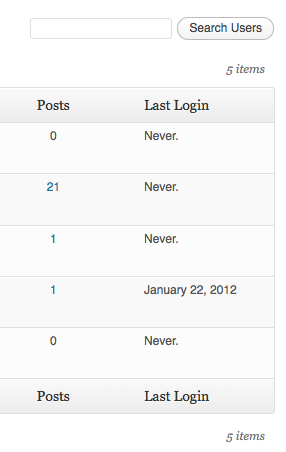
عمود لـ آخر تسجيل دخول في جدول المستخدم.
التنصيب
- تنزيل WP Last Login.
- فك ضغط المجلد إلى المسار
/wp-content/plugins/. - تفعيل الإضافة من خلال قائمة ‘إضافات’ في ووردبريس.
الأسئلة المتكررّة
لا توجد أسئلة حتى الآن.
المراجعات


المساهمون والمطوّرون
“إضافة WP Last Login آخر تسجيل دخول” هو برنامج مفتوح المصدر. وقد ساهم هؤلاء الأشخاص بالأسفل في هذه الإضافة.
المساهمون
لقد تم ترجمة ”إضافة WP Last Login آخر تسجيل دخول“ إلى 11 لغة. شكراً إلى جميع المُترجمين لمُساهماتهم.
ترجمة ”إضافة WP Last Login آخر تسجيل دخول“ إلى لغتك.
مُهتم بالتطوير؟
تصفّح الشفرة، تحقق من مستودع SVN، أو الاشتراك في سجل التطوير بواسطة RSS.
سجل التغييرات
7
- Added compatibility with Two Factor plugin. Props @bkno.
- Improved date display to display login time on hover.
6
- Revamped file structure to remove unnecessary files.
- Fixed a bug where login dates were overwritten on plugin reactivation. Props @richardbuff.
5
- Improved uninstall routine (no longer queries all users).
- تم تحديث فئات مساعدة.
- Tested with WordPress 6.1.
4
- Improved date display to account for the timezone of the site. Props @knutsp.
3
- تم إصلاح الخلل حيث يختفي المستخدمون الذين لم يسجلوا الدخول من قوائم المستخدمين عند الفرز عن طريق آخر تسجيل دخول. شاهد https://wordpress.org/support/topic/new-users-dont-get-the-meta-field/
2
- إصدار صيانة.
- تم تحديث الكود للالتزام بمعايير برمجة وأكواد ووردبريس.
- تم اختبارها إلى ووردبريس 5.0.
1.4.0
- تم إصلاح خطأ طويل الأمد، حيث لم يعمل فرز المستخدمين حسب آخر تسجيل دخول.
- تم اختبارها إلى ووردبريس 4.3.
1.3.0
- إصدار صيانة.
- تم اختبارها إلى ووردبريس 4.0.
1.2.1
- يعيد التغييرات إلى wp_login() حيث يبدو أن الـ argument الثانية لم يتم تعيينها في جميع الأوقات.
1.2.0
- المستخدمون الآن قابلون للفرز حسب آخر تسجيل دخول!
- تم تحديث فئات مساعدة.
- تمت إضافة الترجمة الدنماركية. بدعم من thomasclausen.
1.1.2
- تم إصلاح الخلل حيث لا يتم عرض محتوى الأعمدة المخصصة الأخرى.
1.1.1
- تم تحديث فئات مساعدة.
1.1.0
- جعل طريقة عرض العمود قابل للتصفية.
- Widened the column a bit to accommodate for large date strings.
1.0
- إصدار مبدئي.