
الوصف
Automated notifications from your WordPress site to your Slack / Mattermost application channels and webhooks.
There is no limit to the ways you may integrate this plugin.
It supports all other Vanilla Bean plugins and is available for under-the-hood use as well as shortcode access.
Key Features
- Real-time WordPress notifications – Post status changes, comments, user registrations
- WooCommerce integration – Sales notifications with order details
- Plugin management alerts – Install, update, and deletion notifications
- Multiple webhook support – Send to Slack, Mattermost, Discord, or custom endpoints
- Formatted data messages – Rich attachments with structured name-value pairs (NEW in 5.5.2)
- Smart queueing – Non-blocking message delivery with optional immediate sending
- Email fallback – Send notifications via email when webhooks aren’t available
- Shortcode support – Easy integration in posts and pages
- Programmatic API – Full developer access with PHP functions
Shortcode Examples
[slackhooker text="Here is a message from my WordPress site"]
او
[slackhooker text="Here is a message" channel="general" username="My WordPress"]
او
[slackhooker text="Here is a message" channel="https://myorg.slack.com/services/xxoxlsodsfsfsdfds#channelname" username="My WordPress"]
Messages are queued last in the PHP process to ensure your other page processing is not interrupted, but you can override:
[slackhooker text="Here is a message from my WordPress." sendnow="true"]
Multiple or custom webhooks supported:
[slackhooker text="Here is a message to multiple webhooks" alsoto="https://hooks.slack.com/services/T03TDTbUF/BBG9SQV6X/abcdefghij,https://hooks.slack.com/services/T03TDTbUF/BBG9SQV6X/abcxxxxxxx"]
Programmatic Examples
Simple text messages:
if(function_exists('\VanillaBeans\SlackHooker\vbean_slackhooker')){
    \VanillaBeans\SlackHooker\vbean_slackhooker('Here is my notification');
}

if(function_exists('\VanillaBeans\SlackHooker\vbean_slackhooker')){
    \VanillaBeans\SlackHooker\vbean_slackhooker('Here is my notification','mychannel','Username',':specific_icon:');
}

if(function_exists('\VanillaBeans\SlackHooker\vbean_slacknotify')){
    \VanillaBeans\SlackHooker\vbean_slacknotify(array('text'=>'Here is my notification','icon'=>':open_mouth:'));
}
Formatted data messages (NEW in 5.5.2):
if(function_exists('\VanillaBeans\SlackHooker\vbean_send_data')){
    $data = array(
        'User ID' => '12345',
        'Email' => 'user@example.com',
        'Status' => 'Active',
        'Last Login' => '2025-10-03 14:30:00'
    );
    \VanillaBeans\SlackHooker\vbean_send_data('User Registration', $data);
}
Custom formatted messages with options:
if(function_exists('\VanillaBeans\SlackHooker\vbean_send_data')){
    $data = array(
        'Order ID' => '#WC-12345',
        'Amount' => '$299.99',
        'Customer' => 'John Doe',
        'Payment Method' => 'Credit Card'
    );

    $options = array(
        'color' => '#00ff00',
        'pretext' => 'New WooCommerce Sale!',
        'text' => 'Payment processed successfully'
    );

    \VanillaBeans\SlackHooker\vbean_send_data('E-commerce Sale', $data, $options);
}
Building custom attachment messages:
if(function_exists('\VanillaBeans\SlackHooker\vbean_build_data_message')){
    $message = \VanillaBeans\SlackHooker\vbean_build_data_message('System Alert', array(
        'Server' => 'web-01.example.com',
        'CPU Usage' => '85%',
        'Memory' => '3.2GB / 4GB',
        'Disk Space' => '75% full'
    ), array('color' => '#ff9900'));

    // Send using existing notification system
    Vanilla_Bean_Slack_Hooker::notification_send($message);
}
Parameters
There are defaults for all except the message. You can specify:
- text – required. This is your message
- endpoints – override defaults with a comma separated list of endpoints with optional channel and alert eg: endpoints=’https://endpoint.com#channel#here’
- channel – defaults to ‘general’ or your admin default specified channel – deprecated
- username – the identity you would like displayed as the sender in the channel
- icon – any of the available emoji icons in the slack system
- sendnow – true or false. Defaults to false. True means that the message would be executed at the time it is called rather than at the end of page load.
New Data Message Parameters (5.5.2):
- title – required for data messages. Main title of the message
- data – associative array of name => value pairs to display
- options – array of formatting options (color, pretext, text, author_name, etc.)
Use Cases
- E-commerce monitoring – WooCommerce order notifications
- User activity tracking – Registration and login alerts
- System monitoring – Server status and health checks
- Content management – Post publication and comment notifications
- Security alerts – Failed login attempts and suspicious activity
- Plugin management – Installation, update, and deletion notifications
الإتصال
We can be found at:
- Website: Velvary Contact
- Twitter: @VelvaryVanilla
- Email: info@velvary.com.au or support@velvary.com.au
لقطات الشاشة

Example of WordPress monitoring notifications in Slack 
Admin settings page with webhook configuration 
Rich formatted data messages with structured fields 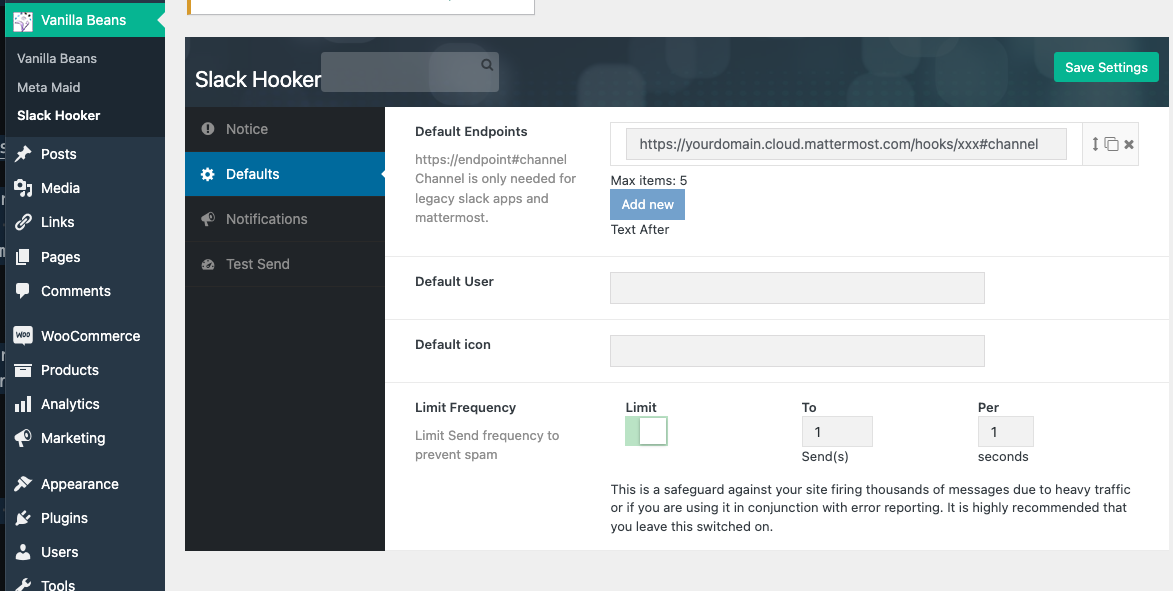
Plugin management notifications 
WooCommerce sales notifications
التنصيب
-
Via WordPress Admin (Recommended)
- Navigate to Plugins > Add New
- Search for “Vanilla Bean Slack Hooker”
- Click Install Now and then Activate
-
Manual Installation
- Download the plugin ZIP file
- Upload to
/wp-content/plugins/vanilla-bean-slack-hooker/ - Activate through the Plugins menu in WordPress
-
Configuration
- Go to Settings > Slack Hooker in your WordPress admin
- Add your webhook URLs (Slack, Mattermost, etc.)
- Configure notification preferences
- Test your setup with the built-in test message feature
الأسئلة المتكررّة
-
What webhook services are supported?
-
The plugin supports any webhook-compatible service including Slack, Mattermost, Discord, Microsoft Teams, and custom webhook endpoints. Email addresses can also be used as fallback endpoints.
-
Are messages sent immediately?
-
By default, messages are queued and sent via WordPress cron to avoid blocking page loads. You can force immediate sending by setting
sendnow="true"in shortcodes or$now=truein programmatic calls. -
Can I send to multiple channels at once?
-
Yes! You can configure multiple default endpoints in the admin settings, or specify additional endpoints using the
alsotoparameter in shortcodes and programmatic calls. -
What data is included in WooCommerce notifications?
-
WooCommerce notifications include order ID, customer name, total amount, payment status, and admin links to view the order details.
-
Is the plugin compatible with multisite?
-
Yes, the plugin works on WordPress multisite installations. Each site maintains its own webhook configuration and notification settings.
-
Can I customize the message format?
-
Absolutely! The new data message functions (5.5.2+) allow you to create rich formatted messages with custom colors, structured data fields, and flexible styling options.
المراجعات

المساهمون والمطوّرون
“Vanilla Bean Slack Hooker” هو برنامج مفتوح المصدر. وقد ساهم هؤلاء الأشخاص بالأسفل في هذه الإضافة.
المساهمون
ترجمة ”Vanilla Bean Slack Hooker“ إلى لغتك.
مُهتم بالتطوير؟
تصفّح الشفرة، تحقق من مستودع SVN، أو الاشتراك في سجل التطوير بواسطة RSS.
سجل التغييرات
5.5.2
Release Date: October 3, 2025
- NEW: Formatted data message support – Rich attachments with name-value pairs
- NEW: vbean_send_data() function – Send structured data messages easily
- NEW: vbean_build_data_message() function – Build custom attachment messages
- Enhanced MAIASS configuration support
- Improved documentation with comprehensive examples
- Better Slack field formatting for structured data display
5.5.0
Release Date: April 21, 2025
- Fixed overly zealous escaping issues
- Improved message content handling
5.4.6
Release Date: April 21, 2025
- Security update – Enhanced input filtering and validation
- Removed unneeded files for improved security
- Tested with WordPress 6.8 and PHP 8.2
- Added comprehensive input sanitization
5.3.1
- Tested with WordPress 6.5 and PHP 8.2
- Compatibility updates
5.2.14
- Bugfix – Fixed default channel reference typo affecting plugin upgrade notifications
- Improved notification reliability
5.2.11
- Bugfix – Fixed default channel reference issue
- Enhanced plugin upgrade notification handling
5.2.7
- Fixed versioning inconsistency
- Updated version management
5.2.0
- NEW: Email notification support – Use email addresses as webhook endpoints
- Enhanced fallback messaging options
5.1.7
- Admin menu bugfix
- Improved navigation
5.1.6
- Tested with WordPress 6.2
- Compatibility verification
5.1.3
- Fixed double replacement in get_url() string processing
- Improved URL handling
5.1.2
- Fixed default value handling for fields
- Resolved missing admin menu item issue
5.1.1
- Fixed path error for MCE plugin integration
- Improved file path handling
5.1.0
- NEW: Optional cron messaging – Support for environments without cron
- Enhanced message delivery options
5.0.0
Major overhaul – Previous settings not carried forward
- NEW: Notification overrides – Per-endpoint configuration
- NEW: Alert mentions – Add @here, @channel, @everyone to endpoints
- Improved admin layout and user experience
- Tested with PHP 8.1 and WordPress 6.1
- Enhanced endpoint management
4.0.5
- Fixed JavaScript naming conflict
- Corrected CSS path issues
4.0.3
- Bugfix – Improved Mattermost compatibility
- Fixed text domain issues
4.0.0
Major overhaul – Previous settings not carried forward
- NEW: Enhanced post alerts – More notification types
- NEW: Customizable endpoints – Per-alert configuration
- Complete codebase rewrite for better performance
3.30
- Added support for endpoints in channels
- Enhanced channel targeting
3.22
- Bugfix – Fixed post status change notifications
- Improved reliability
3.21
- Tested with WordPress 6.1 and PHP 8.1
- Compatibility updates
3.10
- Added site URL to notifications for better identification
- NEW: Post/page publication notifications
- Enhanced notification content
3.05
- Added system plugin updater integration
- Improved plugin management
3.04
- Fixed broken image references
- Improved asset handling
3.03
- Cosmetic improvements
- UI enhancements
3.02
- NEW: WooCommerce sales notifications
- E-commerce integration support
3.00
- NEW: Mattermost compatibility
- Expanded webhook service support
2.60
- Added current user information to plugin alerts
- Enhanced notification context
2.55
- Added toggle option for help display
- Improved user experience
2.47
- Enabled inheritance of v2.46 channel defaults
- Backward compatibility improvements
2.46
- NEW: Channel selection for default alerts
- Enhanced configuration options
2.45
- Fixed test message typo
- Improved testing functionality
2.44
- NEW: Plugin management notifications – Install, update, delete alerts
- Tested with WordPress 5.3
- Enhanced system monitoring
2.20
- Migrated from cURL to WordPress HTTP API
- Improved reliability and compatibility
2.14
- Updated @channel syntax for latest Slack API
- Enhanced mention functionality
2.13
- Fixed plugin validation update bug
- Added programmatic examples to settings page
- Improved documentation
2.12
- Updated plugin icon
- Visual improvements
2.11
- Added missing menu icon
- UI enhancements
2.10
- Tested with PHP 7.1 and WordPress 4.7
- Compatibility verification
2.0
- NEW: Repetition prevention – Avoid spam notifications
- NEW: Multiple webhook support
- Enhanced message management
1.50
- Fixed icon display issue in notifications
- Improved visual consistency
1.42
- Set delayed send to properly flag Slack as working
- Enhanced status tracking
1.41
- Performance improvement – Moved to cron job to prevent page load delays
- Non-blocking message delivery
1.24
- Tested with WordPress 4.5
- Compatibility updates
1.23
- Updated 404 error handling
- Improved error management
1.22
- Updated common functions
- Code optimization
1.21
- NEW: Default icon support
- Enhanced customization options
1.2
- NEW: Default comment alerts
- Comment notification system
1.1
- Fixed broken plugin download link
- Improved distribution
1.01
- Fixed shortcode documentation bug
- Documentation improvements
1.0
- Initial release
- Basic Slack webhook integration