

الوصف
Telephone Input For Contact Form 7 is a free WordPress plugin that adds a professional international telephone input field to any Contact Form 7 form. The field features a searchable, mobile-friendly country flag dropdown that automatically detects and prefixes the correct international dial code — giving your forms a polished, globally-ready phone number input with zero configuration.
Standard Contact Form 7 phone fields accept any text, leaving you with inconsistent, unformatted, and unvalidated phone number submissions. This plugin solves that problem by replacing the plain phone input with a fully-featured international telephone field backed by the intl-tel-input library — the same library trusted by thousands of production applications worldwide.
Requires Contact Form 7 to be installed and activated on your WordPress site.
📄 Documentation | 🔴 Live Demo | ⭐ Get Pro Version
Why Use Telephone Input For Contact Form 7?
A plain text phone field collects messy, inconsistent data. Users format numbers differently, forget dial codes, or enter invalid values — and you end up with unusable contact data.
This plugin replaces the guesswork with a structured international phone input. The country flag dropdown makes selecting a country instant and intuitive. The dial code is captured automatically and included in your email notification alongside the number the user typed. Phone format validation catches invalid entries before they reach your inbox. The result is cleaner leads, fewer invalid submissions, and a more professional form experience for your visitors.
Free Version Features
-
International Telephone Input Field — Add a fully functional international phone number input to any Contact Form 7 form using the built-in tag generator. No coding required. The field is registered as a native CF7 form tag and works exactly like any other CF7 field.
-
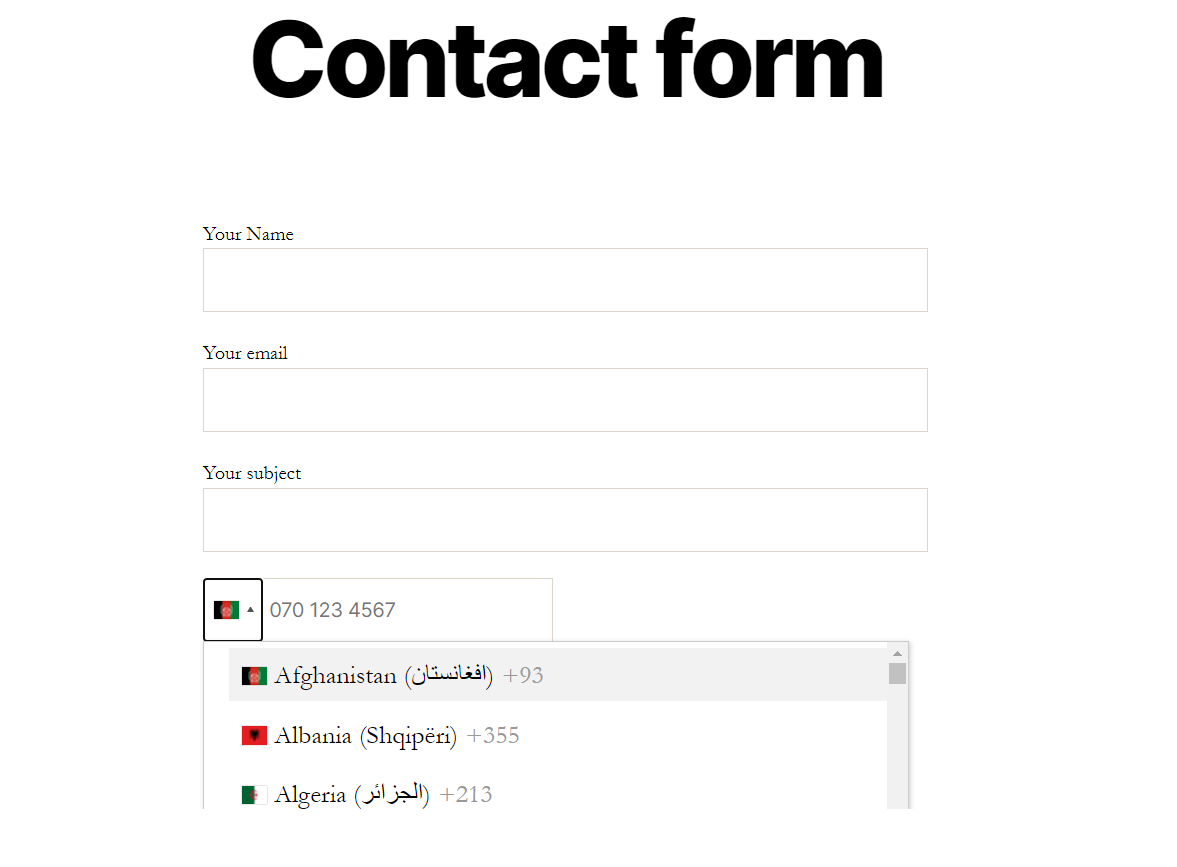
Country Flag Dropdown — The telephone field includes a searchable flag dropdown listing all countries in the world. Users can scroll or type to find their country, making it fast and intuitive on both desktop and mobile.
-
Automatic Dial Code Detection — When a user selects a country from the dropdown, the international dial code for that country (e.g. +1 for the US, +44 for the UK, +91 for India) is automatically detected and stored. The dial code is captured separately and merged with the phone number before it is sent in your email notification.
-
Dial Code Included in Email Notification — The submitted phone number is automatically combined with the selected country dial code and delivered as a single formatted value in your Contact Form 7 email notification via the standard mail tag. No manual formatting or extra steps required.
-
Enable / Disable Country Dropdown — Control whether the country flag dropdown is displayed on the telephone field. When enabled, users can select their country and the dial code is applied. When disabled, the field renders as a plain international telephone input without the dropdown.
-
Phone Number Format Validation — Submitted values are validated on the server side against an international phone number pattern. Only properly formatted phone numbers (digits, spaces, hyphens, parentheses, and a leading + for the country code) are accepted. Invalid entries trigger a CF7 validation error and prevent form submission.
-
Required Field Support — Mark the telephone input field as required using the standard CF7 required field option. If a user submits the form without entering a phone number, submission is blocked and a validation error is shown.
-
Custom Field ID — Assign a custom HTML ID attribute to the telephone input field for targeting with CSS or JavaScript.
-
Custom CSS Class — Add one or more custom CSS class names to the telephone input field for flexible front-end styling without modifying plugin files.
-
Mail Tag Integration — Include the submitted phone number (with dial code) in your CF7 email notifications by inserting the corresponding mail tag into the Mail tab — the same way any other CF7 field works.
-
Mobile Friendly — The country flag dropdown and telephone input are fully responsive and work smoothly on smartphones and tablets of all screen sizes.
-
Works with All Recent CF7 Versions — Tested and compatible with Contact Form 7 up to version 7.0
-
Powered by intl-tel-input — Built on the widely trusted intl-tel-input JavaScript library, which is used in production by thousands of web applications globally.
Pro Version Features
The following features are available exclusively in the Pro version. They appear as disabled fields in the CF7 tag generator for free users.
-
Only Countries (Country Whitelist) — Restrict the country dropdown to show only a specific set of countries. Enter a hyphen-separated list of country codes (e.g.
us-ca-gb) and the dropdown will display only those countries. Ideal for businesses that serve specific regions or want to limit submissions to particular markets. -
Preferred Countries (Pin Countries to Top) — Specify one or more countries that should appear at the top of the dropdown list above all other countries. Enter country codes (e.g.
us-gb) to promote them to the top position for faster selection. Perfect when your audience is primarily from one or two countries but you still want the full global list available below. -
Exclude Countries (Country Blacklist) — Hide specific countries from the dropdown entirely. Enter a hyphen-separated list of country codes (e.g.
us-ca) and those countries will be removed from the list. Useful for compliance requirements, regional restrictions, or simply keeping the dropdown tidy for your target audience.
Perfect For
- Contact and enquiry forms that serve an international audience
- Lead generation forms where a valid phone number is required
- Booking, reservation, and appointment request forms
- eCommerce checkout or order enquiry forms
- Event registration forms collecting attendee contact details
- Any Contact Form 7 form where a clean, validated, international phone number field is needed
How It Works
- Install and activate the plugin (Contact Form 7 must already be active).
- Open any Contact Form 7 form in the editor.
- Click Add Form Tag and select telephone_input from the list.
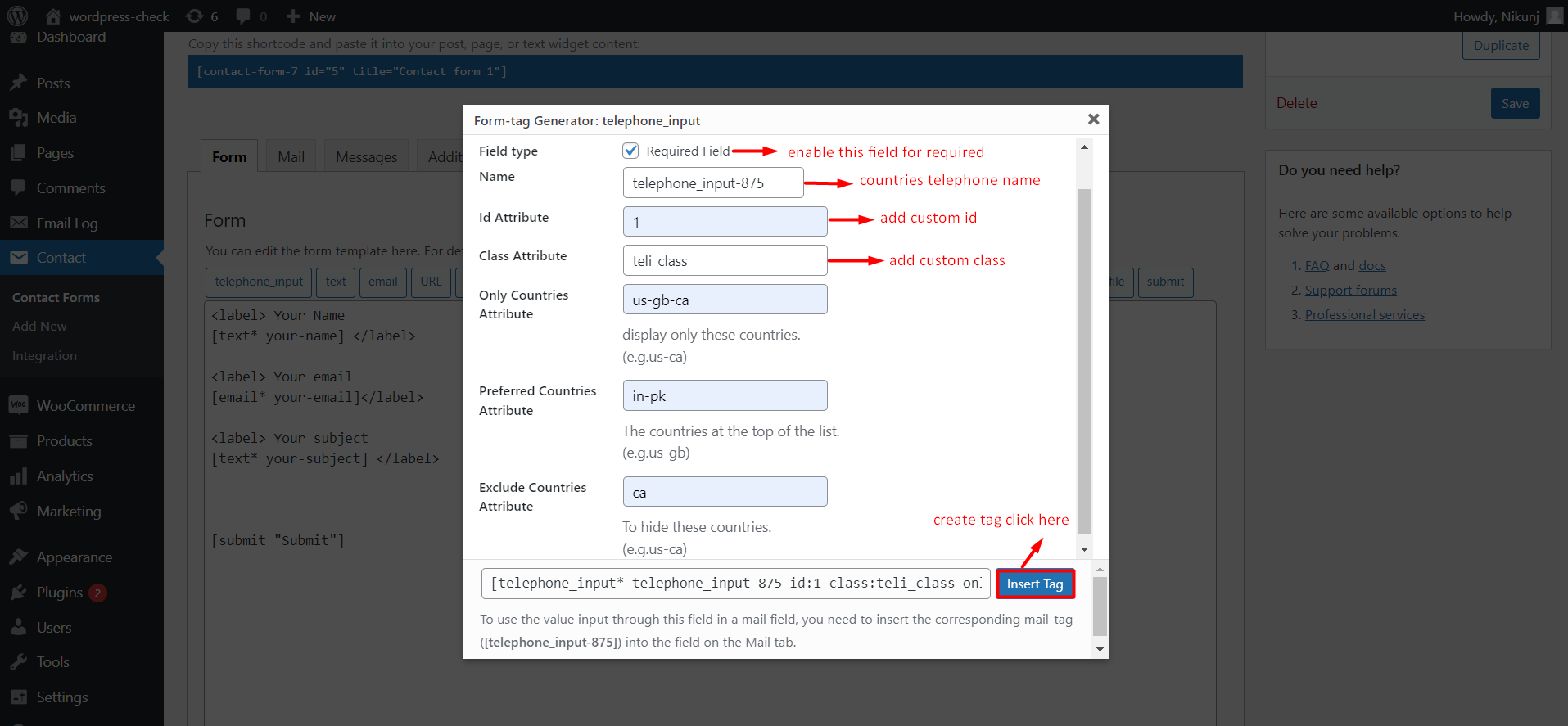
- In the tag generator panel, configure your field:
- Tick This is a required field if the phone number must be entered before submission
- Enter a Name for the field (used for the mail tag)
- Optionally set a custom ID or Class
- Check or uncheck Enable dropdown to control whether the country flag picker is shown
- Click Insert Tag to add the shortcode to your form.
- Go to the Mail tab and insert the mail tag (e.g.
[your-phone-field]) wherever you want the phone number to appear in the notification email. The value will include the selected dial code and the number the user typed. - Save the form. The international telephone input is now live on your site.
لقطات الشاشة
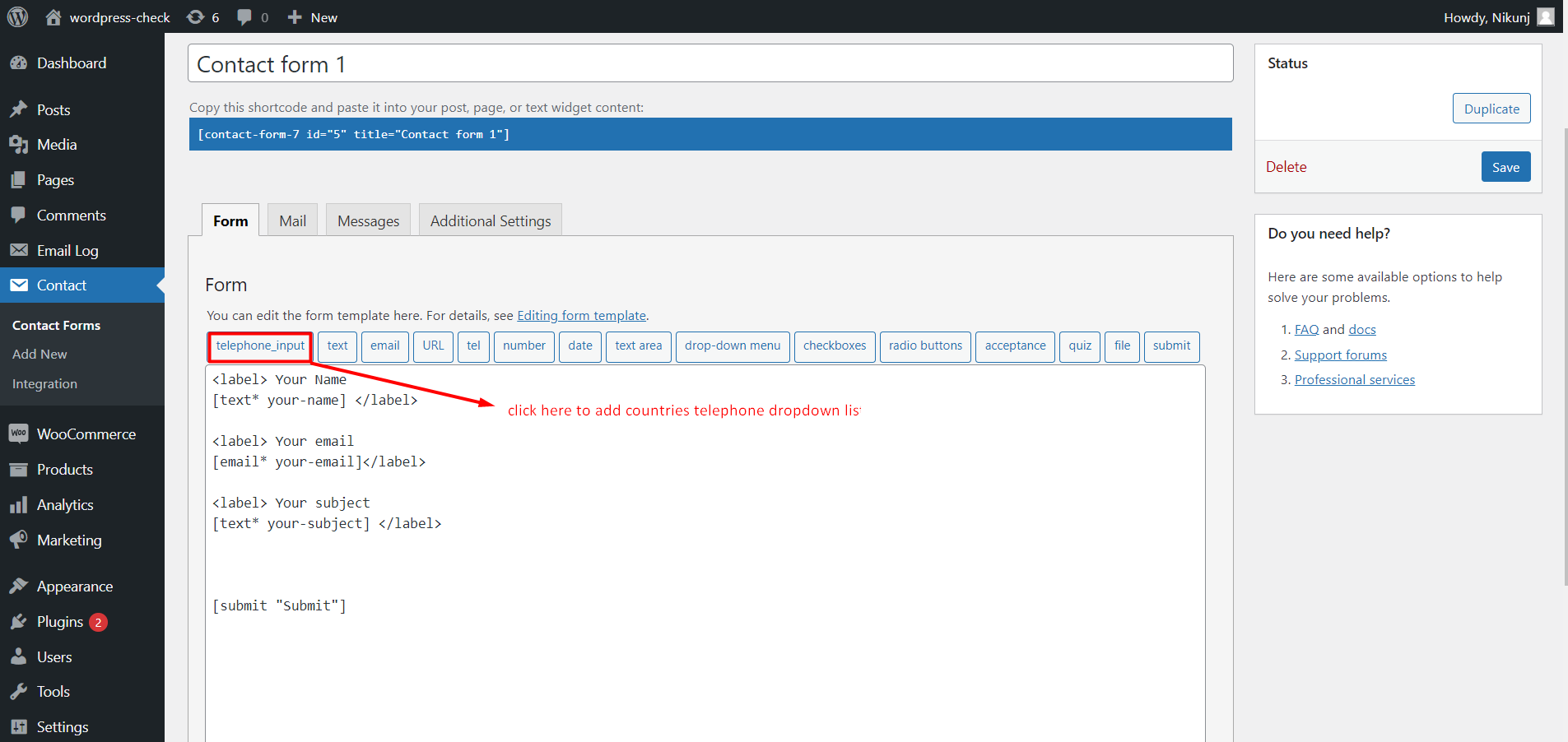
![CF7 form template — generated [telephone_input] shortcode tag shown in the form body](https://ps.w.org/telephone-input-for-contact-form-7/assets/screenshot-2.png?rev=2792768)
التنصيب
Automatic Installation (Recommended)
- Make sure Contact Form 7 is installed and activated.
- In your WordPress dashboard, go to Plugins > Add New.
- Search for Telephone Input For Contact Form 7.
- Click Install Now, then click Activate.
Manual Installation
- Download the plugin ZIP file.
- Go to Plugins > Add New > Upload Plugin in your WordPress dashboard.
- Upload the ZIP file and click Install Now.
- Click Activate Plugin after installation.
After Activation
- Open any Contact Form 7 form editor.
- Click Add Form Tag and select telephone_input.
- Configure the field options and click Insert Tag.
- Add the mail tag to your Mail tab template.
- Save and test your form.
الأسئلة المتكررّة
-
Does this plugin require Contact Form 7?
-
Yes. Contact Form 7 must be installed and activated for this plugin to work. The telephone input is registered as a custom CF7 form tag and relies entirely on the CF7 framework for rendering, validation, and email output.
-
Does the submitted phone number include the country dial code in the email?
-
Yes. When a user selects a country and enters their phone number, the plugin captures the international dial code (e.g. +44) and the phone number separately, then merges them into a single formatted value before it is sent via the CF7 mail tag. Your email notification will contain the full number including the dial code.
-
Can I make the telephone field required?
-
Yes. In the tag generator, tick the This is a required field checkbox. If a user submits the form without entering a phone number, validation will fail and an error message will be displayed — the same behaviour as any other required CF7 field.
-
Is the phone number validated before submission?
-
Yes. The plugin includes server-side phone number format validation. It checks that the submitted value contains only valid phone number characters (digits, spaces, hyphens, parentheses, and an optional leading +). Invalid entries are rejected and a validation error is shown to the user.
-
Can I disable the country flag dropdown?
-
Yes. In the tag generator, uncheck the Enable dropdown option. When disabled, the field renders as a plain international telephone text input without the country selector.
-
Can I restrict the dropdown to only show certain countries?
-
Restricting the dropdown to a specific list of countries (Only Countries / whitelist) is a Pro version feature. Upgrade here.
-
Can I pin certain countries to the top of the dropdown?
-
Pinning preferred countries to the top of the list is a Pro version feature. Upgrade here.
-
Can I hide or remove specific countries from the dropdown?
-
Excluding specific countries from the dropdown (blacklist) is a Pro version feature. Upgrade here.
-
Can I add a custom ID or CSS class to the telephone field?
-
Yes. Both a custom HTML ID and a custom CSS class can be set directly in the tag generator when creating the telephone input field.
-
Is the field mobile-friendly?
-
Yes. The country flag dropdown and the telephone input are fully responsive and support touch interaction on all smartphones and tablets.
-
Is the plugin compatible with the latest version of WordPress and Contact Form 7?
-
Yes. The plugin has been tested up to WordPress 7.0 and is compatible with all recent versions of Contact Form 7.
-
Where can I find setup documentation?
-
Full documentation and a step-by-step setup guide are available at (https://topsmodule.com/how-to-create-telephone-input-for-contact-form-7/).
-
Where can I see a live demo?
-
You can view a live working demo at (https://topsmodule.com/task/telephone-input-for-contact-form-7/).
-
How do I upgrade to the Pro version?
-
Visit (https://www.topsmodule.com/product/telephone-input-for-contact-form-7/) to get the Pro version and unlock country whitelisting, preferred countries, and country exclusion features.
المراجعات
لا توجد مراجعات لهذه الإضافة.
المساهمون والمطوّرون
“Telephone Input For Contact Form 7” هو برنامج مفتوح المصدر. وقد ساهم هؤلاء الأشخاص بالأسفل في هذه الإضافة.
المساهمون
ترجمة ”Telephone Input For Contact Form 7“ إلى لغتك.
مُهتم بالتطوير؟
تصفّح الشفرة، تحقق من مستودع SVN، أو الاشتراك في سجل التطوير بواسطة RSS.
سجل التغييرات
1.0
- Initial release.
- Add international telephone input field to any Contact Form 7 form.
- Country flag dropdown with full worldwide country list.
- Automatic dial code detection and capture.
- Dial code merged with phone number in email notifications via mail tag.
- Enable / disable country dropdown option.
- Server-side phone number format validation.
- Required field support.
- Custom ID and CSS class attribute support.
- Mobile and touch-screen compatible.
- Built on the intl-tel-input library.