

الوصف
You put a PDF form on your site. Visitors download it, print it, fill it, scan it and email it back, if they remember. Then you retype the answers.
SimplePDF Embed turns every PDF link on your site into a form your visitors fill and sign right on the page. Nothing to rebuild: link a PDF the way you always have.
Get every filled PDF back, automatically
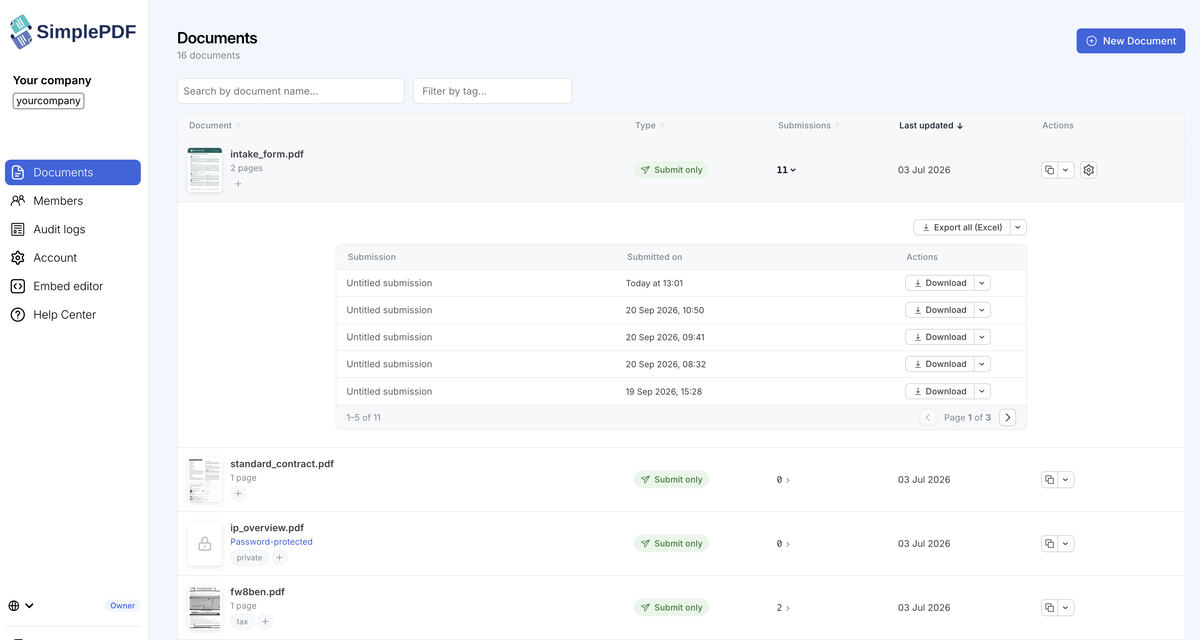
With a SimplePDF account, visitors click Submit and the filled PDF lands in your dashboard. No chasing.
- Email alerts on every submission
- Webhooks to send filled PDFs to your own systems
- Export the form data to CSV or Excel
- Required fields, so forms come back complete
- Your logo in the editor (Pro and above)
- Filled PDFs saved to your own storage (S3 or Azure Blob Storage on Pro, SharePoint on Premium)
Every plan starts with a 7-day free trial: see the plans.
Free, without an account
Visitors fill and sign your PDFs, then download them. The document is filled in their browser.
Works the way your site already works
- Every PDF link opens in SimplePDF by default, whatever the extension case (
Consent.PDF) or query string (form.pdf?ver=2) - Or limit it to the pages and posts you pick, and try it on a draft before going live
- The settings page lists the PDF links on your pages, posts, Site Editor templates, patterns and menus, and where each one opens
- Add the
exclude-simplepdfclass to a link to keep the browser’s own PDF viewer - Visitors who browse with an AI assistant (ChatGPT’s browser, Chrome with WebMCP) can ask it to fill the form for them, and check every answer before they submit. One checkbox turns it off.
What visitors can do in the editor
- Fill fillable forms, or add text, checkboxes, pictures and signatures to any PDF
- Add, delete, rotate and merge pages
- Works on desktop and mobile, in every modern browser
- Works with the block editor and the classic editor
Try it out
https://wordpress.simplepdf.co/
External services
This plugin uses SimplePDF to open your PDFs in an editor on your page. Filled PDFs stay in your visitors’ browser, unless you have a SimplePDF account and they click Submit. The settings page also checks that your SimplePDF account exists.
لقطات الشاشة


التنصيب
- Install the plugin from Plugins > Add New, or upload the zip file to
wp-content/plugins/. - Activate it from the Plugins menu.
- Go to Settings > SimplePDF Embed: it lists the PDF links on your site and where each one opens.
- Optional: to get the filled PDFs back, enter your company identifier (for
acme.simplepdf.com, enteracme).
الأسئلة المتكررّة
-
What changes with a SimplePDF account?
-
Without an account, visitors fill your PDF and download it. It is then up to them to send it to you.
With an account, they click Submit and the filled PDF lands in your dashboard, with an email alert or a webhook if you want one. You can export the answers to CSV or Excel, make fields required, and add your logo. See the plans.
-
Where do the filled PDFs go?
-
Without an account, the visitor downloads the filled PDF: it is not sent to SimplePDF.
With an account, submitted PDFs are stored in your SimplePDF dashboard, or in your own storage (S3, Azure Blob Storage or SharePoint) on the plans that include it.
-
Do I need a SimplePDF account?
-
No. Visitors can fill, sign and download PDFs without one. An account is what brings the filled PDFs back to you.
-
Can I try it on one page first?
-
Yes. In Settings > SimplePDF Embed, set “Where it runs” to “Only on pages and posts I pick” and pick a draft or private page. Every other PDF link keeps opening in the browser.
-
I installed the plugin: what next?
-
Every PDF link on your site now opens in SimplePDF. Open Settings > SimplePDF Embed to see which pages link a PDF and where each link opens. To add a new form, upload the PDF to your Media Library and link to it from any page or post.
-
A PDF link does not open in SimplePDF
-
Settings > SimplePDF Embed lists the PDF links visitors can reach on your pages, posts, Site Editor templates, patterns and menus, and where each one opens. A link opens in the browser when:
- The link does not point to a
.pdffile - The link has the
exclude-simplepdfclass - The page is not picked in “Where it runs”
Links added by a page builder, a classic menu or a widget open the same way but are not listed.
- The link does not point to a
-
How do I keep one PDF in the browser’s viewer?
-
Add the
exclude-simplepdfclass to that link. -
Can AI assistants fill my forms?
-
Yes, when a visitor browses with one (ChatGPT’s browser, Chrome with WebMCP). The assistant fills the form in the editor on your page, where the visitor checks every answer, and required and read-only fields still apply. To turn it off, untick “Give AI assistants direct access to your forms” in Settings > SimplePDF Embed. Assistants that click and type like a person can still fill your forms, as on any website.
-
Where do I send a feature request or a bug report?
-
Email us at wordpress@simplepdf.com.
-
Where can I see the code?
-
The plugin and the script it bundles are open source:
المراجعات

المساهمون والمطوّرون
“SimplePDF Embed” هو برنامج مفتوح المصدر. وقد ساهم هؤلاء الأشخاص بالأسفل في هذه الإضافة.
المساهمون
ترجمة ”SimplePDF Embed“ إلى لغتك.
مُهتم بالتطوير؟
تصفّح الشفرة، تحقق من مستودع SVN، أو الاشتراك في سجل التطوير بواسطة RSS.
سجل التغييرات
1.2.2
- Links from the plugin to simplepdf.com now say where they come from (the plugin’s settings page or its WordPress.org listing), so we can see which of them help people. They carry nothing about your site or your visitors
1.2.1
- The PDF links report now also lists the links in your Site Editor templates, template parts, synced patterns and navigation menus, like your home page, header and footer
- It lists only what visitors can reach: published pages and posts, the drafts or private pages you picked to try it, and the templates, patterns and menus your site actually shows
- One line per PDF link, with where it opens in its own column, 20 pages or templates at a time
- In “Only on pages and posts I pick” mode, the report says once which pages it runs on, instead of a note on every row
1.2.0
- New settings page: see every PDF link on your pages and posts, and where each one opens
- Choose where it runs: everywhere, or only on the pages and posts you pick, drafts included
- Your company identifier is checked, so a typo shows up right away
- PDF links open in SimplePDF whatever the extension case (
Consent.PDF), query string or#pagefragment - AI assistants in your visitors’ browser can now fill your forms (WebMCP). This is on after the update: to turn it off, untick “Give AI assistants direct access to your forms” in Settings > SimplePDF Embed
- Uninstalling the plugin removes its settings
- Update web-embed-pdf to 1.9.0
- Plugin tested with the latest WordPress version (7.1.2)
1.1.3
- Update web-embed-pdf to 1.8.4
- Plugin tested with the latest WordPress version (6.9.4)
1.1.2
- Plugin tested with the latest WordPress version (6.7.1)
1.1.1
- Move to SimplePDF.com (from SimplePDF.eu)
1.1.0
- Add support for SimplePDF form links
1.0.0
- Initial release