

الوصف
PixelCraft with WebP helps speed up your site by creating WebP copies of images you upload (and optionally replacing originals). It uses WordPress image APIs (GD or Imagick) with sensible PHP fallbacks when a host mis-reports WebP support.
- Automatic conversion on upload for JPEG and PNG (after WordPress generates thumbnails).
- Keep originals or replace them after a successful WebP write (your choice).
- Quality preset and max width/height for the full-size WebP.
- Bulk conversion in the admin (batched AJAX, optional WP-Cron background queue).
- Savings report per attachment (stored in attachment meta).
- Settings under Settings PixelCraft with WebP.
- Media list column showing optimization status.
- Frontend delivery: when enabled, image URLs can switch to
.webpfor clients that sendAccept: image/webp(compatible with WooCommerce product images that use core attachment APIs). - No external services — conversion runs on your server only.
Trademark notice: WordPress is a registered trademark of the WordPress Foundation. This plugin is not affiliated with or endorsed by WordPress or the WordPress Foundation.
More info: wordpressplugin.adbear.cloud
Privacy
This plugin does not collect, store, or transmit personal data to third parties. Conversion and logging (if enabled) occur on your server. See the FAQ for details.
لقطات الشاشة
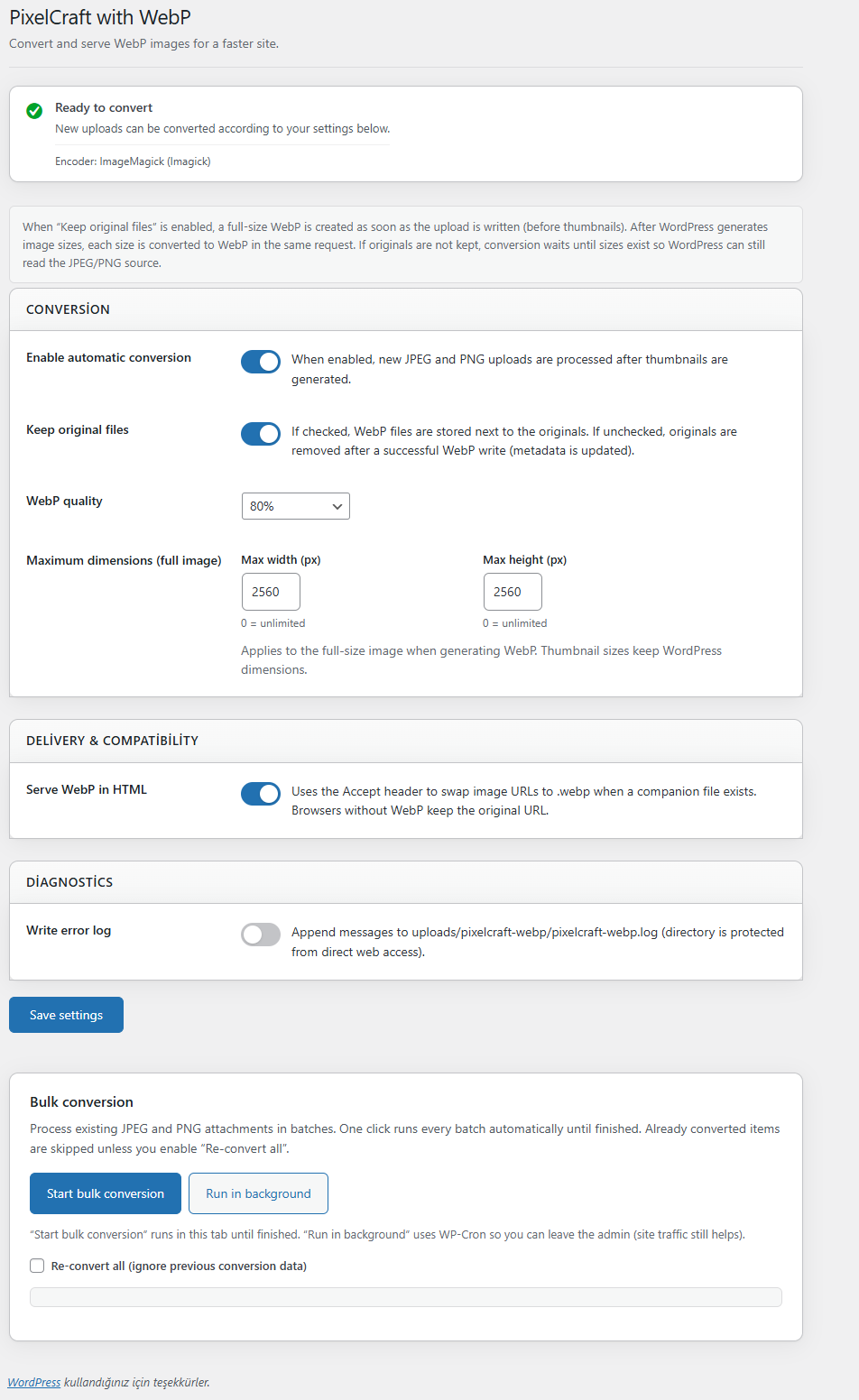
screenshot-1.png — Settings screen: conversion, delivery, diagnostics, and bulk conversion.
التنصيب
- Upload the
pixelcraft-webpfolder to/wp-content/plugins/, or install the ZIP via Plugins Add New Upload Plugin. - Activate the plugin through the Plugins screen in WordPress.
- Go to Settings PixelCraft with WebP and adjust options.
- For existing images, use Bulk conversion on the same settings page (WebP-capable PHP required).
الأسئلة المتكررّة
-
Does this plugin send my images to a third-party service?
-
No. All conversion happens on your server. There are no paid APIs or remote encoders.
-
What PHP requirements are needed?
-
You need WebP encoding support via GD (
imagewebp) and/or Imagick with WebP. The plugin detects capability and shows a notice in settings if encoding is not available. -
Will it work with WooCommerce?
-
Yes. Product images use WordPress attachment URLs; when “Serve WebP in HTML” is enabled and a
.webpcompanion exists, compatible browsers receive WebP URLs where the plugin applies filters. -
What happens if I uninstall?
-
See uninstall.php: plugin options and scheduled bulk jobs are removed. WebP files and attachment meta created while the plugin was active are not automatically deleted (your media and files stay intact). You can remove
.webpfiles manually if needed. -
Does the plugin collect personal data?
-
No analytics or tracking are included. Optional file logging is local, disabled by default, and when enabled writes only under
wp-content/uploads/pixelcraft-webp/.
المراجعات


المساهمون والمطوّرون
“PixelCraft with WebP” هو برنامج مفتوح المصدر. وقد ساهم هؤلاء الأشخاص بالأسفل في هذه الإضافة.
المساهمون
ترجمة ”PixelCraft with WebP“ إلى لغتك.
مُهتم بالتطوير؟
تصفّح الشفرة، تحقق من مستودع SVN، أو الاشتراك في سجل التطوير بواسطة RSS.
سجل التغييرات
2.0.7
- Plugin Review: optional logging and
.htaccess/index.phpstubs are written only underwp-content/uploads/pixelcraft-webp/(viawp_upload_dir()), not a generic uploads subfolder. - Plugin Review: PHP identifiers (classes, functions,
defines, options, meta keys, AJAX actions, cron hooks, script/style handles, CSS class prefix) now use the distinctpclwebpprefix; one-time migration moves data from olderwebpforge_*keys where present.
2.0.6
- Branding: display name PixelCraft with WebP; directory slug, text domain, settings screen slug, and main file
pixelcraft-webp/pixelcraft-webp.php.
2.0.5
- Branding preparation release before the current
pixelcraft-webppackage naming.
2.0.4
- WordPress coding standards / Plugin Check: translator comments for placeholder strings in bulk JS i18n; AJAX bulk inputs use
filter_inputwhere appropriate;HTTP_ACCEPTsanitized in the front-end WebP check; documentedphpcs:ignorefor the corewp_image_editorfilter (cannot be prefixed).
2.0.3
- Plugin URI updated to the product page with full feature details: https://adbear.cloud
2.0.2
- Plugin header: simplified formatting for Plugin Check compatibility (Description, Version, License as GPLv2 or later); moved non-header lines out of the plugin docblock.
2.0.1
- Plugin header: Plugin URI points to the WordPress.org plugin page; Author URI remains the author site (WordPress.org requires these two URLs to differ).
2.0.0
- Breaking package layout: package structure was rebuilt and internal identifiers were namespaced with a unique prefix (options, meta keys, AJAX actions, cron hooks, CSS/JS handles) to avoid collisions with other plugins.
- One-time migration copies legacy option/meta data, clears legacy cron hooks, and renames the uploads log folder when present.
- If you previously installed an earlier package folder, remove the old plugin folder after upgrading to prevent duplicate plugins.
1.0.2
- Plugin display name was previously adjusted to comply with WordPress.org trademark rules (names may not begin with the restricted “WP” prefix).
1.0.1
- WordPress.org submission polish: readme contributor matches the WordPress.org profile username; removed redundant load_plugin_textdomain call (translations load automatically for plugins hosted on WordPress.org as of WordPress 6.7).
1.0.0
- Initial release on WordPress.org track: WebP conversion, bulk tools, admin settings, media column, optional WebP delivery via Accept header, logging, uninstall handler.