

الوصف
Comics for your WordPress site
MangaFocus is a free plugin that adds a dedicated comic viewer to WordPress posts and pages. Select your comic images and let readers browse single pages, two-page spreads, fullscreen views or vertical scrolling.
Its distinctive feature is Focus Mode: readers move through the panel regions you define, enlarged in reading order. This helps readers follow panels on smaller screens.
Use hand-drawn or AI-assisted comics, service introductions, brochures and illustrated guides. MangaFocus displays existing images; it does not generate comic images or automatically send content to an AI API.
Free features
- Publish and reuse: place a MangaFocus block directly in a post or page, or register a comic in Manga Library and reuse it with the Registered Viewer block or a shortcode.
- Focus Mode: define panel regions and their reading order, with optional separate regions for smartphone screens.
- Reading layouts: single pages, two-page spreads and responsive automatic layouts; fullscreen page navigation, vertical scrolling and fullscreen viewing of one complete page at a time.
- Presentation: right-to-left or left-to-right binding; standalone cover and landscape pages; cover launch buttons. Enable inline, fullscreen and Focus Mode independently.
- Controls: zoom, pan, swipe, keyboard and page-edge navigation. Normal page transitions can be instant, page-turn, fade or slide, with reduced-motion support.
Start with a post or a reusable comic
For one location, add a MangaFocus block directly to a post or page. This Direct Viewer stores images and settings in that block.
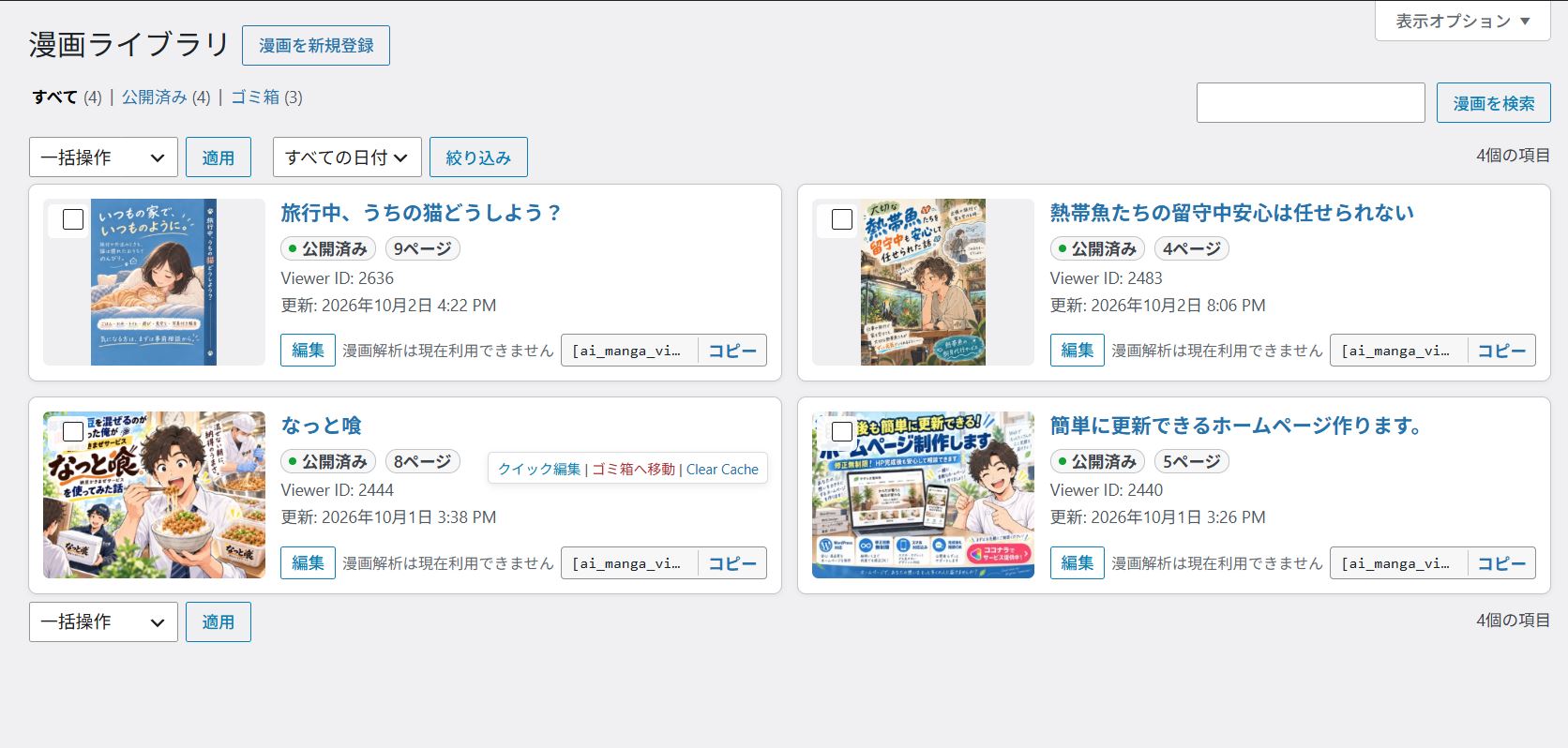
For reuse, save the comic in Manga Library and select it with Registered Viewer blocks or shortcodes. Edit the library entry to update those placements. See Installation for both workflows.
You can also use “Register in Manga Library” on a Direct Viewer. This creates an independent copy of its current configuration; later edits to the original block and the library entry are not synchronized automatically.
Choose how readers view the comic
- Normal reading: move through whole pages, or a complete two-page spread at a time.
- Fullscreen: use the available screen area for page navigation or continuous vertical scrolling.
- Focus on one page at a time: within a fullscreen spread, enlarge each complete page in reading order.
- Focus Mode: enlarge the author-defined panel regions within each page, in the order you set. Pages without configured panels remain in sequence as full pages.
To configure Focus Mode, select a page in the MangaFocus block, turn on “Enable Focus Mode”, then choose “Add panel” and drag over the image. Repeat and use the panel list’s Previous and Next controls to set reading order. Preview before publishing. At least one panel is needed to use Focus Mode alone.
See the Japanese manual.
Optional Pro add-on
Free works independently: comic display, Focus Mode and Manga Library do not require Pro.
Pro adds calls to action (CTA), comic reading analytics, consultation documents and comic-production prompts for external AI services. The AI helpers prepare text locally for you to review and copy; they do not automatically send it to an AI API or generate images.
Without Pro, comics use the Free Viewer; saved Pro settings remain for later reuse.
Data and privacy
Free alone does not collect reader events on the public site or automatically send comic content to an external AI API. It does not send telemetry, use an external analytics service or depend on a CDN.
Pro Analytics is disabled by default and is designed to store its data in the WordPress site’s local database. Administrators can set a retention period and delete stored analytics data. Free includes the analytics table lifecycle, retention schedule and deletion settings to support Pro compatibility and manage retained data; without Pro, no new reader events are collected.
External image URLs connect readers’ browsers to the image host.
Development
The distributed plugin contains its human-readable PHP, JavaScript, and CSS source. It does not use minified, bundled, or transpiled runtime files.
The maintained development repository is available at https://github.com/cni-works/mangafocus.
Build tool (excluded from the ZIP): https://github.com/cni-works/mangafocus/blob/3c13166c04880ebe4342dfcdb4f4bd9dbbcc70eb/scripts/build-release.ps1. Run powershell -File scripts/build-release.ps1 from the corresponding repository revision.
لقطات الشاشة





التنصيب
Install and activate MangaFocus, then choose a workflow.
Publish directly in a post or page
- Open a post or page in the block editor and add the MangaFocus block.
- In “Page images”, select comic images in reading order.
- Set the reading modes, layout and binding direction. If using Focus Mode, add panel regions as described above.
- Preview the desktop and mobile layouts, then publish or update the post or page.
Register a comic for reuse
- Open Manga Library, choose “Add New” and open the “Register New Comic” screen.
- Add page images and configure the MangaFocus block’s reading settings, then publish the library entry.
- In a post or page, add the Registered Viewer block and select the registered comic.
- Preview, then publish or update the post or page.
Use Classic Editor
Create and edit the comic in Manga Library, which uses the block editor. Copy its shortcode from the library list and paste it into your Classic Editor post or page, for example:
[ai_manga_viewer id="123"]
Replace 123 with the registered comic’s ID. Posts and pages keep their existing editor preferences; MangaFocus does not change Classic Editor’s global settings.
الأسئلة المتكررّة
-
Does MangaFocus generate manga with AI?
-
No. It displays images you supply, whether hand-drawn, AI-assisted or made by other methods. Pro’s optional AI helpers prepare text for use in an external service, not images.
-
Does uninstalling MangaFocus delete comic data?
-
Manga Library posts and post metadata are not deleted automatically. Analytics tables and settings are retained by default and deleted only if “Delete on uninstall” is enabled. The scheduled retention cleanup is removed during uninstall.
المراجعات
لا توجد مراجعات لهذه الإضافة.
المساهمون والمطوّرون
“MangaFocus – Panel-by-Panel Manga Reader” هو برنامج مفتوح المصدر. وقد ساهم هؤلاء الأشخاص بالأسفل في هذه الإضافة.
المساهمون
لقد تم ترجمة ”MangaFocus – Panel-by-Panel Manga Reader“ إلى لغة واحدة. شكراً إلى جميع المُترجمين لمُساهماتهم.
ترجمة ”MangaFocus – Panel-by-Panel Manga Reader“ إلى لغتك.
مُهتم بالتطوير؟
تصفّح الشفرة، تحقق من مستودع SVN، أو الاشتراك في سجل التطوير بواسطة RSS.
سجل التغييرات
0.5.1
- Fixed an issue where the manga library editor could open in Classic Editor mode when Classic Editor was set as the default.
- Manga library entries now use the block editor while respecting editor preferences for other post types.
0.5.0
-
Renamed panel reading to Focus Mode; it enlarges configured panels in sequence.
-
Added page-turn, fade, slide and instant transitions, preserving legacy settings and reduced-motion support.
0.4.1
- Added website/manual links and clarified Pro’s upcoming release. No feature or data changes.
0.4.0
- 通常表示・全画面表示・コマ読みを個別に選択可能に。旧設定と保存値を保持。
- 設定画面とコマ読み開始位置の選択肢を整理。1ページ表示では見開き専用設定を非表示。
- ブロック設定に表紙画像を追加。アイキャッチの自動設定を廃止し、既存表紙を維持。
- 縦長表紙の左右余白と、画像を覆わない案内矢印の配置を改善。
- 自由ズームOFF時の縦読みと、中間ページからの開始位置を修正。
- 小画面の全画面ページ送り配置と日本語の設定説明を改善。
0.3.0
- Renamed the plugin to MangaFocus and aligned the distribution slug and Text Domain with
mangafocus. - Added author-defined Panel-by-Panel reading to Free/Core.
- Added Manga Library, the Registered Viewer block, and shortcodes.
- Added single-page, spread, automatic, standalone cover, and standalone landscape layouts.
- Added fullscreen page focus, vertical scrolling, zoom, and the fullscreen cover launcher.
- Added Manga Library cover management, the admin list, and copying from Direct Viewer.
- Added Feature, Capability, and Extension APIs with a compatibility schema that preserves Pro settings.
- Added local Analytics storage, retention, and cleanup infrastructure while keeping the collector and reports outside Free/Core.
- Added bundled English and Japanese localization, REST argument definitions, documentation, and a reproducible WordPress.org release build.
0.2.0-alpha
- Improved page navigation, right-to-left and left-to-right binding, swipe gestures, and keyboard controls.
- Added fullscreen viewing, free zoom, pinch gestures, and panning.
- Added the initial Manga Library and Registered Viewer infrastructure.
0.1.0-alpha
- Initialized the standalone WordPress plugin under its former AI Manga Viewer name.