
الوصف
This plugin permit to approuve your gestion of your client (or references).
You shoudl be create a simple desctiption of your refernce , with a title, decription, and logo.
You have 2 solution for view the references. You can put a slide or just a list.
An to use is simple , you just add htis in your template :
fnp_get_references($limit=-1, $post_per_page=10, $miniature=true, $link=true, $sizew=140, $sizeh=140,$cssClass=”fnp_thumb img_black”, $sliderJs=true);
The simple difference for use the categories or tags is
And you can add in your template page of your themes:
fnp_get_references_by_cat or fnp_get_references_by_tags
with this options ($key, $limit=-1, $post_per_page=10, $thumb=true, $link=true, $sizew=140, $sizeh=140,$cssClass=”fnp_thumb img_black”, $sliderJs=true)
لقطات الشاشة
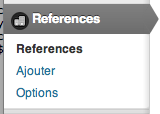
List in Admin Menu 
List Of Your references 
Exemple Of Slider
التنصيب
- Upload
Simple_referencesfolder into the/wp-content/plugins/directory - Activate the plugin through the ‘Plugins’ menu in WordPress
- Place
<?php fnp_get_references() or fnp_get_references_by_cat("cat") ?>in your templates
الأسئلة المتكررّة
- Options of fnp_get_references() ?
-
fnp_get_references($limit=-1, $post_per_page=10, $thumb=true, $link=true, $sizew=140, $sizeh=140,$cssClass=”fnp_thumb img_black”, $sliderJs=true):
- limit : limit oy all references,
- post_per_page : limit of reference on your page,
- thumb : if you can use minature ,
- link : : If you want a link ,
- sizew : width size of you thumb,
- sizeh : height size of you thumb,
- cssClass : default class of you thumb,
- sliderJs : If you yant a slide or a list,
- Options of fnp_get_references_by_cat() ?
-
fnp_get_references_by_cat($category, $limit=-1, $post_per_page=10, $thumb=true, $link=true, $sizew=140, $sizeh=140,$cssClass=”fnp_thumb img_black”, $sliderJs=true) :
- category : category id,
- limit : limit oy all references,
- post_per_page : limit of reference on your page,
- thumb : if you can use minature ,
- link : : If you want a link ,
- sizew : width size of you thumb,
- sizeh : height size of you thumb,
- cssClass : default class of you thumb,
- sliderJs : If you yant a slide or a list
- Options of fnp_get_references_by_tags() ?
-
fnp_get_references_by_tags($tags, $limit=-1, $post_per_page=10, $thumb=true, $link=true, $sizew=140, $sizeh=140,$cssClass=”fnp_thumb img_black”, $sliderJs=true) :
- tag : tag id,
- limit : limit oy all references,
- post_per_page : limit of reference on your page,
- thumb : if you can use minature ,
- link : : If you want a link ,
- sizew : width size of you thumb,
- sizeh : height size of you thumb,
- cssClass : default class of you thumb,
- sliderJs : If you yant a slide or a list
المراجعات
لا توجد مراجعات لهذه الإضافة.
المساهمون والمطوّرون
“Simple References” هو برنامج مفتوح المصدر. وقد ساهم هؤلاء الأشخاص بالأسفل في هذه الإضافة.
المساهمون
ترجمة ”Simple References“ إلى لغتك.
مُهتم بالتطوير؟
تصفّح الشفرة، تحقق من مستودع SVN، أو الاشتراك في سجل التطوير بواسطة RSS.
سجل التغييرات
0.1
- First version.
0.2
- Add option for categorie and tags.