Title: Simple History – Track, Log, and Audit WordPress Changes
Author: Pär Thernström
Published: 8 يوليو، 2010
Last modified: 16 سبتمبر، 2026
---
البحث عن الإضافات
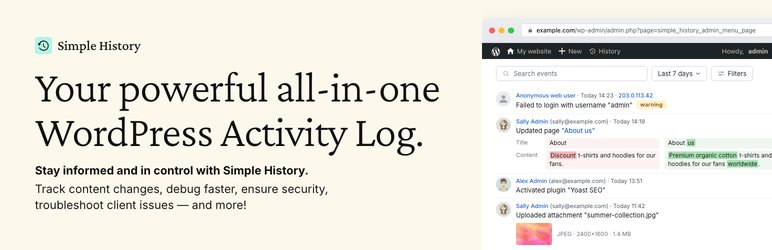

# Simple History – Track, Log, and Audit WordPress Changes
بواسطة [Pär Thernström](https://profiles.wordpress.org/eskapism/)
[تنزيل](https://downloads.wordpress.org/plugin/simple-history.5.33.0.zip)
[Live Preview](https://ar.wordpress.org/plugins/simple-history/?preview=1)
* [تفاصيل](https://ar.wordpress.org/plugins/simple-history/#description)
* [المراجعات](https://ar.wordpress.org/plugins/simple-history/#reviews)
* [التطوير](https://ar.wordpress.org/plugins/simple-history/#developers)
[الدعم](https://wordpress.org/support/plugin/simple-history/)
## الوصف
Trusted by 300,000+ WordPress sites, rated 4.9 stars with [450+ five-star reviews](https://wordpress.org/support/plugin/simple-history/reviews/?filter=5),
actively developed for 10+ years, and translated into 15+ languages.
Simple History is the complete audit log for WordPress. It tracks every meaningful
change — content edits, user logins, plugin updates, security events, and more —
so site owners, teams, agencies, and developers always know who did what and when.
Just install and activate; no configuration required.
Every event is written to be read: plain language like _Updated page “About us”_,
relative timestamps such as “5 minutes ago”, and before/after comparisons instead
of raw data dumps.
### 🔍 How Simple History Helps in Real Situations
**Track what’s happening on your site**
_“Has anyone done anything today? Ah, Sarah
uploaded the new press release and created an article for it. Great — now I don’t
have to do that.”_
**Identify issues and debug faster**
_“The site feels slow since yesterday. Has
anyone done anything special? … Ah, Steven activated ‘naughty-plugin-x’, that must
be it.”_
**Keep freelancers & agencies accountable**
_“I hired a developer to optimize my
site. But did they actually do anything? A quick glance at Simple History shows
me exactly what they worked on.”_
**Spot suspicious activity early**
_“I see three failed logins from an unfamiliar
IP address overnight. Let me click the IP to check all activity from that address—
just those attempts, nothing else. Good to know.”_
### ✨ What Simple History Tracks
#### Security & Monitoring
* Failed user logins with IP tracking and filtering by type (wrong password vs.
non-existent username)
* Core file integrity checks against official checksums
* Forced security auto-updates from WordPress.org
* Site Health status changes
* Admin page access denied events
#### Content & Users
* Posts, pages, and custom post types — create, edit, delete, and homepage assignment
* Attachments with image edit details (crop, rotate, flip, scale) and thumbnail
previews
* Taxonomies with detailed diffs of name, slug, description, and parent
* Comments, menus (with item-level detail), and widgets
* User profiles, logins, logouts, and role changes
* Notes — the collaboration feature in WordPress 6.9
#### System & Updates
* Plugin lifecycle: install, update, activate, deactivate, delete, and auto-update
toggle
* Theme install, update, activate, switch, and delete
* WordPress core updates (manual and automatic)
* Translation and language pack updates
* Available update notifications
* Settings and option screen changes
#### Privacy & Compliance
* Privacy data export and user data erasure requests
* Privacy page changes
* IP addresses anonymized by default — no cookies, no external fonts
* WordPress AI plugin activity is logged without ever storing API keys or prompt
content
### 🔌 Built-in Third-Party Plugin Support
Simple History includes built-in logging for:
* **WordPress AI plugin** – Feature toggles, AI provider and model changes, and
connector approval requests, grants, and revocations
* **Jetpack** – Module activations and deactivations
* **Advanced Custom Fields (ACF)** – Field group and field changes
* **User Switching** – User switch events
* **WP Crontrol** – Cron event and schedule changes
* **Enable Media Replace** – File replacement details
* **Limit Login Attempts** – Login attempts, lockouts, and config changes
* **Redirection** – Redirect and group changes, global settings
* **Duplicate Post** – Post and page cloning
* **Beaver Builder** – Layout, template, and settings saves
Is your plugin missing? Plugin authors can add support using the [logging API](https://simple-history.com/docs/logging-api/?utm_source=wordpress_org&utm_medium=plugin_directory&utm_campaign=documentation&utm_content=readme_doc_logging_api).
### 💬 What Users Say
[450+ five-star reviews](https://wordpress.org/support/plugin/simple-history/reviews/?filter=5)
on WordPress.org:
* _“So far the best and most comprehensive logging plugin”_ – [@herrschuessler](https://wordpress.org/support/topic/so-far-the-best-and-most-comprehensive-logging-plugin/)
* _“The best history plugin I’ve found”_ – [Rich Mehta](https://wordpress.org/support/topic/the-best-history-plugin-ive-found/)
* _“Fantastic plugin I use on all sites”_ – [Duncan Michael-MacGregor](https://wordpress.org/support/topic/fantastic-plugin-i-use-on-all-sites/)
* _“It is a standard plugin for all of our sites”_ – [Mr Tibbs](https://wordpress.org/support/topic/it-is-a-standard-plugin-for-all-of-our-sites/)
### 🚀 View Your Log Everywhere
Simple History starts tracking instantly after activation — no setup needed. It
even imports recent activity so your log isn’t empty on day one. Access your log
from:
* **Dashboard widget** – Activity stats summary and recent events
* **Admin bar quick view** – Dropdown with latest events on any admin page
* **Command palette** – Type “Simple History” to jump to the log for the current
post
* **Dedicated admin page** – Full log with search, filters, and insights sidebar
* **Email reports** – Weekly summary delivered to your inbox
* **RSS feed** – Password-protected feed for your favorite reader
* **WP-CLI** – Command-line access for automation and scripting
* **REST API** – Programmatic access for custom integrations
### 📧 Weekly Email Reports – Stay Informed Without Logging In
[Weekly email reports](https://simple-history.com/features/email-reports-weekly/?utm_source=wordpress_org&utm_medium=plugin_directory&utm_campaign=documentation&utm_content=readme_doc_email_reports)
deliver a summary of your site’s activity every Monday morning — total activity,
daily breakdown, key metrics (logins, content updates, plugin changes), and direct
links to the full log.
Perfect for site owners, agencies managing client sites, and teams who need regular
updates without logging in. Enable it in settings and [see what the email looks like](https://simple-history.com/features/email-reports-weekly/?utm_source=wordpress_org&utm_medium=plugin_directory&utm_campaign=documentation&utm_content=readme_doc_email_reports#example)
before turning it on.
### 🛠️ For Developers & Power Users
* **WP-CLI** – [List, search, and export events](https://simple-history.com/features/wp-cli-commands/?utm_source=wordpress_org&utm_medium=plugin_directory&utm_campaign=documentation&utm_content=readme_doc_wp_cli_commands)
from the command line — perfect for automation and managing multiple sites
* **REST API** – Full programmatic access to query the log and add custom events.
See the [documentation](https://simple-history.com/docs/?utm_source=wordpress_org&utm_medium=plugin_directory&utm_campaign=documentation&utm_content=readme_doc_overview)
* **Logging API** – [Log your own events](https://simple-history.com/docs/logging-api/?utm_source=wordpress_org&utm_medium=plugin_directory&utm_campaign=documentation&utm_content=readme_doc_logging_api)
from themes and plugins with a single line of code
* **RSS feed** – Subscribe to changes using any feed reader
* **AI & agent-friendly** – The REST API and RSS feed make Simple History accessible
to AI agents and automated workflows like Claude Code
* **Stealth Mode** – Run Simple History completely hidden from the admin interface
via code; [Premium](https://simple-history.com/add-ons/premium?utm_source=wordpress_org&utm_medium=plugin_directory&utm_campaign=documentation&utm_content=readme_doc_stealth_mode)
adds a GUI. Ideal for agencies and client sites
### 🔆 Extend with Add-ons
#### [Simple History Premium](https://simple-history.com/add-ons/premium?utm_source=wordpress_org&utm_medium=plugin_directory&utm_campaign=documentation&utm_content=readme_doc_premium)
**Alerts & Notifications** – Get notified instantly via Email, Slack, Discord, or
Telegram when important events occur. Start quickly with preset rules for common
scenarios or build custom rules filtered by event type, user, role, and log level.
**Log Forwarding** – Stream events to external destinations: local log files, syslog
servers (UDP/TCP/TLS), Datadog, Splunk, webhooks, or external MySQL/MariaDB databases.
Perfect for centralized logging, compliance, and backup.
**Enhanced Controls** – Custom retention periods (or keep logs forever), CSV/JSON
export of filtered search results, post activity panel in the block editor, custom
log entries for team decisions, stealth mode GUI, logger control to fine-tune which
events are recorded, and an ad-free experience.
#### [WooCommerce Logger](https://simple-history.com/add-ons/woocommerce/?utm_source=wordpress_org&utm_medium=plugin_directory&utm_campaign=addons&utm_content=readme_addon_woocommerce)
Track WooCommerce activity: orders, refunds, stock changes, product updates, pricing
adjustments, settings modifications, and coupon usage.
#### [Debug and Monitor](https://simple-history.com/add-ons/debug-and-monitor/?utm_source=wordpress_org&utm_medium=plugin_directory&utm_campaign=addons&utm_content=readme_addon_debug_monitor)
Monitor outgoing HTTP requests and emails, debug API calls, and see what’s happening
under the hood. Essential for developers and support teams.
### 💚 Sponsor this project
If you like this plugin please consider [sponsoring the development of the free plugin](https://simple-history.com/sponsor/?utm_source=wordpress_org&utm_medium=plugin_directory&utm_campaign=sponsorship&utm_content=readme_sponsor_footer).
The plugin has been free for over 10 years and will continue to be free.
## لقطات الشاشة
[⌊The main event log: a clear timeline of who did what on your site, when, and from
where — alongside a sidebar with daily activity and your most active users.⌉⌊The
main event log: a clear timeline of who did what on your site, when, and from where—
alongside a sidebar with daily activity and your most active users.⌉[
The main event log: a clear timeline of who did what on your site, when, and from
where — alongside a sidebar with daily activity and your most active users.
[⌊Content changes show a full before/after diff, so you can see exactly which words
were edited on a post or page — not just that something changed.⌉⌊Content changes
show a full before/after diff, so you can see exactly which words were edited on
a post or page — not just that something changed.⌉[
Content changes show a full before/after diff, so you can see exactly which words
were edited on a post or page — not just that something changed.
[⌊User events capture every change to a profile: first and last name, display name,
website, role, and more — with the previous value preserved next to the new one.⌉⌊
User events capture every change to a profile: first and last name, display name,
website, role, and more — with the previous value preserved next to the new one.⌉[
User events capture every change to a profile: first and last name, display name,
website, role, and more — with the previous value preserved next to the new one.
[⌊Every plugin install, activation, and deactivation is logged with author, version,
source, and a link to the plugin — so you always know what's running on your site.⌉⌊
Every plugin install, activation, and deactivation is logged with author, version,
source, and a link to the plugin — so you always know what's running on your site
.⌉[
Every plugin install, activation, and deactivation is logged with author, version,
source, and a link to the plugin — so you always know what’s running on your site.
[⌊Click any IP address to see where it came from — hostname, organisation, city,
and country — then filter every event from that IP or subnet in one click. Ideal
for investigating failed logins.⌉⌊Click any IP address to see where it came from—
hostname, organisation, city, and country — then filter every event from that IP
or subnet in one click. Ideal for investigating failed logins.⌉[
Click any IP address to see where it came from — hostname, organisation, city, and
country — then filter every event from that IP or subnet in one click. Ideal for
investigating failed logins.
[⌊Open any event to see the full details Simple History stores behind it: post IDs,
user IDs, before/after values, and every other field — the complete audit trail
for each entry.⌉⌊Open any event to see the full details Simple History stores behind
it: post IDs, user IDs, before/after values, and every other field — the complete
audit trail for each entry.⌉[
Open any event to see the full details Simple History stores behind it: post IDs,
user IDs, before/after values, and every other field — the complete audit trail
for each entry.
[⌊History Insights shows a chart of daily activity, event counts for today, this
week, and this month, and your most active users — all next to the log.⌉⌊History
Insights shows a chart of daily activity, event counts for today, this week, and
this month, and your most active users — all next to the log.⌉[
History Insights shows a chart of daily activity, event counts for today, this week,
and this month, and your most active users — all next to the log.
[⌊Stats and Summaries is a full reporting dashboard: breakdowns of users, posts
and pages, plugins, media, and more — for any date range you choose.⌉⌊Stats and
Summaries is a full reporting dashboard: breakdowns of users, posts and pages, plugins,
media, and more — for any date range you choose.⌉[
Stats and Summaries is a full reporting dashboard: breakdowns of users, posts and
pages, plugins, media, and more — for any date range you choose.
[⌊Dashboard widget: a compact view of recent activity right on your WordPress Dashboard,
so you see what's happened on your site without leaving the page you already check
every day.⌉⌊Dashboard widget: a compact view of recent activity right on your WordPress
Dashboard, so you see what's happened on your site without leaving the page you
already check every day.⌉[
Dashboard widget: a compact view of recent activity right on your WordPress Dashboard,
so you see what’s happened on your site without leaving the page you already check
every day.
[⌊Weekly email reports keep you informed without logging in. Pick who receives the
digest, preview it, or send a test email — all from the settings page.⌉⌊Weekly email
reports keep you informed without logging in. Pick who receives the digest, preview
it, or send a test email — all from the settings page.⌉[
Weekly email reports keep you informed without logging in. Pick who receives the
digest, preview it, or send a test email — all from the settings page.
[⌊The weekly digest itself: a clean summary of posts, users, logins, plugin changes,
and more — delivered straight to your inbox.⌉⌊The weekly digest itself: a clean
summary of posts, users, logins, plugin changes, and more — delivered straight to
your inbox.⌉[
The weekly digest itself: a clean summary of posts, users, logins, plugin changes,
and more — delivered straight to your inbox.
## الأسئلة المتكررّة
### Is the plugin free?
Yes! Simple History has been free for over 10 years and will remain free. To support
development and unlock extra features, you can purchase the premium add-on. [View premium features](https://simple-history.com/premium/?utm_source=wordpress_org&utm_medium=plugin_directory&utm_campaign=addons&utm_content=readme_addons_overview).
### How do I view the log?
You can access the log in multiple ways:
* The **dashboard** widget with activity stats summary
* A **dedicated log page** in the WordPress admin area
* The **admin bar** quick view dropdown on
* The **WordPress command palette** – type “Simple History” to jump to the log
for the current post
### Can I change where the History menu appears in WordPress admin?
Yes! You can customize the menu position in the plugin settings. Choose between
showing Simple History at the top or bottom of the main menu, or inside the dashboard
menu or tools menu.
### Do I need coding skills to use the plugin?
No! Just install and activate the plugin, and it will start collecting activity
logs automatically.
### Where is the log stored?
The log is stored in your WordPress database.
### Can I export the log?
Yes, you can export logs in **CSV** or **JSON** format for further analysis.
### Is it compatible with other plugins?
Yes! Simple History supports many popular plugins out of the box. Additionally,
developers can integrate it with any plugin using the [Logging API](https://simple-history.com/docs/logging-api/?utm_source=wordpress_org&utm_medium=plugin_directory&utm_campaign=documentation&utm_content=readme_doc_faq_api).
### Does Simple History log the WordPress AI plugin?
Yes. When the official WordPress AI plugin is active, Simple History logs when AI
features are turned on or off, when a feature’s AI provider or model changes, and
when plugins or themes request, are granted, or lose access to an AI provider on
the Connector Approvals screen.
API keys and AI prompt or response content are never logged — those stay in the
AI plugin’s own settings.
### Will this plugin slow down my website?
No, Simple History is lightweight and optimized for performance. Most logging occurs
in the WordPress admin area when a WordPress user performs an action.
By default, nothing is logged on the front end, ensuring visitors experience no
impact on performance.
### Who can view the log?
Access to the log depends on the user’s role:
* **Administrators** can view all logged events.
* **Editors** can see events related to posts and pages.
### Can I exclude certain users from being logged?
Yes, you can exclude users based on **role** or **email** using the [`simple_history/log/do_log`](https://simple-history.com/docs/hooks/?utm_source=wordpress_org&utm_medium=plugin_directory&utm_campaign=documentation&utm_content=readme_doc_hooks#simplehistorylogdolog)
filter.
For more details, check the [hooks documentation](https://simple-history.com/docs/hooks/?utm_source=wordpress_org&utm_medium=plugin_directory&utm_campaign=documentation&utm_content=readme_doc_hooks#simplehistorylogdolog).
### How long is the history kept?
By default, logs are stored for **30 days**. Sites that installed Simple History
before version 5.25.0 keep **60 days**.
Upgrade to [Simple History Premium](https://simple-history.com/add-ons/premium?utm_source=wordpress_org&utm_medium=plugin_directory&utm_campaign=documentation&utm_content=readme_doc_premium)
to change this using a GUI.
### Can I track changes made by specific users?
Yes! You can **filter logs by username**, making it easy to track individual activity.
### Is this plugin GDPR compliant?
GDPR compliance depends on **how you use the plugin** and how you handle collected
data. WordPress guidelines prohibit plugins from making legal compliance claims,
so you should review your site’s data policies to ensure compliance.
That said, Simple History follows **privacy-friendly practices**:
* ❌ No Google Fonts
* ❌ No cookies
* ❌ No local storage
* ✅ IP addresses are anonymized by default
Since the plugin logs events (which may contain personal data), it’s **your responsibility**
to ensure GDPR compliance based on your site’s usage.
For more information, see our support page [GDPR and Privacy: How Your Data is Stored in Simple History](https://simple-history.com/support/gdpr-and-privacy/?utm_source=wordpress_org&utm_medium=plugin_directory&utm_campaign=documentation&utm_content=readme_doc_gdpr_support).
## المراجعات

### [Excellent plugin!](https://wordpress.org/support/topic/excellent-plugin-9968/)
[dubbyd](https://profiles.wordpress.org/dubbyd/) 14 سبتمبر، 2026 1 reply
I first saw this plugin on a website made for us by an agency, and thought hmm if
its good for the agency I'll give it a go. Its lightweight, works really nicely
and helps to know what is going on with your website. Like seeing all those failed
login attempts from overseas can be a timely prompt to beef up security and change
to stronger passwords. Had tried other activity loggers but they slowed my site.

### [useful overview](https://wordpress.org/support/topic/useful-overview/)
[webby](https://profiles.wordpress.org/recnwpadmin/) 6 سبتمبر، 2026
useful overview of all that happens on and to the site

### [Great Plugin](https://wordpress.org/support/topic/great-plugin-41744/)
[juwaeiil](https://profiles.wordpress.org/juwaeiil/) 1 سبتمبر، 2026
Very helpful, great!

### [Great Plugin](https://wordpress.org/support/topic/great-plugin-41738/)
[alberttay](https://profiles.wordpress.org/alberttay/) 31 أغسطس، 2026 1 reply
Great Plugin!

### [Utile.](https://wordpress.org/support/topic/utile-30/)
[Jean-François CROHAS](https://profiles.wordpress.org/jfcrohas/) 20 أغسطس، 2026
1 reply
Je découvre depuis quelques jours. Plugins simple et utile.

### [Mandatory!](https://wordpress.org/support/topic/mandatory-7/)
[chrisweiller](https://profiles.wordpress.org/chrisweiller/) 12 أغسطس، 2026 1 reply
We use it with every project – great!
[ إقرأ جميع المراجعات 490 ](https://wordpress.org/support/plugin/simple-history/reviews/)
## المساهمون والمطوّرون
“Simple History – Track, Log, and Audit WordPress Changes” هو برنامج مفتوح المصدر.
وقد ساهم هؤلاء الأشخاص بالأسفل في هذه الإضافة.
المساهمون
* [ Pär Thernström ](https://profiles.wordpress.org/eskapism/)
* [ Simple History ](https://profiles.wordpress.org/wpsimplehistory/)
لقد تم ترجمة ”Simple History – Track, Log, and Audit WordPress Changes“ إلى 19 لغة.
شكراً إلى جميع [المُترجمين](https://translate.wordpress.org/projects/wp-plugins/simple-history/contributors)
لمُساهماتهم.
[ترجمة ”Simple History – Track, Log, and Audit WordPress Changes“ إلى لغتك.](https://translate.wordpress.org/projects/wp-plugins/simple-history)
### مُهتم بالتطوير؟
[تصفّح الشفرة](https://plugins.trac.wordpress.org/browser/simple-history/)، تحقق
من [مستودع SVN](https://plugins.svn.wordpress.org/simple-history/)، أو الاشتراك
في [سجل التطوير](https://plugins.trac.wordpress.org/log/simple-history/) بواسطة
[RSS](https://plugins.trac.wordpress.org/log/simple-history/?limit=100&mode=stop_on_copy&format=rss).
## سجل التغييرات
✨ If you find Simple History useful ✨
* [Sponsor the plugin to keep it free.](https://simple-history.com/sponsor/?utm_source=wordpress_org&utm_medium=plugin_directory&utm_campaign=sponsorship&utm_content=readme_sponsor_footer)
* [Add a 5-star review so other users know it’s good.](https://wordpress.org/support/plugin/simple-history/reviews/?filter=5)
* [Get the premium add-on for more features.](https://simple-history.com/add-ons/premium?utm_source=wordpress_org&utm_medium=plugin_directory&utm_campaign=documentation&utm_content=readme_doc_premium)
> Experimental entries are gated behind the experimental features setting (Settings
> Simple History Experimental). Enable it to try them, then share feedback so we
> know what to ship for everyone.
### 5.33.0 (September 2026)
The weekly email is redesigned. It opens with a summary of your week, and every
number links to its events. Events by WordPress and visitors are no longer credited
to the logged-in admin, and Redirection logging works again with Redirection 5.10.
And some minor fixes here and there.
[Read more about it in the release post](https://simple-history.com/2026/simple-history-5-33-0-released/)
**Added**
* Weekly email can now be turned on with one click from the welcome notice, the
welcome log entry and the log sidebar (yup, we really like the weekly email,
and we think you will too!).
* Experimental: Compact view for the event log, which fits more events on the screen.
**Changed**
* Weekly email design updated:
- wider layout, section icons, clickable numbers linking to matching events,
shorter captions and a single “Nothing to report” line for empty sections.
- now includes a plain-text version, so it’s less likely to end up in spam.
- opens with a short summary of the week: event count, change from last week,
failed logins and most active user.
- …and closes with a tip.
* WordPress, WP-CLI, anonymous user and “other” cards link to their events for
all users.
* Repeated edits of the same Simple History setting are grouped into one row.
* “Similar events” link is now an expand/collapse control that keeps keyboard focus.
* Event details line up with the event text, and long labels wrap instead of pushing
values off-screen.
**Fixed**
* Redirection plugin events are logged again with Redirection 5.10.0 and later.
* Events by WordPress or visitors (update checks, failed logins, scheduled tasks)
are no longer attributed to the logged-in administrator.
* Event log loads its first page faster (fixed debounce effect).
* Loading placeholders and the date dropdown no longer shift while the log loads.
* Admin bar quick view shows a message when events can’t be loaded.
**Security**
* Redirection events can no longer be added to the log by users without permission
to manage redirects.
### 5.32.0 (September 2026)
Expandable diffs, a “View revision” link that opens the exact revision a change
created, and a fix for failed application password logins flooding the log.
[Read more about it in the release post](https://simple-history.com/2026/simple-history-5-32-0-released/)
**Added**
* Long diffs can be expanded in place with an “Expand diff” button.
* Note events carry the same action links as the page or post the note belongs
to.
* Experimental — “Hide events of this type” in an event’s actions menu removes
that event type from the current list. Hidden types show as removable chips above
the list and never change what gets logged.
**Changed**
* Post and page events link to the revision the change created, labelled “View
revision”. On WordPress 7.1 and later it opens the editor’s visual revision view.
* Site icon changes show the old and new icon as images, side by side, instead
of attachment IDs.
* Action links below events are grey until the event is hovered or focused, and
separated by a dot in the dashboard widget.
* When a license key has reached its activation limit, the settings page explains
why and how to free it up from the Lemon Squeezy “My orders” page.
* Experimental — Event fields sent to AI tools through the WordPress Abilities
API carry readable labels and descriptions, following the [output schema conventions added in WordPress 7.1](https://make.wordpress.org/core/2026/07/31/abilities-api-improvements-in-wordpress-7-1/).
**Fixed**
* Relative times (“2 minutes ago”) could be off by the site’s UTC offset.
* “Copy event message” and “Copy as Markdown” copied the site’s time instead of
the time shown in the log.
* Content diffs use the same green and red as WordPress core’s revision screen.
Some events used a different set.
* “Edited your profile” events no longer appear when nothing changed. The block
editor saves editor preferences to your user record, and each save was logged
as a profile edit.
* Notes inside a block (WordPress 7.1) no longer show a literal `
` tag, and
a note starting with an @mention no longer has it glued to the next word.
* Reaction emoji no longer show as broken images when the site’s emoji image host
is unreachable.
* Failed application password logins are throttled, grouped, filtered and counted
like other failed logins. A brute-force attack against the REST API could previously
flood the log.
* Featured image changes on posts no longer show raw “thumb_id” and “thumb_title”
rows, show “None” on the empty side, load small thumbnails, and are included
in the structured event details.
* Uploading a zip over an installed theme or plugin is logged as an update, downgrade
or reinstall, instead of as a new install.
**Security**
* Misc security hardening.
### 5.31.0 (August 2026)
🎨 Site Editor changes are now logged — templates, template parts, site-wide styles,
patterns, navigation menus and fonts. This release also adds support for the official**
WordPress AI plugin**, so you can see which plugins and themes have been granted
access to which AI providers, plus a round of security hardening and the usual fixes.
[Read more about all changes in the release post](https://simple-history.com/2026/simple-history-5-31-0-released/)
**Added**
* Site Editor changes are now logged: templates, template parts, site-wide styles,
patterns, navigation menus and fonts, including changes made outside the block
editor. Resetting a template to the theme default is logged as a reset, not a
deletion.
* Support for the official WordPress AI plugin: Simple History now logs when AI
features are enabled or disabled, when a feature’s AI provider or model is changed,
and when plugins or themes request, are granted, or lose access to AI providers
on the Connector Approvals screen. API keys and AI prompt content are never stored
in the log.
* `--format=json` and `--format=yaml` on `wp simple-history info`, so a deploy
or CI script can check that Premium is active and licensed.
* Experimental — Activity log is now available to AI tools and automation through
the WordPress Abilities API (WordPress 6.9+). Read-only — nothing exposed can
change or delete log entries.
**Changed**
* Tested on WordPress 7.1.
* Theme update events now name the version the theme went from and to, the way
plugin update events already did.
* Experimental — Role events no longer list every capability in the details panel
when there are more than 10; the count stays in the event message and the full
list in the event context.
**Fixed**
* “Deleted user” events showed a blank id, email and login instead of the details
of the removed user.
* Personal data export requests were logged whatever their status, not only when
newly requested.
* `wp simple-history info` never showed the license line on sites with Premium
active.
* Event counts are now grouped for your locale — “187 304 events” rather than “
187304 events” — in the log header, the stats bar, pagination and grouped-event
counts.
* Backfill notice showed a stray ` ` in its item counts on locales that separate
thousands with a space.
* “Today” and “Yesterday” date dividers, and the “Today” label on each event, switched
over at UTC midnight instead of your own midnight, so recent events could show
the wrong day.
* Welcome notice shown after install no longer appears on the history page it links
to, so its “Take a look” link always goes somewhere.
* Log now shows the real reason it failed to load instead of “Unknown error” —
on most sites every error detail was being discarded before it reached the screen.
* Database errors while loading the log now name the problem, so you can act on
it or pass it to your host.
**Security**
* Comment content is escaped before it reaches the event details panel, so a comment
can no longer put markup into the log.
* RSS feed no longer breaks when logged content contains the `]]>` character sequence,
which anyone able to leave a comment could trigger.
* Colour values from the theme customizer are validated before being drawn as a
swatch, so a theme with a permissive colour setting cannot inject CSS into the
log.
* CSV exports treat tab and carriage return as formula triggers, alongside the `
=`, `+`, `-` and `@` already covered.
* Additional escaping and input validation across the options, theme and media
loggers.
* Referring URL stored with every event now has secret-looking query string values
masked, the way Detective Mode already masked the URLs it stores.
* Masking now also covers session, bearer, credentials and private key field names.
### 5.30.0 (August 2026)
👍 Two experimental features graduate in this release: **event reactions** and the**
header status bar**, which shows the status of your current settings at a glance—
how long history is kept, whether email reports and alerts are on, and where logs
are forwarded. This release also includes a round of security hardening and some
miscellaneous fixes.
[Read more about all changes in the release post](https://simple-history.com/2026/simple-history-5-30-0-released/)
**Added**
* “Plugin info” action link on plugin update-available events, so you can quickly
check what an unfamiliar plugin is without leaving the log.
* “Find events from the same IP address” in an event’s actions menu, alongside
the existing user and event-type filters.
* Changes to more Simple History settings are now logged: Email Reports, the Experimental
features toggle, and add-on license keys (key values are never stored in the
log). (And yes – it was a bit funny that the plugin that logs changes to other
plugins didn’t log its own settings changes!)
* WP-CLI: `--metadata_search` and `--ai_only` options on `wp simple-history list`,
matching the metadata search and AI filter in the GUI.
* WP-CLI: AI attribution columns (`ai_agent`, `ai_detected_via`, `ai_application`)
on `wp simple-history list`, showing which AI tool made a change and how it was
detected.
* Header now shows “Stealth mode: on” while stealth mode is hiding Simple History
from other users, including other administrators.
**Changed**
* Reactions graduated from experimental and are now on by default — react to events
with a 👍 (disable in Settings General). Premium adds ❤️ 🎉 🚀 and more reaction
types.
* Header settings/info bar is graduated from experimental and now shows for all
admins — a glance at how long history is kept, whether email reports and alerts
are on, and where logs are forwarded, with each one linking straight to its setting.
* Checkbox settings now show as On/Off (instead of 1/0) in the “Modified settings”
log details.
* Settings changes are now detected across all save mechanisms (Settings API, direct
option updates, and REST) and recorded as a single event.
* Large or structured settings are now logged as “changed” without storing their
full value, keeping the log readable.
* Developers: `simple_history/user_can_clear_log` now defaults to whether the user
can manage settings, instead of always allowing it. The “Clear log” button is
unaffected for administrators.
* Exporting the log as HTML is faster on sites with large activity logs.
**Deprecated**
* WP-CLI: `wp simple-history event search` — use `wp simple-history event list --
search=` instead. The old command still works but will be removed in a
future version.
**Fixed**
* WP-CLI: `wp simple-history event search` always returned zero results.
* WP-CLI: `--fields` on `wp simple-history list` ignored column names written with
a space after the comma.
* PHP 8 fatal error when a setting was changed by a request without a referrer,
such as from the REST API or WP-CLI. [#649](https://github.com/bonny/WordPress-Simple-History/pull/649)
* Untranslatable strings in the statistics view and the weekly email report. [#672](https://github.com/bonny/WordPress-Simple-History/pull/672)
* Invalid date or month filter values now return a clear error (HTTP 400 in the
REST API, a friendly message in WP-CLI) instead of a server error.
* RSS feed no longer breaks when its address contains a date filter it can’t read—
for example an older feed URL saved in a feed reader. It now returns an empty
feed instead of an error.
* Removed an unnecessary database query on every admin page load (a leftover from
the one-time history backfill check).
* Dashboard widget now shows an error message with details when the log can’t be
loaded (for example when the REST API is blocked), instead of loading placeholders
forever.
* Fatal error on WordPress 6.3 when saving a post that creates a revision.
* Post update events now link to the revision they created. (The link had been
missing since the feature was added in 5.16.0!)
* PHP warning when logging a comment whose post has been deleted. Such events now
read “a comment to (deleted)” instead of showing an empty title.
* “Filter events: This IP” in the IP address popover did nothing when used from
the dashboard widget — it now opens the event log filtered to that address.
* Filtering by IP address now finds events by any address recorded for them, not
just the one the web server saw. On sites behind a proxy or load balancer the
visitor’s real address is read from a forwarding header, and filtering by it
previously returned nothing.
* Experimental — Failed XML-RPC logins no longer create a duplicate “failed application
password” entry alongside the regular failed-login entry.
**Security**
* Looking up a person’s username, email address and roles from the user card now
follows WordPress’s own rule and requires permission to list users. Who performed
an event is still shown to everyone who can read that event.
* REST API endpoints now require the same permission as opening the history page.
* Detective Mode masks more field names — passwords, tokens, secrets and card numbers—
and now also covers nested values, query strings and command line arguments.
* Clearing the log, exporting it and regenerating the RSS feed address now also
require permission to manage settings.
* Event text escaping is now consistent across the media, categories, user and
comments loggers, and in exported HTML files.
See [CHANGELOG.md](https://github.com/bonny/WordPress-Simple-History/blob/main/CHANGELOG.md)
for the full changelog.
## ميتا Meta
* Version **5.33.0**
* Last updated **قبل يومين**
* Active installations **300٬000+**
* WordPress version ** 6.3 أو أعلى **
* Tested up to **7.1.1**
* PHP version ** 7.4 أو أعلى **
* Languages
* [Chinese (China)](https://cn.wordpress.org/plugins/simple-history/)، [Chinese (Taiwan)](https://tw.wordpress.org/plugins/simple-history/)،
[Danish](https://da.wordpress.org/plugins/simple-history/)، [Dutch](https://nl.wordpress.org/plugins/simple-history/)،
[Dutch (Belgium)](https://nl-be.wordpress.org/plugins/simple-history/)، [English (US)](https://wordpress.org/plugins/simple-history/)،
[French (France)](https://fr.wordpress.org/plugins/simple-history/)، [German](https://de.wordpress.org/plugins/simple-history/)،
[German (Switzerland)](https://de-ch.wordpress.org/plugins/simple-history/)،
[Korean](https://ko.wordpress.org/plugins/simple-history/)، [Polish](https://pl.wordpress.org/plugins/simple-history/)،
[Portuguese (Brazil)](https://br.wordpress.org/plugins/simple-history/)، [Romanian](https://ro.wordpress.org/plugins/simple-history/)،
[Russian](https://ru.wordpress.org/plugins/simple-history/)، [Spanish (Chile)](https://cl.wordpress.org/plugins/simple-history/)،
[Spanish (Colombia)](https://es-co.wordpress.org/plugins/simple-history/)، [Spanish (Mexico)](https://es-mx.wordpress.org/plugins/simple-history/)،
[Spanish (Spain)](https://es.wordpress.org/plugins/simple-history/)، [Spanish (Venezuela)](https://ve.wordpress.org/plugins/simple-history/)،
و [Swedish](https://sv.wordpress.org/plugins/simple-history/).
* [ترجمة إلى لغتك](https://translate.wordpress.org/projects/wp-plugins/simple-history)
* Tags
* [activity](https://ar.wordpress.org/plugins/tags/activity/)[audit log](https://ar.wordpress.org/plugins/tags/audit-log/)
[event log](https://ar.wordpress.org/plugins/tags/event-log/)[history](https://ar.wordpress.org/plugins/tags/history/)
[user tracking](https://ar.wordpress.org/plugins/tags/user-tracking/)
* [عرض متقدم](https://ar.wordpress.org/plugins/simple-history/advanced/)
## التقييم
4.9 من 5 نجوم.
* [ 464 5-star reviews ](https://wordpress.org/support/plugin/simple-history/reviews/?filter=5)
* [ 13 4-star reviews ](https://wordpress.org/support/plugin/simple-history/reviews/?filter=4)
* [ 6 3-star reviews ](https://wordpress.org/support/plugin/simple-history/reviews/?filter=3)
* [ 4 2-star reviews ](https://wordpress.org/support/plugin/simple-history/reviews/?filter=2)
* [ 3 1-star reviews ](https://wordpress.org/support/plugin/simple-history/reviews/?filter=1)
[Your review](https://wordpress.org/support/plugin/simple-history/reviews/#new-post)
[See all reviews](https://wordpress.org/support/plugin/simple-history/reviews/)
## المساهمون
* [ Pär Thernström ](https://profiles.wordpress.org/eskapism/)
* [ Simple History ](https://profiles.wordpress.org/wpsimplehistory/)
## الدعم
مشكلات تمّ حلها في آخر شهرين:
1 من 1
[عرض منتدى الدعم](https://wordpress.org/support/plugin/simple-history/)
## تبرع
هل ترغب في تقديم دعم متقدم لهذه الإضافة؟
[ تبرع لهذه الإضافة ](https://simple-history.com/sponsor/?utm_source=wordpress_org&utm_medium=plugin_directory&utm_campaign=sponsorship&utm_content=readme_donate_link)