
الوصف
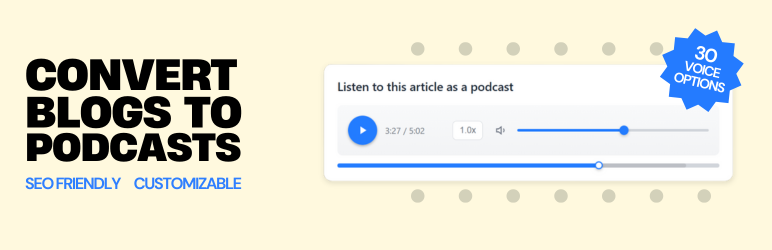
Listen to This Article as a Podcast is a text to speech audio player plugin for WordPress, powered by the Hi, Moose text-to-podcast generator. It turns posts into natural-sounding, podcast-style audio and adds a visible transcript to the page, so readers can listen and read along while search engines and AI systems can better understand the content.
Text to Speech & Read Aloud Audio for WordPress
It adds a text to speech audio version of your posts, similar to a read aloud or listen to this article feature, but with a more natural, podcast-style presentation instead of a flat word-for-word reading.
Perfect for sites that want to offer text to speech, text to audio, podcast-style audio, read aloud, or listen to this article experiences without managing audio files manually. Unlike many basic text to speech tools, Hi, Moose is designed to create a more engaging, human-like listening experience, and it does not require you to bring your own OpenAI, Google, or other third-party AI keys.
By offering a text to speech version of your content, you can:
* Increase Engagement: Give readers a more natural way to consume long posts with podcast-style audio instead of a simple read-aloud playback.
* Improve Accessibility: Help visitors who prefer listening, reading along with a transcript, or using both together.
* Support SEO, AEO, and GEO: The plugin embeds a visible transcript and Schema.org JSON-LD data, giving search engines and AI systems more on-page content to understand and reference.
This plugin automatically detects your domain and lets you manage text to speech audio right inside the WordPress editor: load available episodes for your domain or generate a new podcast-style audio version for the current post or page.
On the Hi, Moose platform, you can customize each podcast-style text to speech version before embedding it. Choose narration voices, adjust pacing and length, provide optional focus instructions, and fine-tune the player’s colors. Hi, Moose also includes built-in analytics showing listeners, plays, resumes, and completion rates. Once generated, the final audio and visible transcript are embedded on your WordPress site through a clean, lightweight player.
Useful Links
Great For
- News & Media Sites: Give readers an audio option for breaking news, long-form journalism, and editorial content.
- Legal Blogs: Make legal analysis, case summaries, and compliance updates easier to consume on the go.
- B2B & SaaS Blogs: Turn whitepapers, product updates, and thought leadership into listenable content.
- Health & Wellness: Offer audio versions of medical articles, wellness guides, and patient education materials.
- Finance & Fintech: Let audiences listen to market commentary, investment insights, and financial guides.
- Education & E-Learning: Provide an audio alternative for tutorials, course materials, and how-to guides.
- Travel & Lifestyle: Add a podcast-style listen option to destination guides, reviews, and travel tips.
- Technology & Engineering: Make technical deep-dives, product reviews, and developer blogs more accessible.
- Real Estate: Convert property market analysis, buying guides, and neighborhood spotlights into audio.
- Government & Nonprofit: Improve accessibility for public-facing announcements, reports, and policy updates.
Features
- Text to Speech Audio Player: Add a built-in audio player to your posts for read aloud and listen to this article use cases.
- Podcast-Style AI Narration: Generate natural-sounding, human-like audio designed to be more engaging than a simple word-for-word reading.
- Voice Selection: Choose separate host and guest voices for each audio version.
- Length & Prompt Controls: Set audio length, add basic instructions, and tailor the generated conversation to your content.
- Advanced Audio Customization: Add host direction, guest direction, scene, style, pace, accent, and extra context for more control over delivery.
- Player Title & Branding: Customize the player title and choose primary and secondary colors to match your brand.
- Visible On-Page Transcript: Embeds a full, indexable transcript that readers can actually see and use, not just hidden metadata.
- Natural-Sounding Voices: Voices are designed to sound human, conversational, and clear rather than robotic or flat.
- Hosted Audio Delivery: No hosting required. Audio and transcripts are delivered via a global CDN.
- Multilingual Text to Speech: Supports 24 languages with automatic detection or manual selection.
- Analytics: Track plays, resumes, completion rate, total listen time, and engagement metrics.
- In-Editor Audio Workflow: Load available audio or generate new audio directly from the post editor sidebar in both Classic and Block Editor.
- Preview Before Publishing: Preview the selected audio in the editor, then click Update/Publish to save.
- SEO-Friendly Structured Data: Automatically includes Schema.org JSON-LD to support search visibility and content understanding.
- Flexible Placement: Auto-insert at the top of a post or use the
[himoose_podcast]shortcode. - Lightweight Player: Responsive and designed to load quickly.
- Accessibility Friendly: Ideal for sites offering read-aloud or audio alternatives.
- Privacy-Friendly: No personally identifiable information (PII) is collected. Do Not Track is respected.
Service Disclosure
This plugin relies on the Hi, Moose platform to generate and host podcast audio.
The audio player and transcript are delivered as an embed directly from the Hi, Moose platform, similar to how YouTube or Vimeo embeds work.
- Service: Hi, Moose (Listen to this Article AI Podcast Generator)
- Data Sent: To retrieve existing episodes, the plugin sends your site’s domain name to our API. If you choose to generate text to speech audio from within WordPress, the plugin sends the post title and post content to Hi, Moose to generate the podcast-style audio and transcript. No WordPress user account data is sent.
- Analytics: The embedded player tracks plays, pauses, and transcript interactions. IP addresses are hashed before storage. No personally identifiable information (PII) is collected.
- Pricing & Free Tier: Hi, Moose includes a free tier for WordPress users with 3 free podcast episodes and up to 10,000 monthly listens. Optional paid plans are available if you need more capacity, but this plugin will not show ads, nag banners, or restrict the WordPress editing experience.
- Terms of Use: https://himoose.com/terms
- Privacy Policy: https://himoose.com/privacy-policy
How to Use
- Edit a post or page in WordPress.
- In the editor sidebar, find the Audio Content box.
- Click Load available audio to choose an existing episode, or Generate audio to create a new one.
- Preview the audio in the editor.
- Click Update/Publish to save your selection.
Placement notes:
* Posts: the player can be auto-inserted at the top of the post content (depending on the plugin setting), or you can place it manually using the shortcode.
* Pages: you must insert the shortcode [himoose_podcast] in the page content to display the player.
لقطات الشاشة
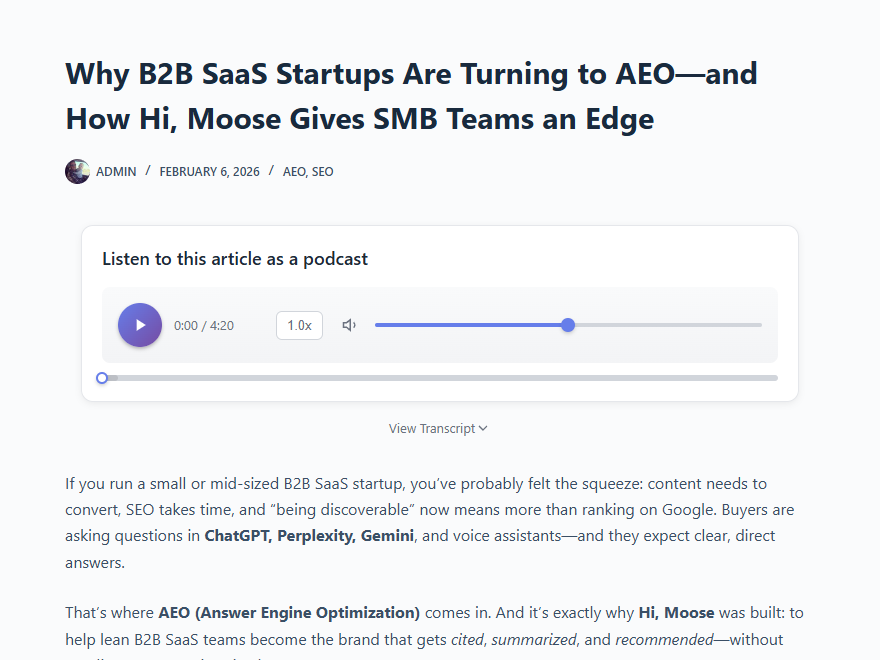
Audio player and transcript embedded into a post. 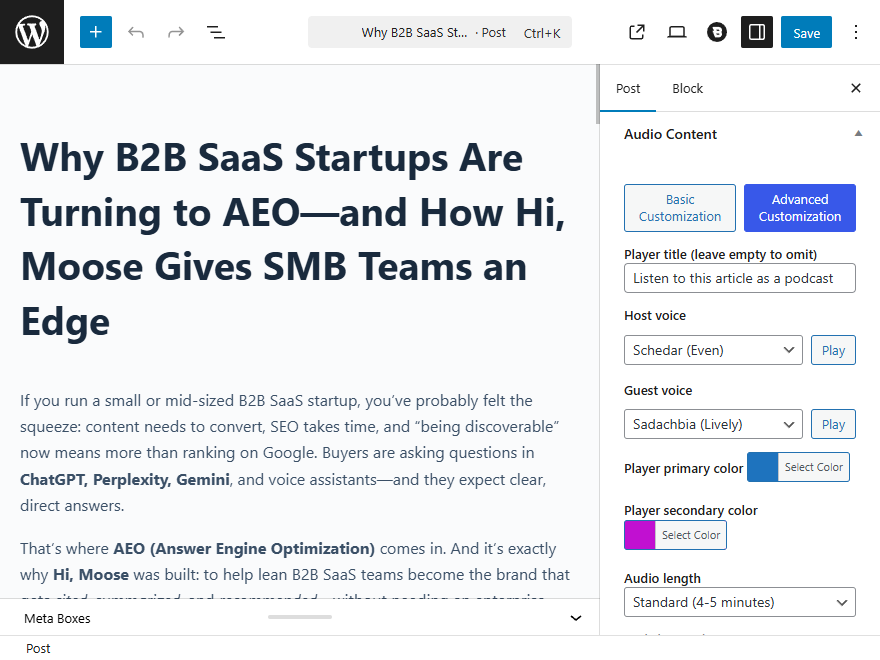
Audio content controls from the Block Editor sidebar. 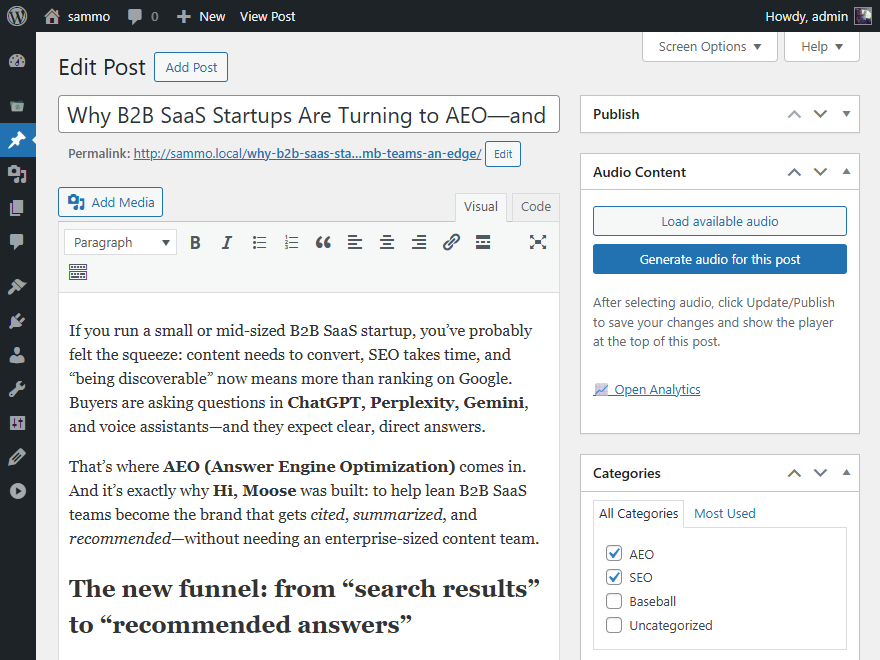
Audio content controls from the Classic Editor sidebar. 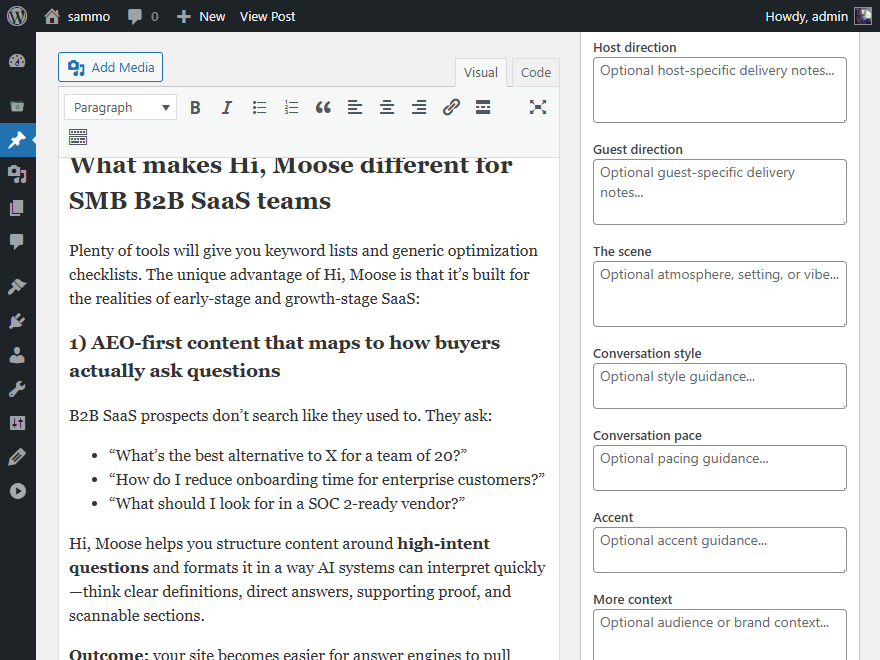
Audio Advanced Mode controls from the sidebar. 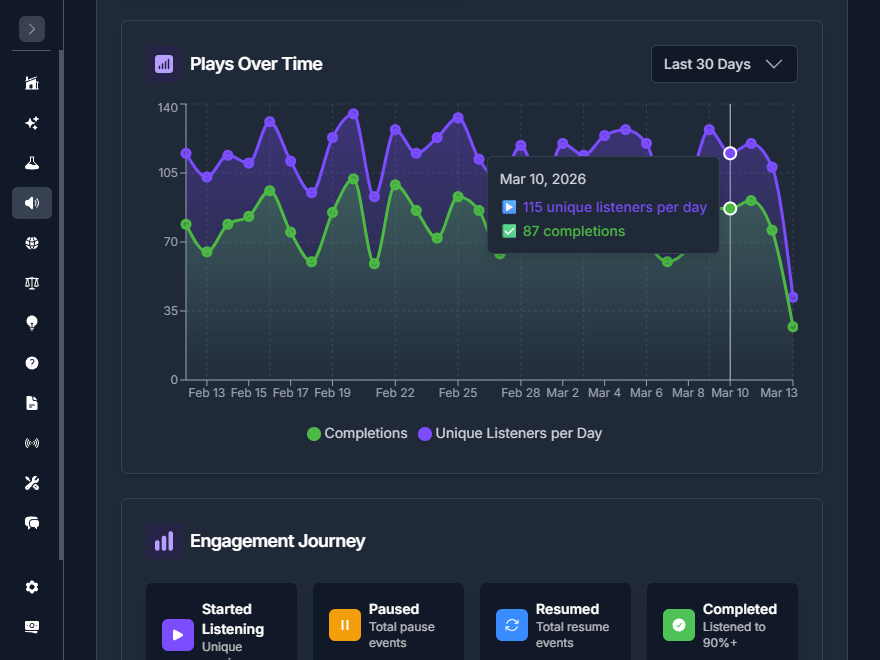
Audio analytics viewe from the Hi, Moose web app.
التنصيب
- Upload the plugin files to the
/wp-content/plugins/listen-to-this-articledirectory, or install the plugin through the WordPress plugins screen. - Activate the plugin through the ‘Plugins’ screen in WordPress.
- Go to Settings Hi, Moose Audio Generator and connect your site with Quick Connect or enter your API key manually.
الأسئلة المتكررّة
-
Is this a text-to-speech WordPress plugin?
-
Yes. This plugin adds a text-to-speech (“read aloud”) audio player to WordPress posts using podcast-style narration. Audio is generated and hosted by the Hi, Moose platform and embedded directly into your site.
-
Where do I get an API Key?
-
You can generate an API key from your Hi, Moose dashboard. Quick and easy; it takes just a minute to get your free API key.
You can also connect your site with Quick Connect during setup if you prefer not to copy and paste an API key manually. -
Can I define the API key in wp-config.php?
-
Yes! For added security, you can define your API key in your
wp-config.phpfile. Add the following line:
define( ‘HIMOOSE_API_KEY’, ‘your-api-key-here’ );
This will override any key saved in the database. -
Does this work with the Block Editor (Gutenberg)?
-
Yes, the plugin adds a meta box to the document sidebar (under the “Post” tab) in the Block Editor, allowing you to select episodes easily.
-
Can I place the player manually?
-
Yes! Use the shortcode
[himoose_podcast]anywhere in your post content and this will override the top placement setting. -
Do I need an OpenAI, Google, or other AI API key?
-
No. You do not need to provide your own OpenAI, Google, or other AI API keys. Audio generation is handled through the Hi, Moose platform, and you can connect with Quick Connect or use a Hi, Moose API key.
-
Is this plugin free?
-
Yes, Hi, Moose includes a free tier for WordPress users with 3 free podcast episodes. Optional paid plans are available if you need more capacity.
-
What languages are supported?
-
The plugin supports 24 languages with automatic language detection or manual selection. This includes English, Spanish, French, German, Portuguese, and many more.
-
Does this help with SEO?
-
Yes. The plugin embeds a full, visible, indexable transcript and Schema.org JSON-LD structured data (PodcastEpisode) on each post. Because Hi, Moose creates a podcast-style adaptation instead of a simple word-for-word playback, the transcript can add useful on-page content for SEO, AEO, and AI-powered search systems like ChatGPT, Gemini, and Perplexity.
-
Do I need to host the audio files myself?
-
No. All audio and transcripts are hosted and delivered through a global CDN by Hi, Moose. There’s nothing to upload, store, or manage on your WordPress server.
-
Does the audio sound robotic?
-
Hi, Moose uses high-quality AI voices designed to sound natural, human-like, and conversational, with a more engaging podcast-style delivery than a basic robotic read aloud.
-
Can I track how many people are listening?
-
Yes. Hi, Moose includes built-in analytics showing plays, resumes, completion rates, total listen time, and other engagement metrics for each episode.
المراجعات
لا توجد مراجعات لهذه الإضافة.
المساهمون والمطوّرون
“Podcast-Style Text to Speech – Hi, Moose” هو برنامج مفتوح المصدر. وقد ساهم هؤلاء الأشخاص بالأسفل في هذه الإضافة.
المساهمون
ترجمة ”Podcast-Style Text to Speech – Hi, Moose“ إلى لغتك.
مُهتم بالتطوير؟
تصفّح الشفرة، تحقق من مستودع SVN، أو الاشتراك في سجل التطوير بواسطة RSS.
سجل التغييرات
1.3.2
- Added a one-time onboarding flow after activation with Quick Connect and manual API key fallback.
- Refined the onboarding page copy and post-connect state.
1.3.1
- Refined the setup UI to streamline the Quick Connect flow.
1.3.0
- Introducing “Quick Connect” – you can now generate a free API key and connect your Hi, Moose account automatically with one click. No more copying and pasting long API keys!
- Redesigned the setup and settings UI to support automated onboarding.
1.2.0
- Added advanced customization controls directly in the editor for both Classic and Block Editor workflows.
- Persist advanced customization defaults for faster repeat generation.
- Updated the editor link to open analytics from the sidebar.
- Improved customization layout handling in narrow editor sidebars.
- Fixed a voice sample typo that prevented one sample from playing correctly.
1.1.0
- Generate new audio directly inside the editor (Classic + Block Editor meta box).
- Added generation options (voices, length, focus, player colors, custom title) and save defaults for faster repeat use.
- Added support for audio selection and generation on both posts and pages (pages require the shortcode).
- Show generation status and preview audio from the editor.
- WordPress 6.9.1 support.
- Updated demo URL.
1.0.0
- Initial release.