AI Translation For TranslatePress

الوصف

AI Translation For TranslatePress is a powerful TranslatePress extension that enhances the functionality of the TranslatePress plugin. This addon uses advanced translation services, like Yandex, Edge Built-in AI, and, Chrome AI to provide accurate and instant translations for your web pages automatically.

Powered by advanced AI translator resources, it delivers accurate and fast translations, helping you reach a global audience with ease.

Compatibility

AI Translation for TranslatePress is fully compatible with popular WordPress editors, page builders, plugins, and custom fields, making it easier to create and manage multilingual websites.

  • Elementor: Translate supported Elementor page content, including text, widgets and other translatable elements, while keeping the existing page design and layout.
  • Gutenberg Block Editor: Translate supported content created with the WordPress block editor without changing the existing block structure or page layout.
  • Astra Theme: Create multilingual websites using the Astra theme and translate supported theme-related content through TranslatePress.
  • WooCommerce: Translate supported WooCommerce content, including store pages and other translatable elements, to help create multilingual online stores.
  • Contact Form 7: Translate supported form content, labels, and other strings automatically.
  • WPForms: Translate supported WPForms content and form-related strings.
  • The Events Calendar: Translate supported event page content, event details, and other translatable strings detected by TranslatePress.

Key Features

  • Chrome Built-in AI: The addon uses Chrome’s built-in AI for translation, providing a fast and efficient way to translate content without relying on external services or paid APIs.

  • Edge Built-in AI Translation: Translate website content using Microsoft Edge’s built-in Translator API. The translation runs through the browser’s supported AI translation features in real-time.

  • Machine Translation: Automatically translate entire webpages using Yandex Translate Widget into multiple languages.

  • No API Key Required: Access advanced translation resources without any need to set up or pay for an API key, just install the addon and start translating instantly.

  • Unlimited Translations: Translate unlimited characters and strings across your entire website, completely free of charge.

  • One-Click Automatic Translation: Easily translate entire web pages within a single click.

  • Edit Translations: After automatic translation, if you are not satisfied with the translated content, you can manually edit it for better accuracy and readability.

“If you spend too much time thinking about a thing, you’ll never get it done. Stop wasting time, complete work smartly & quickly!”

Pro Features

  • Google Translate Widget: Use the Google Translate widget to automatically translate your website into supported languages.

  • OpenAI Translation: Connect your OpenAI API key and use OpenAI models to automatically translate WordPress content.

  • Gemini AI Translation: Use Google Gemini as an AI translation provider for translation while preserving surrounding context, helping produce more natural and meaningful translations.

  • Anthropic Translation: Connect Anthropic as a translation provider to translate WordPress content using AI models.

  • Front-End Page Translation: Run page translation directly from the front end for a faster translation workflow.

  • Automatic Language Detection: Automatically detect a visitor’s preferred language and suggest switching the website to that language.

  • Bulk Translation:Translate multiple pages at once instead of opening and translating each page individually, saving time and manual efforts.

  • Clear Translation: Quickly remove existing automatic translations from supported pages when you want to reset the translated content and start the translation process again.

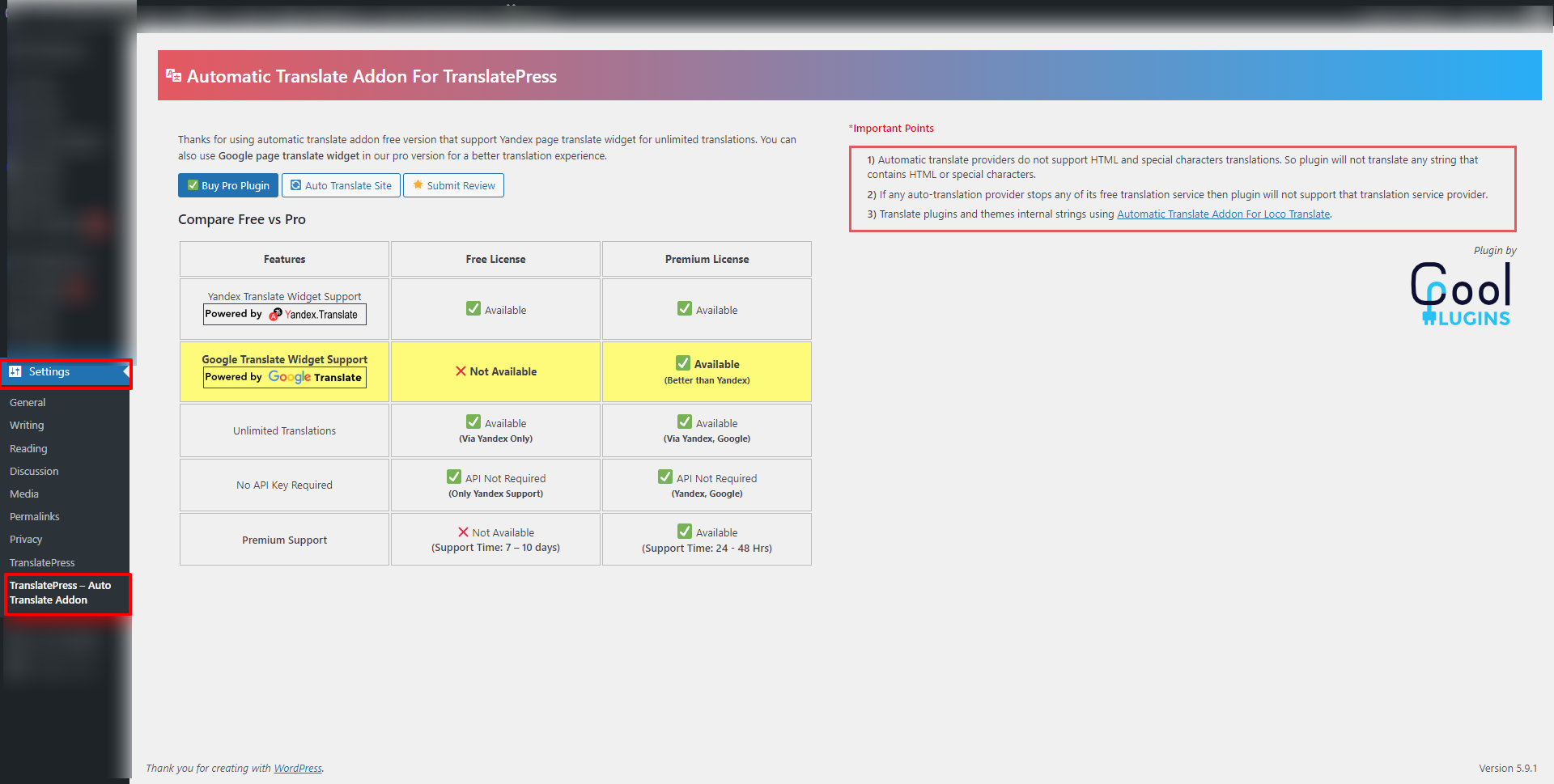
Free vs. Pro Version Comparison

Free Version:

✅ Yandex Translate Widget for automatic translations
✅ Chrome Built-in AI translation
✅ Edge Built-in AI translation
✅ Unlimited translations
✅ One-click automatic translation
✅ Manual editing of translated content
❌ OpenAI translation
❌ Gemini AI translation
❌ Anthropic Translation
❌ Front-end page translation
❌ Automatic language detection
❌ Bulk Translation
❌ Clear translation
❌ Premium Support

Pro Version:

✅ Google Translate widget for accurate translations
✅ Unlimited translations without API keys
✅ OpenAI translation (Via API Key)
✅ Gemini AI translation (Via API Key)
✅ Anthropic Translation (Via API Key)
✅ Bulk Translation
✅ Clear Translation
✅ Front-end page translation
✅ Automatic language detection
✅ Premium Support (24-48 hour response time)

Upgrade to Pro!!

Important Notice: This addon only provides settings to use third-party auto-translation widgets and services (Yandex), it does not provide any translation service. So, we don’t guarantee 100% correctness. Please check all translated text carefully before making it live on your production site. If any auto-translate provider stops providing an auto-translation widget or service in the future, in that case, the plugin will not support that translation provider.

Check out our other advanced Automatic Translate Addons

  • LocoAI – Auto Translate for Loco Translate is an addon that enhances the functionality of the Loco Translate plugin by enabling the automatic translation of WordPress themes and plugins. This addon connects with sources like Google, Yandex, DeepL, or AI-powered sources like ChatGPT, Gemini AI and Chrome AI to provide instant and automated translations.
  • AutoPoly – AI Translation For Polylang duplicates your page or post titles, content, images, galleries, or meta fields, and automatically translates them into the selected language. Whether you’re using Elementor or Gutenberg, this addon makes the translation process easier.
  • Linguator AI – Auto Translate & Create Multilingual Sites is a powerful multilingual plugin that helps you create and manage multilingual content on your WordPress website. Easily translate your posts, pages, menus, and categories into different languages using AI and connect with visitors worldwide.
  • AutoMLP – AI Translation for WPML is WPML automatic translation addon. It allows you to translate your WordPress website using different AI services like OpenAI, Google Gemini, or Chrome AI at low cost.

Special THANKS!

Special thanks to TranslatePress – Translate Multilingual sites plugin author, cozmoslabs, Razvan Mocanu, for creating an awesome plugin for translations and also thanks to Yandex for providing a translate widget for websites.

Important Links & Information

Yandex Translate Terms
Yandex Privacy Policy

Use of 3rd Party Services: This plugin connects to the Cool Plugins feedback server only for optional usage data sharing and voluntary feedback submission (for example, during plugin deactivation). Data is transmitted solely after explicit user consent. No hidden tracking is performed, and no frontend visitor or site user data is collected. For more details, please review our Data Usage Policy, TOS, and Privacy Policy.

التنصيب

  • Install AI Translation for TranslatePress from the WordPress.org repository or upload the plugin-zip unzipped folder to the /wp-content/plugins directory.
  • Activate the plugin through Plugins >> Installed Plugin menu in WordPress.
  • Now you can translate any page content within a single click.
  • If you want to use Google Translate Widget for automatic translation, then you need to purchase premium plugin.

الأسئلة المتكررّة

Are you using any language translation API?

No, there is no requirement for any translation API key to use this plugin free or pro version. It uses free page translation widgets and services for unlimited automatic translations.

Is there any translation limit?

There is no limit; you can translate unlimited characters without any API key.

What languages can I translate to?

The languages available depend on the translation widget you use.

Can I edit the automatically translated text?

Yes, you can still manually edit the translated text using TranslatePress.

Is the translation guaranteed to be accurate?

No, the plugin uses machine translation, which can be inaccurate. So, we recommend you to review all translated content before publishing it.

Do I need to install TranslatePress first?

Yes, you need to install and activate the free version of “TranslatePress – Translate Multilingual sites” before using this addon.

What are the benefits of the Pro version?

The Pro version adds Google Translate Widget, Chrome Built-in AI Translation, Edge Built-in AI Translation, OpenAI, Gemini AI, Anthropic Translation, Front-End Page Translation, Automatic Language Detection, Bulk Translation support, and Premium Support.

Will automatic translation change my website design?

The plugin focuses on translating content available through TranslatePress. Your existing theme and page layout should remain in place, although compatibility can vary depending on how a theme, plugin, widget, block, or custom content is generated.

How can I report security bugs?

You can report security bugs through the Patchstack Vulnerability Disclosure Program. The Patchstack team helps validate, triage, and handle any security vulnerabilities. Report a security vulnerability

المراجعات

25 يونيو، 2026 1 reply
I use both the free and the paid version, depending on the project.The super great: – it compensates(corrects) the main translation plugin that gets every year more expensive. And their new internal translation so-called service is even more expensive. – there is a *brilliant* idea of using the translation in the frontend with free tools, to fill the backend DB. – the split of function between the free and the paid is acceptable, not making the free unusable.But there is also a feeling of "could do much more" for little effort (compared to what was done already): – **the slugs are not translated (would not be much complicated to incorporate the string in the translation table and manage the characters of slugs)**. This is very annoying, as this is what is submitted first to search engines, and later creates a 404 or needs a 30x. – in the paid version: too many clicks for nothing (when there is no choice, do not ask for clicking; NIKE=just do it! like selecting the language, merging, saving …) – it could automate all translations registered in the backend in one time, either by opening several pages/windows at the same time -one per language-, or one after the other with javascript miracles (what they do already) Tip for other users: do as me, a little PHP with AI coding –> a little shortcode that prints all the contents and custom fields of the latest "X" CPT/posts, in *one* post … so when I translate that 1 page, I translate 30 to 50 post contents in ONE time … then suppress that post with this shortcode, but translation of the 50 pages is in the DB. Edit: even greater with all the latest 1.8+ updates. Changed here to 5 stars (but I still regret the no slug translation)
6 مارس، 2026
I was invited to leave review. I have not used it a lot yet, but so far seems to be a very good complement for TranslatePress.
5 نوفمبر، 2025 1 reply
Me incomodou o alerta para fazer uma avaliação porque gerou erros no meu painel e eu não consegui de forma alguma clicar na opção de não avaliar.
18 سبتمبر، 2025
I gave a feedback about a bug on support page here on wordpress and the developer fixed the issue in less than one day. Wondeful!
إقرأ جميع المراجعات 69

المساهمون والمطوّرون

“AI Translation For TranslatePress” هو برنامج مفتوح المصدر. وقد ساهم هؤلاء الأشخاص بالأسفل في هذه الإضافة.

المساهمون

لقد تم ترجمة ”AI Translation For TranslatePress“ إلى لغة واحدة. شكراً إلى جميع المُترجمين لمُساهماتهم.

ترجمة ”AI Translation For TranslatePress“ إلى لغتك.

مُهتم بالتطوير؟

تصفّح الشفرة، تحقق من مستودع SVN، أو الاشتراك في سجل التطوير بواسطة RSS.

سجل التغييرات

Version 2.0.8 || 10/August/2026

  • Added: Edge AI Translation Provider for Edge Browser.

Version 2.0.7 || 15/June/2026

  • Improved: User Opt-in code improvements.

Version 2.0.6 || 27/May/2026

  • Improved: Code Improvements & Optimization.
  • Tested upto: WordPress 7.0.

Version 2.0.5 || 17/April/2026

  • Fixed: Issue with Yandex translator.

Version 2.0.4 || 06/April/2026

  • Improved: UI changes

Version 2.0.3 || 23/March/2026

  • Improved: Single Page Translation UI for better usability.
  • Improved: Dashboard UI and overall interface.

Version 2.0.2 || 20/Feburary/2026

  • Fixed: Issues reported by “Plugin Check” plugin.

Version 2.0.1 || 02/Feburary/2026

  • Improved: Code improvement.

Version 2.0.0 || 27/January/2026

  • Fixed: Issues reported by “Plugin Check” plugin.
  • Added: Google Chrome AI Translation Support.
  • Improvements: Reduce number of clicks while translation.

Version 1.2.8 || 03/November/2025

  • Fixed: Minor changes.
  • Added: Added other plugin recommendations to create multilingual site.

Version 1.2.7 || 30/September/2025

  • Improved: Review notice.
  • Fixed: Minor issue.

Version 1.2.6 || 17/September/2025

  • Removed: Redundant rating div.
  • Improved: Rating div styling.

Version 1.2.5 || 25/August/2025

  • Fixed: Addressed security vulnerabilities.
  • Improved: Enhanced overall code quality.
  • Tested upto: WordPress 6.8.2.

Version 1.2.4 || 31/Jul/2025

  • Improved: Updated the Translator Popup design and functionality.
  • Added: Yandex Support language.
  • Fixed: Minor changes.

Version 1.2.3 || 17/Jun/2025

  • Added: User opt-in option in plugin.
  • Fixed: Minor issue.

Version 1.2.2 || 14/Apr/2025

  • Added: New Dashboard.

Version 1.2.1 || 10/Mar/2025

  • Fixed: Review notice issue
  • Fixed: Merge Translation issue.
  • Fixed: Compatibility issue with pro version

Version 1.2.0 || 21/Feb/2025

  • Added: Progress bar in yandex & google translator.
  • Added: Integrated new Popup.
  • Added: Stored translated strings information.
  • Fixed: Minor Issues.
  • Improved: User experience on translation provider popup.
  • Improved: Minor textual changes.
  • Tested upto: WordPress 6.7.2.
  • Tested upto: TranslatePress version 2.9.5.

Version 1.1.2 || 13/Dec/2024

  • Fixed: load_textdomain issue.
  • Tested upto: WordPress 6.7.1.

Version 1.1.1 || 22/July/2024

  • Tested upto: WordPress version 6.6.
  • Tested upto: Translate Press version 2.8.1.

Version 1.1.0 || 15/Jan/2024

  • Improved: Overall code improvement.
  • Fixed: Minor textual changes.

Version 1.0.3 || 29/May/2023

  • Fixed: Wrong spells.

Version 1.0.2 || 29/May/2023

  • Added: Preloader.
  • Fixed: Wrong folder name issue.

Version 1.0.1 || 15/May/2023

  • Tweaks: Minor textual changes

Version 1.0 || 03/Mar/2022

  • Added: New Admin Menu
  • Improvements: Improved code
  • Fixed: Minor issue

Version 0.6 || 17/Apr/2021

  • Fixed: Yandex Translator not working issue

Version 0.5 || 15/Mar/2021

  • Tweak: Updated Wrong Review Link
  • Tweak: Tested Upto 5.7

Version 0.4 || 03/Feb/2021

  • Integrated: Add filter for data group

Version 0.3 || 29/Jan/2021

  • Fixed: Wrong Page language Bug

Version 0.2 || 28/Jan/2021

  • Fixed: Wrong HTML rendering bug
  • Integrated: Feedback Form
  • Improvements: Minor Code improved

Version 0.1 || 21/Jan/2021

  • New: Initial plugin release.