

الوصف
JETPACK – أفضل إضافة في ووردبريس
Jetpack هو إضافة على ووردبريس تساعدك على إنشاء محتوى أفضل وزيادة أعداد المشتركين لديك وجني المال من موقعك على الويب وإبقائه آمنًا وسريعًا ومؤمَّنًا. يمكنك زيادة حركة المرور على موقعك على الويب وتتبُّعها باستخدام ميزة Jetpack stats، وإنشاء محتوى أفضل باستخدام Jetpack AI. يمكنك بدء خدمة الرسائل الإخبارية وزيادة عدد جمهورك وتحويل المعجبين إلى مشتركين بمقابل مادي. أنشئ محتوى جميلاً باستخدام Jetpack Creator وأبقِ موقعك سريعًا باستخدام Jetpack Boost.
كيفية البدء باستخدام JETPACK
التثبيت مجاني وسريع وسهل. قم بإعداد Jetpack في غضون دقائق. استفد من الميزات الأكثر قوة، مثل أمان موقع ووردبريس وأدوات التصميم والنمو عن طريق الترقية إلى خطة مدفوعة.
هل تحتاج إلى دعم الخبراء؟
لدينا فريق عالمي من أعضاء فريق الدعم المستعدين لتوفير دعم استثنائي. اطرح أسئلتك في منتدى الدعم أو اتصل بالدعم.
سبب استخدام JETPACK على موقعك
أكثر أمانًا. أسرع. مزيد من حركة المرور.
أمان ووردبريس والأداء والتسويق وأدوات التصميم — تم إعداد Jetpack من قِبل خبراء ووردبريس لجعل مواقع ووردبريس أكثر أمانًا وأسرع، ومساعدتك على تكبير حركة مرورك.
تأمين الموقع تلقائيًا طوال أيام الأسبوع وعلى مدار الساعة
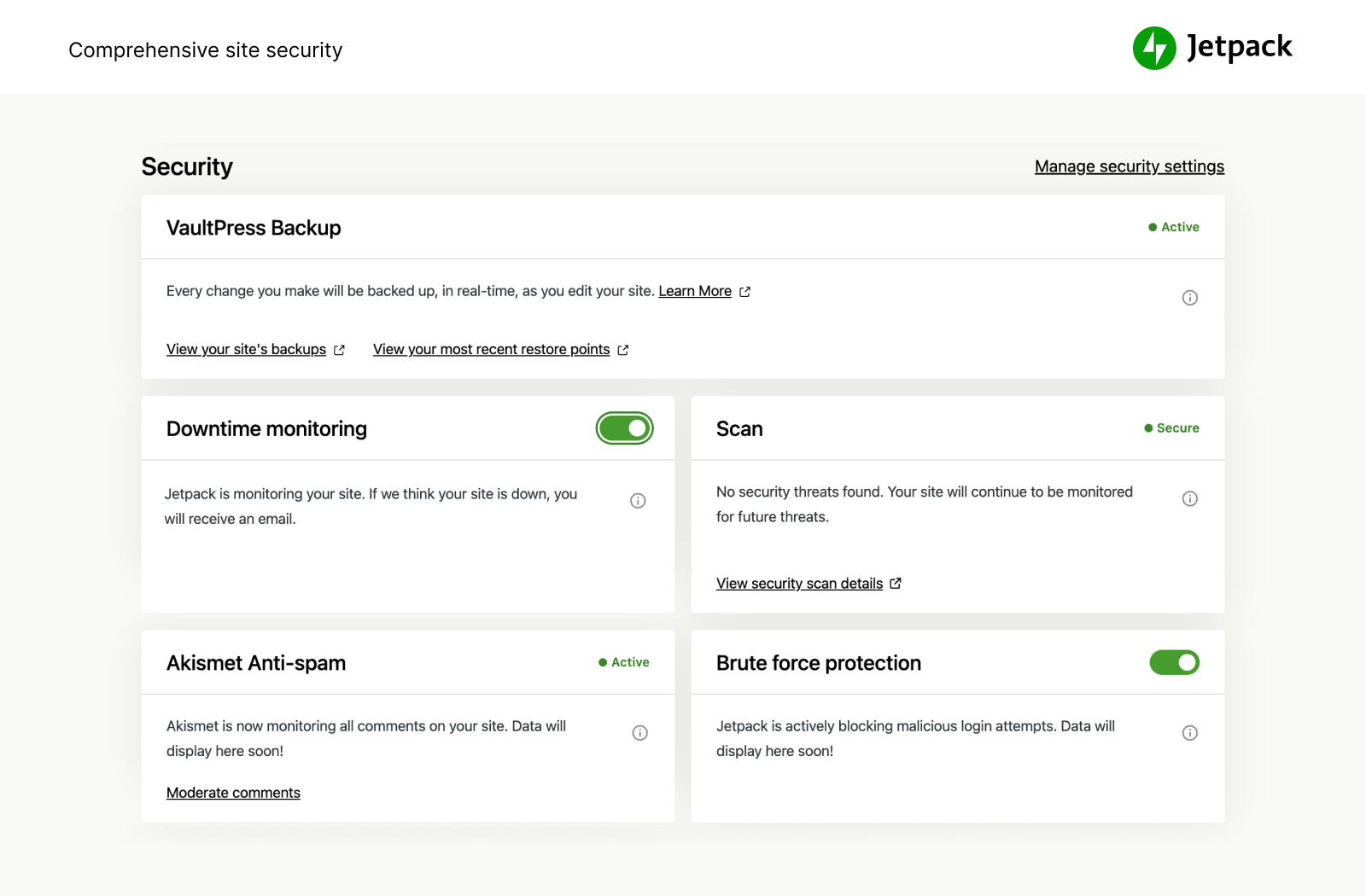
نحمي موقعك بحيث يمكنك تشغيل موقعك أو عملك. يوفر Jetpack Security أمانًا سهل الاستخدام وشاملاً لموقع ووردبريس، بما في ذلك النسخ الاحتياطية التلقائية في الوقت الفعلي وعمليات الاستعادة السهلة وفحوصات البرامج الضارة والحماية من البريد المزعج. تُعد الميزات الأساسية، مثل: الحماية من القوة الغاشمة ومراقبة وقت التعطل/التشغيل الأساسية، مجانية.
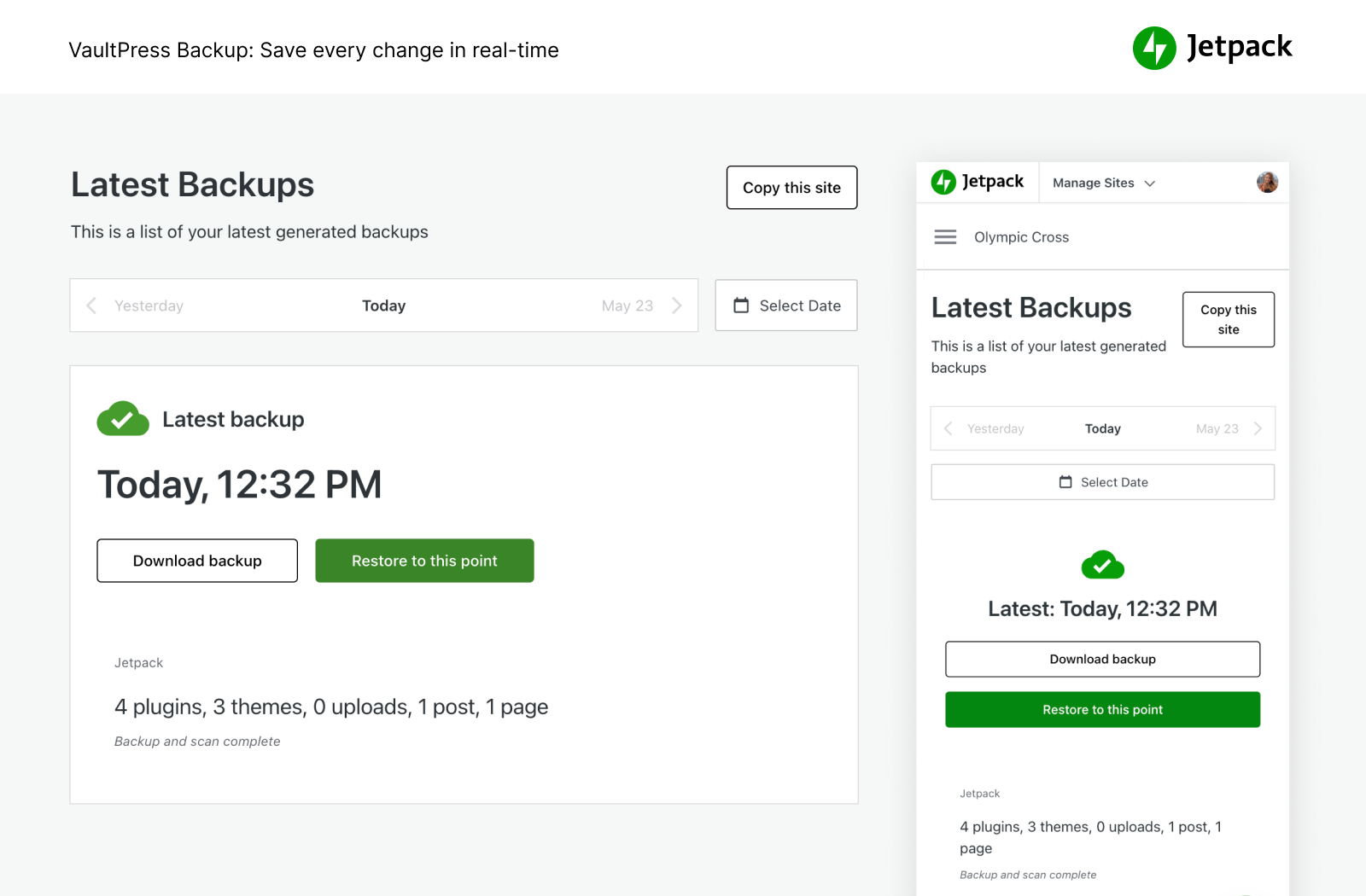
- قم بنسخ موقعك احتياطيًا في الوقت الفعلي وقم باستعادته إلى أي مرحلة بنقرة واحدة. يبدأ التخزين على السحابة عند 10 جيجابايت، وهي مساحة كبيرة بما يكفي لمعظم المواقع، إلى جانب توافر خيارات التخزين الإضافية إذ لزم الأمر. رائعة لمخازن التجارة الإلكترونية، ولا سيما Woo.
- يمكنك إدارة الترحيل إلى مضيف جديد، وترحيل ملفات القالب والإضافات إلى قاعدة بيانات جديدة، وتكرار مواقع الويب بسهولة، وإنشاء نسخ احتياطية كاملة لقاعدة البيانات ونسخ مواقع الويب وإصلاح مواقع الويب المعطلة عن طريق استعادة نسخ احتياطية أقدم والسماح لك بإعداد موقع تجريبي بسهولة عن طريق إنشاء نسخة مكررة من موقعك الحالي على الويب على ووردبريس.
- اطلع على كل تغيير في الموقع ومن قام به من خلال سجل النشاط، وهو أمر رائع للتنسيق أو تصحيح الأخصاء أو الصيانة أو حل المشكلات.
- افحص حركة المرور الواردة إلى موقعك على ووردبريس باستخدام جدار حماية تطبيق الويب، وقرر هل ستسمح بها أم ستحظرها استنادًا إلى القواعد المتنوعة.
- أضف طبقة حماية مهمة إلى موقعك باستخدام جدار حماية تطبيق الويب لدينا، وخصوصًا عندما يستغل المهاجمون بفاعلية الثغرات الأمنية التي لم يتم تصحيحها.
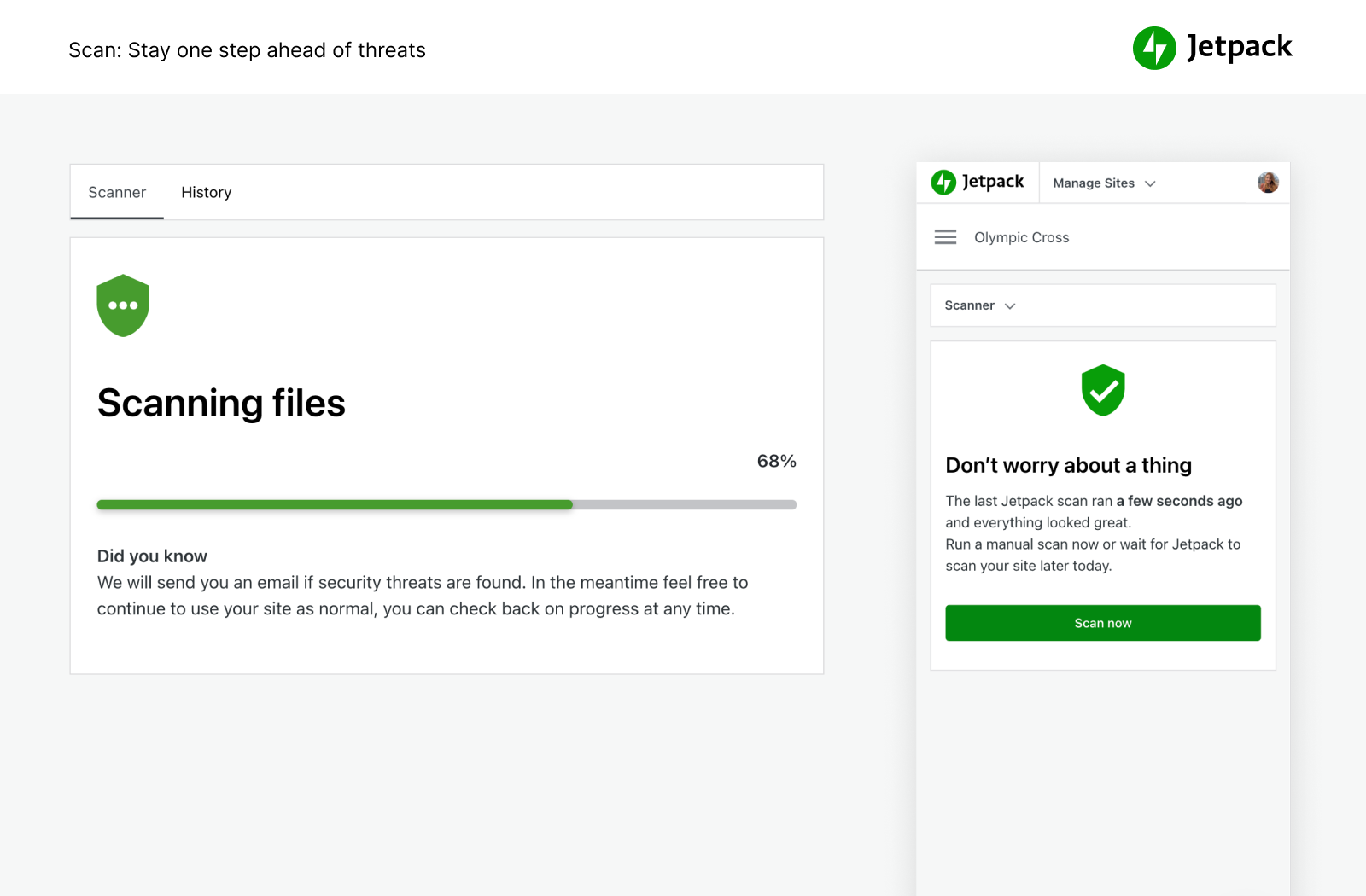
- يقوم تلقائيًا بتنفيذ فحوصات البرامج الضارة وفحوصات الأمان بحثًا عن تهديدات برمجية أخرى. الإصلاح بنقرة واحدة لاستعادة موقعك من البرامج الضارة.
- قم بحظر تعليقات البريد المزعج وتكوين ردود باستخدام ميزات مكافح البريد العشوائي المدعوم بواسطة أكسيميت.
- حماية هجمات القوة الغاشمة لحماية صفحة تسجيل إلى ووردبريس الخاصة بك من الهجمات.
- راقب وقت تشغيل / تعطل موقعك واحصل على تنبيه فوري بشأن أي تغيير من خلال البريد الإلكتروني.
- يمكنك تسجيل الدخول الآمن المدعوم بواسطة ووردبريس.كوم الذي تستخدمه ملايين المواقع والذي يتضمن خيار 2FA الاختياري (المصادقة ثنائية) لتوفير حماية إضافية.
- قم بتحديث الإضافات الفردية تلقائيًا لسهولة صيانة الموقع وإدارته.
يمكنك شراء كل ميزات الأمان في Jetpack في حزمة الأمان لدينا، أو يمكن شراء كل من VaultPress Backup وScan وAkismet Anti-spam على حدة.
أقصى سرعة والأداء
استمتع بسرعة فائقة في الموقع من خلال Jetpack. تعمل شبكة توصيل المحتوى المجانية الخاصة بـ Jetpack على تحسين صورك تلقائيًا. شاهد انخفاض مرات تحميل صفحتك — سنعمل على تحسين صورك وعرضها لك من خلال شبكة الخوادم العالمية الفعّالة الخاصة بنا، إلى جانب تسريع موقعك على الأجهزة المحمولة لتقليل استخدام النطاق الترددي وتوفير المال!
- تم عرض شبكة توصيل المحتوى للصور والملفات الثابتة الأساسية، مثل: CSS وJavaScript، من خوادمنا وليس منك، ما يوفِّر لك المال والنطاق الترددي.
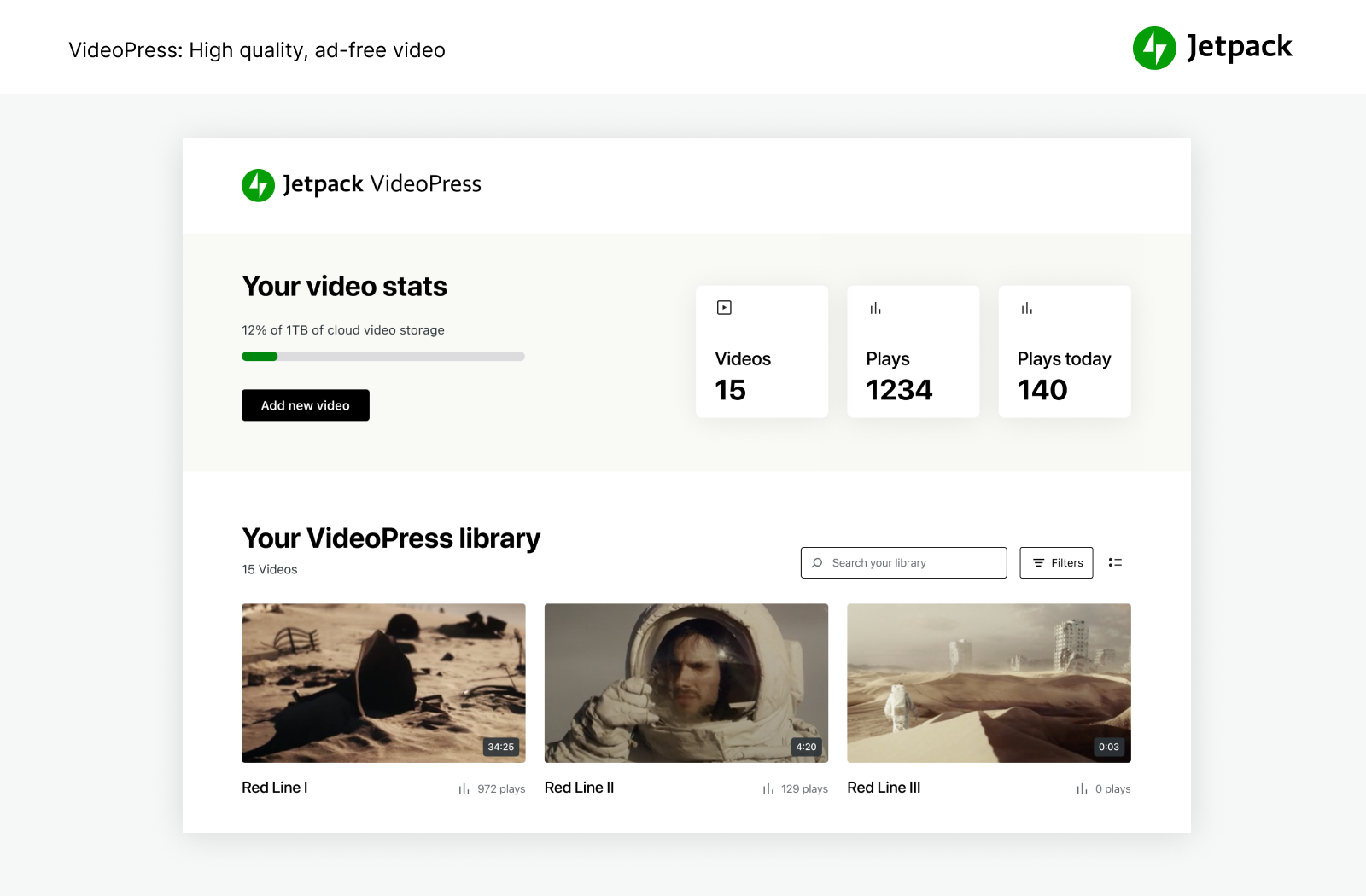
- تحافظ استضافة مقاطع الفيديو غير المحدودة وعالية السرعة والخالية من الإعلانات على التركيز على محتواك، وليس على الإعلانات أو التوصيات التي توجِّه الأشخاص إلى خارج الموقع.
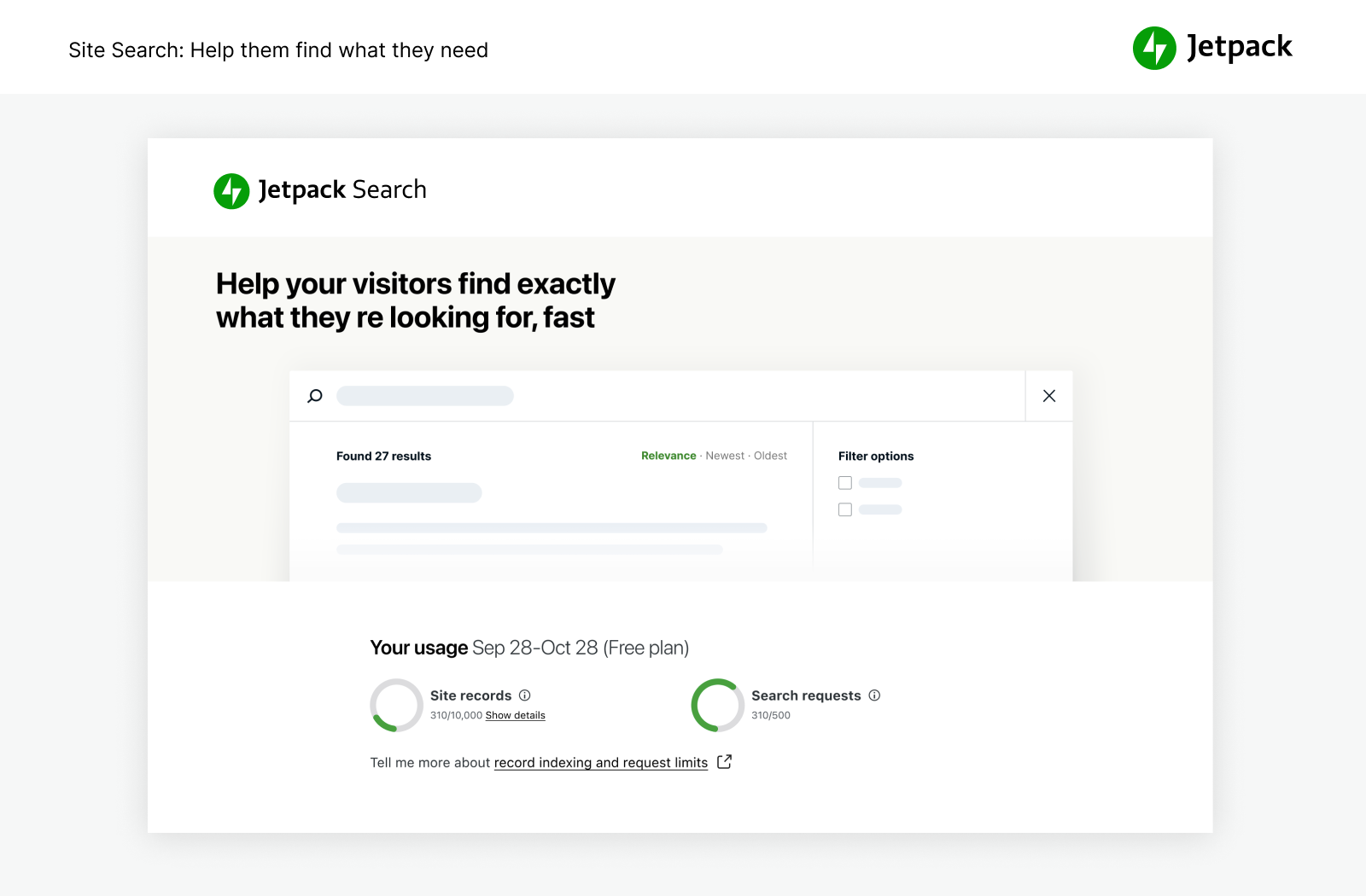
- يُعد البحث المخصص في الموقع فعَّالاً وقابلاً للتخصيص بشكل لا يصدق. يساعد زائريك على العثور على المحتوى المناسب في الفور بحيث يقرؤوا ويشترون المزيد. تعمل بشكل رائع مع مواقع WooCommerce / التجارة الإلكترونية للمساعدة على تصفية المنتجات بحيث يحصل العملاء على ما يريدونه في موقعك بشكل أسرع.
- يوصى باستخدام Jetpack Boost للحصول على أقصى سرعة لموقع ووردبريس.
الأدوات الفعَّالة للتطور
أنشئ موقع ووردبريس الخاص بك وخصصه، وقم بتحسينه للزوار ولتحقيق أرباح، واستمتع بمشاهدة معدل تطور العمل من خلال إحصاءاتك. يمكنك إنشاؤه ومشاركته ومراقبة تطوره.
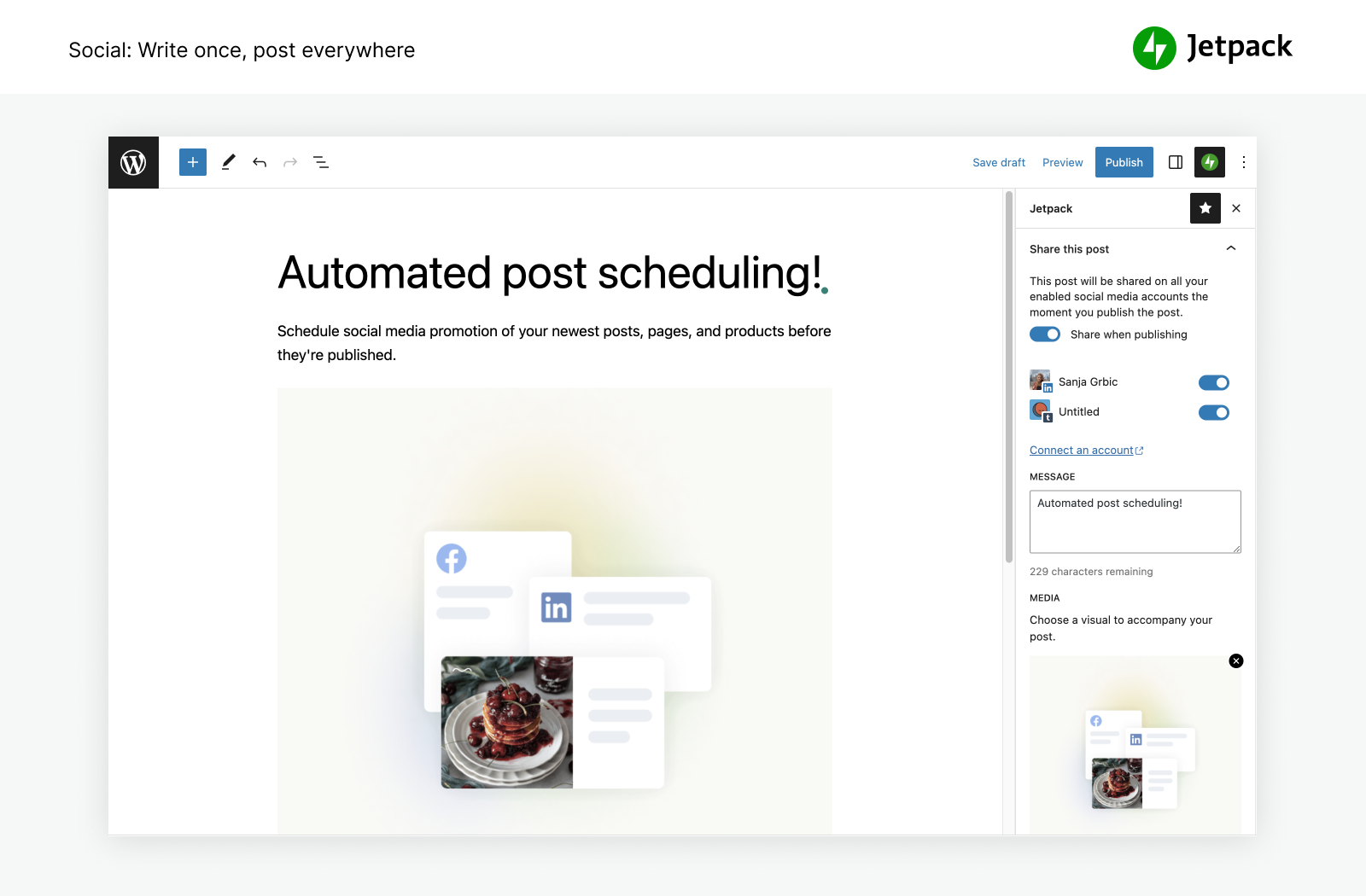
- انشر التدوينات والمنتجات تلقائيًا على شبكات التواصل الاجتماعي ببساطة عن طريق استخدام أدواتنا للاتصال بفيسبوك وBluesky وThreads وTumblr وMastodon وLinkedin وNextdoor.
- قم بمشاركة مقالات إنستغرام على صفحاتك ومقالات المدونة بسهولة.
- قم بتحصيل عملية دفع أو تبرع أو بيع منتج أو خدمة أو عضوية ما تحتوي على تكاملات بسيطة باستخدام PayPal وStripe.
- قم بزيادة حركة المرور باستخدام أدوات تحسين محركات البحث لغوغل وBing وفيسبوك وووردبريس.كوم. تم إنشاء خريطة موقع XML تلقائيًا.
- قم بالإعلان على موقعك لإنشاء إيرادات. تقوم شبكة الإعلانات بالعمل من أجلك تلقائيًا للعثور على إعلانات عالية الجودة موضوعة في موقعك.
- قم بإدارة ميزات Jetpack من أي مكان باستخدام تطبيق ووردبريس الرسمي للهاتف المحمول، المتاح لنظام تشغيل iOS الخاص بـ Apple (iPhone أو iPad) ونظام تشغيل أندرويد الخاص بغوغل.
- هل تبحث عن إدارة علاقات العملاء؟ تحقَّق من إضافة Jetpack CRM التي تعمل بجانب Jetpack لمنحك طريقة بسيطة وعملية لبناء علاقات مع عملائك وعملائك المتوقعين.
إحصاءات فعّالة لنمو موقعك
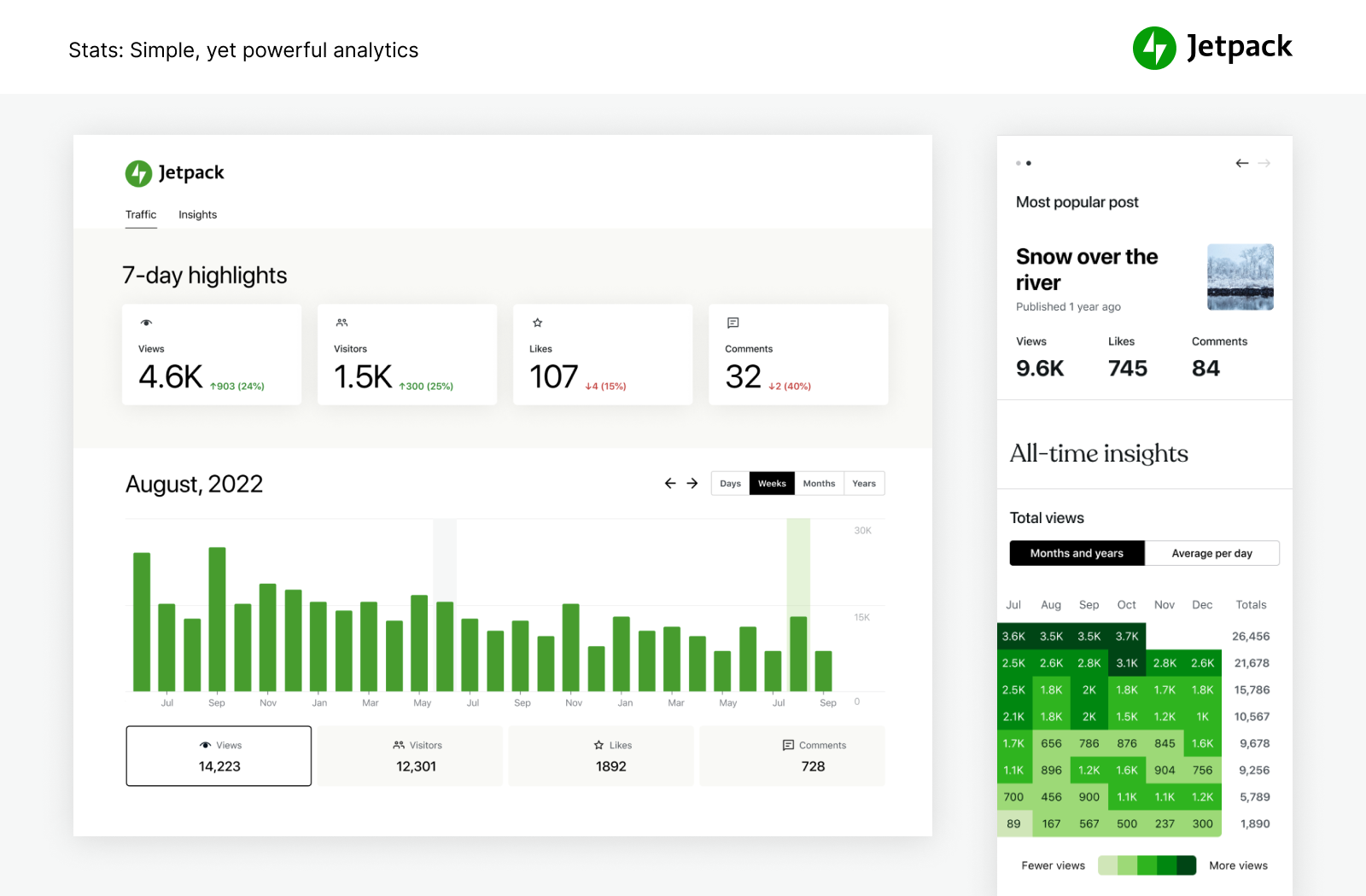
باستخدام Jetpack Stats، لا يلزم أن تكون خبيرًا في البيانات لمعرفة كيفية أداء موقعك.
- إحصاءات الموقع وتحليلاته المتقدمة لمساعدتك على فهم جمهورك.
- اكتشف التدوينات والصفحات الأفضل أداءً لديك.
- تعرّف على مَن ينشئ المحتوى الأكثر رواجًا في فريقك باستخدام مقاييس المؤلفين التي نقرها.
- تعقّب بسهولة عاداتك واتجاهاتك في إنشاء المحتوى على مدار الأعوام.
- اعرض ميول المشاهدين أسبوعيًا وسنويًا مع أهم الأحداث في 7 أيام واستعراض أحداث العام.
- اطلع على شبكات التواصل الاجتماعي الأكثر رواجًا التي تتم مشاركة محتواك عليها بشكل أكبر.
- استكشف البيانات في الوقت الفعلي بشأن الزائرين والإعجابات والتعليقات.
- احصل على رؤى تفصيلية حول الإحالات التي تجلب حركة المرور إلى موقعك.
- اكتشف البلدان التي يأتي زائروك منها
- قِس عدد النقرات على الرابط، ومرات تشغيل الفيديوهات، وعمليات تنزيل الملفات داخل موقعك.
الكتابة بذكاء أكبر، ليس أكثر صعوبة.
جرّب سهولة صياغة المحتوى الاحترافي باستخدام الذكاء الاصطناعي البسيط والفعال. يتكامل Jetpack AI Assistant من دون عناء مع محرر ووردبريس الخاص بك، ما يوفّر واجهة سهلة الاستخدام للتفاعل مع الذكاء الاصطناعي.
يسمح لك هذا المكوّن الفعال بإنشاء محتوى متنوع حسب رغبتك، ما يقلل الوقت والجهد اللذَين تبذلهما في إنشاء المحتوى بشكل ملحوظ.
ما عليك سوى تقديم مطالبة وترقُّب صياغة Jetpack AI Assistant التدوينات الرائعة والصفحات التفصيلية والقوائم المنظّمة والجداول الشاملة – كل ذلك مصمم خصوصًا لتلبية احتياجاتك.
- استفد من قوة الذكاء الاصطناعي مباشرة من المحرّر الخاص بك.
- أطلق العنان لمحتوى عالي الجودة ومخصص يكون تحت إمرتك.
- حافظ على المعايير المهنية بكل سهولة.
- أصبحت التراجم المدعومة بالذكاء الاصطناعي عبر العديد من اللغات في متناول يدك، ما يقضي على حواجز اللغة.
الترويج لمحتواك بسهولة باستخدام JETPACK BLAZE
اعثر على معجبين جدد عن طريق الترويج لتدويناتك وصفحاتك عبر ملايين المواقع في ووردبريس.كوم وشبكة الإعلانات في Tumblr.
- أنشئ إعلانك. اختر جمهورك. عيّن ميزانيتك. الأمر بهذه السهولة.
- ضاعف مدى وصولك مقابل بضعة دولارات فقط.
أدوات التصميم السهلة
قم بتخصيص موقعك بسرعة لكي تجعله بارزًا — لا يلزم ترميز.
- القوالب – قوالب ووردبريس البسيطة للبدء على موقعك.
- المقالات ذات الصلة — حافظ على الزائرين الموجودين في موقعك عن طريق عرض محتوى ذي صلة لهم تلقائيًا سيهتمون به.
- أدوات المعرض وعرض الشرائح — معارض الصور وعرض شريط التمرير وعروض الشرائح لمواقع ووردبريس ومخازنه.
- الاشتراكات — تُيسِّر على الزائرين التسجيل لاستقبال تنبيهات بشأن أحدث مقالاتك وتعليقاتك.
- نموذج جهة الاتصال: قم بإنشاء نماذج جهة اتصال غير محدودة بسهولة مجانًا من دون أي ترميز. تلقّ تنبيهات البريد الإلكتروني لكل استجابة. تكامل مع حلول البريد، مثل البريد المبتكر للوصول إلى عملائك وعملائك المتوقعين بسرعة. الاتصال بمكافح البريد العشوائي على Jetpack (المدعوم بواسطة أكسيميت) لتصفية عمليات الإرسال.
- دعم oEmbed — قم بتضمين صفحات ومقالات وروابط فيسبوك وإنستغرام بسهولة.
التكاملات
يتم تحديث Jetpack شهريًا لضمان التكامل السلس مع أفضل إضافات ووردبريس والمنتجات التقنية الأخرى.
- تم إنشاؤه لـ WooCommerce: تم إعداد Jetpack وWooCommerce على حد سواء بواسطة Automattic. يتكامل Backup وScan وAnti-spam بشكل مثالي في متاجر Woo / eComm.
- يتوافق Jetpack تمامًا مع الإصدار 2.0 من إضافة صفحات الهاتف المسرعة الخاصة بووردبريس.
- افهم عملاءك بشكل أفضل وقم بالتسويق باستخدام تكامل Google Analytics (GA).
- منصات شبكات التواصل الاجتماعي: الإنستغرام وفيسبوك وتويتر وLinkedIn وThreads وBluesky وNextdoor.
- مكوِّنات بسيطة لتخصيص موقعك: بينتريست وWhatsapp ومُشغِّل البث الصوتي وصور GIF والخرائط ومعرض متجانب وعرض الشرائح.
- معالجات المدفوعات: قم بتحصيل المدفوعات أو التبرعات وبيع المنتجات من خلال Stripe وPayPal بسهولة.
- إضافات سرعة الموقع وأدائه: تعمل بشكل رائع مع ذاكرة التخزين المؤقت الفائقة في ووردبريس عن طريق Automattic وCloudflare.
- نموذج جهة الاتصال: يحظر مكافحة البريد العشوائي (المدعوم بواسطة أكيسميت) تعليقات البريد المزعج الخاصة بنماذج Jetpack ونموذج جهة الاتصال 7 ونماذج Ninja ونماذج Gravity ونماذج Formidable والمزيد.
- التكاملات التقنية الأخرى: إنستغرام والبريد المبتكر وMailchimp وCalendly وWhatsapp وبينتريست وRevue والمزيد.
استكشاف المزيد على JETPACK
إذا أُعجبت بـ Jetpack، ففكِّر في التحقق من منتجاتنا وحزمنا الأخرى
- Jetpack Complete – الحزمة الكاملة إلى جانب الأمان في الوقت‑الفعلي وأفضل أداء وكل ما تحتاج إليه لتطوير أعمالك.
- Jetpack Security – توفِّر حزمة الأمان لدينا أمانًا‑سهل‑الاستخدام وشاملاً لموقع ووردبريس، بما في ذلك‑النُّسخ الاحتياطية في الوقت الفعلي وفحص البرامج الضارة والحماية من البريد المزعج.
- Jetpack Backup – احفظ كل تغيير وعاود الاتصال بالإنترنت بسرعة باستخدام عمليات استعادة بنقرة‑واحدة من Jetpack VaultPress Backup.
- Jetpack Scan – احمِ موقعك من الجهات الفاعلة السيئة على‑مدار‑الساعة من خلال‑جدار الحماية في تطبيق الويب وفحص البرامج الضارة التلقائي والإصلاحات‑بنقرة واحدة.
- Jetpack Search – سلِّم النتائج الأكثر صلة إلى الزائرين فورًا باستخدام Jetpack Search. لا يلزم ترميز، ولا إعلانات، ولا تعقُّب.
- Jetpack Boost – ارفع سرعة موقعك على الويب. استمتع بمزايا الأداء نفسها، مثل: مواقع الويب الرائدة في العالم، ولن تحتاج إلى أي مطور.
- Jetpack VideoPress – اعرض فيديو بجودة‑مذهلة من دون أي متاعب. اسحب الفيديوهات وأفلتها من خلال محرّر ووردبريس وواصل التركيز على محتواك وليس الإعلانات.
- Jetpack AI – حوِّل أفكارك إلى محتوى‑جاهز‑للنشر بسرعة فائقة.
- Jetpack Stats – تتبَّع الزيارات إلى موقعك على الويب والتدوينات الرائجة والمشتركين في خدمة الرسائل الإخبارية والمزيد.
- Jetpack Social – شارك محتوى موقعك الإلكتروني تلقائيًا على المنصات التي تفضّلها على شبكات التواصل الاجتماعي، من مكان واحد.
- Jetpack CRM – تتضمن Jetpack CRM كل الأدوات التي تحتاج إليها لتطوير أعمالك. إنها أيضًا وحدات، لذا يمكنك تخصيصها لملاءمة احتياجاتك.
- Jetpack Creator – صمم محتوى مذهلاً، وعزز قاعدة المشتركين لديك، واربح المال من وجودك على الإنترنت.
- رسائل Jetpack الإخبارية – حوِّل مقالات مدونتك إلى رسائل إخبارية لتصل بسهولة إلى المشتركين. قدّم اشتراكات مدفوعة وحقّق عائدًا من محتواك.
احتفظ بالرسائل المزعجة بعيدًا عن موقعك على الويب
- Akismet Anti-spam – امسح البريد المزعج تلقائيًا من التعليقات والنماذج. وفّر وقتك، واحصل على المزيد من الردود، وامنح تجربة أفضل للزائرين لديك – من دون أن تحرك ساكنًا.
الترويج لمحتواك للحصول على مزيد من المشاهدات
- Blaze – اعثر على معجبين جدد عن طريق الترويج لتدويناتك وصفحاتك عبر ملايين المواقع في ووردبريس.كوم وشبكة الإعلانات في Tumblr.
هل تريد إدارة أكثر من موقع واحد؟
- Jetpack Manage – كل الأدوات التي تحتاج إليها لإدارة مواقع ووردبريس المتعددة. راقب أمان الموقع وأداءه وحركة المرور به، وتلقَّ تنبيهًا إذا كان الموقع يحتاج إلى اهتمام.
الارتقاء من خلال الإضافات الفردية
هل تمنيت يومًا أن تمتلك ميزة واحدة فقط من Jetpack في إضافتك الخاصة؟ أصبح بإمكانك ذلك الآن. تحقق من الإضافات الفردية لدينا وثبِّت ما تحتاج إليه فقط.
لقطات الشاشة
المكوّنات
تقدّم هذه الإضافة 52 مكوّن.
- Form Create forms to collect data from site visitors and manage their responses.
- All Playlists Every playlist on the site, paginated, under a heading you can edit.
- VideoPress Embed a video from your media library or upload a new one with VideoPress.
- Latest Videos Playlist VideoPress powered list of your latest videos in a single customizable player. New uploads show up automatically.
- Video Playlist VideoPress powered list of videos in a single customizable player. Build the playlist from your VideoPress library or video links.
- Related Posts Display a list of related posts.
- Donations Form Collect one-time, monthly, or annually recurring donations.
- GIF Search for and insert an animated image.
- Business Hours Display opening hours for your business.
- Top Posts & Pages Display your most popular content.
- OpenTable Book a reservation with OpenTable.
- Voice to content Transform your spoken words into a post ready to publish with AI.
- Google Calendar Embed a Google Calendar.
- Ad Earn income by adding high quality ads to your post.
- Like Give your readers the ability to show appreciation for your posts.
- Cookie Consent Display a customizable cookie consent banner. To display this block on all pages of your site, please add it inside a Template Part that is present on all your templates, like a Header or a Footer.
- Payments Sell products and services or receive donations on your website.
- Writing Prompt Answer a new and inspiring writing prompt each day.
- Sharing Buttons Give your readers the ability to easily share your content with X, Facebook, Tumblr, LinkedIn, and a host of other services to help spread your message across the web.
- Recipe (Beta) Add images, ingredients and cooking steps to display an easy to read recipe.
- Blog Stats Show a stats counter for your blog.
- Star Rating Rate movies, books, songs, recipes — anything you can put a number on.
- Contact Info Add an email address, phone number, and physical address with improved markup for better SEO results.
- Latest Instagram Posts Display an automatically updating list of the latest posts from your Instagram feed.
- Nextdoor Embed a Nextdoor post for your neighbors on your blog.
- Send A Message Let your visitors send you messages with the tap of a button.
- Podcast Player Select and play episodes from a single podcast.
- Image Compare Compare two images with a slider. Works best with images of the same size.
- Subscriber Login Show links for subscribers to login, logout, or manage their subscription.
- Google Docs (Beta) Embed a Google Document.
- Goodreads Features books from the shelves of your Goodreads account.
- Calendly Embed a calendar for customers to schedule appointments.
- Subscribe Subscribe to this blog's posts as a newsletter.
- Markdown Add headings, lists, or links to plain text with ease.
- Tock Reserve a table at your restaurant with Tock.
- Pinterest Embed a Pinterest pin, board, or user.
- Zoom Scheduler Embed a Zoom Scheduler booking page.
- Mailchimp Allow readers to join a Mailchimp audience.
- Repeat Visitor Control block visibility based on how often a visitor has viewed the page.
- AI Assistant Elevate your content creation with our AI-powered Gutenberg Block, offering seamless customization and generation. Bear in mind that, as an evolving tool, occasional imprecision may occur.
- Blogroll Share the sites you follow with your users.
- Tiled Gallery Display multiple images in an elegantly organized tiled layout.
- Map Add an interactive map showing one or more locations.
- Payment Buttons Sell products and subscriptions.
- Story Add an interactive story.
- Eventbrite Checkout Embed Eventbrite event details and ticket checkout.
- Jetpack AI Search Provide a summarized answer to questions, trained on the sites content. Powered by AI.
- Paid Content Restrict access to your content for paying subscribers.
- Slideshow Display multiple images in sequential order.
- Payment Button Button allowing you to sell products and subscriptions.
- Paywall Limit access to the content below this block to chosen subscribers.
- Sharing Button Display a sharing button, allowing users to share your post.
التنصيب
تثبيت تلقائي
التثبيت مجاني وسريع وسهل. إعداد إعداد Jetpack في غضون دقائق.
بدائل يدوية
بدلاً من ذلك، قم بتثبيت Jetpack عبر دليل المكوّن الإضافي أو ارفع الملفات يدويًا إلى خادمك واتبع الإرشادات التي تظهر على الشاشة. إذا كنت بحاجة إلى مساعدة إضافية، فاقرأ إرشاداتنا التفصيلية.
الأسئلة المتكررّة
-
هل إضافة Jetpack مجانية؟
-
نعم! تكون الميزات الأساسية في Jetpack مجانية للمواقع غير التجارية.
يشتمل ذلك على: إحصاءات الموقع وشبكة توصيل المحتوى عالية السرعة للصور والتدوينات ذات الصلة والمراقبة وقت التعطل والحماية من هجمات القوة الغاشمة والمشاركة التلقائية على شبكات التواصل الاجتماعي وتخصيص الشريط الجانبي وأدوات تحسين محركات البحث (SEO) وأكثر من ذلك بكثير.
-
هل ينبغي أن أشتري باقة مدفوعة؟
-
يعتمد ذلك على موقعك ونوع الحماية والأداء والتصميم الذي تحتاج إليه. إذا ربحت الأموال من خلال موقعك، فستكون الإجابة بـ “نعم”. لكي تكون مطلعًا، تتضمن خدمات Jetpack المدفوعة عمليات النسخ الاحتياطي في الوقت الفعلي وفحص الأمان وتصفية البريد المزعج واستضافة الفيديوهات وتحقيق الأرباح من الموقع والبحث والدعم ذا الأولوية والمزيد.
لمعرفة مزيد عن خدمات الأمان الأساسية وخدمات ووردبريس التي نقدمها، والاطلاع على كيفية قيامنا بتحسين موقعك، تفضَّل بزيارة صفحة الخطط لدينا.
-
لماذا أحتاج إلى حساب WordPress.com؟
-
لأن Jetpack وخدماته تتوفر وتُستضاف بواسطة WordPress.com، يلزم وجود حساب ووردبريس.كوم الخاص بـ Jetpack بالنسبة إلى الوظيفة.
-
لديّ حساب على ووردبريس بالفعل، لكن Jetpack لا يعمل. ماذا يحدث؟
-
يختلف حساب WordPress.com عن الحساب الذي تستخدمه لتسجيل الدخول إلى ووردبريس المستضاف ذاتيًّا. إذا تمكنت من تسجيل الدخول إلى WordPress.com، فعندئذٍ يُصبح لديك حساب WordPress.com بالفعل. إذا كنت لا تستطيع تسجيل الدخول، فيمكنك إنشاء حساب آخر بسهولة أثناء عملية التنصيب.
-
كيف يمكنني عرض الإحصاءات الخاصة بي؟
-
بمجرد أن تقوم بتثبيت Jetpack، ستكون إحصاءاتك متاحة على لوحة تحكم Jetpack الخاصة بك ومن خلال الرابط تطبيق ووردبريس للهاتف المحمول الرسمي
-
كيف يمكنني المساهمة في Jetpack؟
-
هناك فرص للمطورين على جميع المستويات للمساهمة. اعرف المزيد حول المساهمة في Jetpack أو فكر في الانضمام إلى إصدار بيتا من البرنامج الخاص بنا.
-
ما الذي يتضمنه Jetpack أيضًا؟
-
Jetpack عبارة عن مجموعة الأدوات النهائية لووردبريس للمحرِّر التقليدي ومحرر المكوِّن على حد سواء، ما يمنحك كل ما تحتاج إليه للحصول على موقع احترافي. يتضمن الميزات الآتية:
- سجل النشاط — راقب جميع تغييرات الموقع لتصحيح الأخطاء أو حل المشكلات أو الصيانة
- الإعلانات — اكسب الدخل عن طريق عرض إعلانات ذات جودة عالية على موقعك.
- رياضيات جميلة — استخدم لغة ترميز LaTeX لكتابة المعادلات والصيغ الرياضية المعقدة، والمزيد.
- عرض شريك التمرير — اعرض تجربة تصفح رائعة للصورة بوضع ملء الشاشة مصحوبة بتعليقات وبيانات EXIF الوصفية.
- شبكة توصيل المحتوى — تساعد صفحاتك على التحميل بصورة أسرع عن طريق السماح لبرنامج Jetpack بتحسين صورك وتقديم الصور والملفات الثابتة الخاصة بك (مثل CSS وJavaScript) من شبكة الخوادم العالمية لدينا.
- التعليقات — استبدل نموذج التعليق الافتراضي الخاص بك بنظام محسَّن يحتوي على خيارات مدمجة لتسجيل الدخول لشبكات التواصل الاجتماعي.
- الإعجابات بالتعليق — تسمح للقراء بالإعجاب بالتعليقات الأخرى لإظهار اتفاقهم أو موافقتهم أو تقديرهم.
- نموذج جهة الاتصال — وفِّر لقرائك القدرة على التواصل من دون تقديم عنوان بريدك الإلكتروني الشخصي.
- CSS مخصص — قم بتخصيص مظهر قالبك من دون إنشاء قالب للأطفال أو القلق بشأن التحديثات التي تحل محل تخصيصاتك.
- أنواع المحتوى المخصص — يضيف أنواع المقالات المخصصة (CPT) إلى موقعك.
- مراقبة وقت التعطل — يُنبهك عبر البريد الإلكتروني إذا تعطل موقعك لضمان الحفاظ على وقت التشغيل.
- مربعات الشريط الجانبي الإضافية – يمكنك إضافة مربعات جانبية إضافية إلى مدونتك، بما في ذلك روابط RSS وصناديق إعجابات فيسبوك.
- Hovercards الخاصة بالجرافتار — اجعل ملف الجرافتار الشخصي الخاص بك مرئيًا لهؤلاء الذين يشاهدون مدونتك.
- Google Analytics — تعقَّب إحصاءات موقعك بفضل Google Analytics.
- التمرير اللانهائي — يسحب المقالات التالية تلقائيًا في طريقة العرض عندما يقترب القارئ من الجزء السفلي من الصفحة.
- واجهة برمجة التطبيقات JSON — تقوم بمصادقة التطبيقات والخدمات لربطها بمدونتك بأمان وتسمح لها باستخدام محتواك أو توفِّر وظائف جديدة.
- الإعجابات — تتيح للقراء إظهار تقديرهم لمقالاتك بنقرة واحدة.
- الضبط — يتيح لك إنشاء مقالات وتعليقات باستخدام الروابط والقوائم والأنماط الأخرى من خلال استخدام حروف وعلامات ترقيم عادية. يستخدم الكتاب والمدوِّنون الذين يرغبون في طريقة سريعة وسهلة الضبط لكتابة نصوص منسقة دون الحاجة إلى رفع أيديهم من على لوحة المفاتيح.
- اكتشاف البرامج الضارة – فحوصات تلقائية عن البرامج الضارة تساعد على حماية موقعك على الويب على ووردبريس بدقة تلقائية.
- التنبيهات — تلقَّ تنبيهات بخصوص التعليقات والإعجابات الجديدة في شريط المسؤول الخاص بك وعلى جهازك المحمول.
- دعم oEmbed — قم بتضمين صفحات ومقالات وروابط فيسبوك وإنستغرام بسهولة.
- إدارة الإضافة — تتيح صيانة الموقع بسهولة عن طريق اختيار الإضافات التي يتم تحديثها تلقائيًا.
- النشر عبر البريد الإلكتروني — انشر المقالات باستخدام أي عميل بريد.
- الحماية — احمِ موقعك من هجمات تسجيل الدخول الغاشمة التقليدية والموزعة.
- الإشهار — قم بمشاركة مقالات جديدة على شبكات التواصل الاجتماعي تلقائيًا أو قم بجدولة مشاركات مستقبلية تحتوي على رسائل مخصصة.
- المقالات ذات الصلة — اعرض المقالات السياقية التي قد يهتم الزائرون بقراءتها بعد انتهائهم من مقالتهم الحالية.
- المصادقة الآمنة — يمكنك تسجيل الدخول الآمن المدعوم بواسطة ووردبريس.كوم الذي يستخدمه ملايين المواقع مع 2FA الاختياري (المصادقة ثنائية) لتوفير حماية إضافية.
- أداة فحص الأمان — مكافحة الفيروسات واكتشاف التهديدات الأخرى لموقعك على ووردبريس بدقة تلقائية.
- البحث — بديل فعال للبحث المدمج في ووردبريس، والمدعوم بواسطة Elasticsearch في سحابة ووردبريس.كوم
- أدوات تحسين محركات البحث — يمكنك تحسين موقعك لمحركات البحث عن طريق الاستفادة من أدوات تحسين محركات البحث الخاصة بنا.
- المشاركة — تقوم بإضافة أزرار المشاركة إلى مقالاتك على المدونة بحيث يتمكن القراء من مشاركة محتواك بسهولة.
- تضمينات الأكواد القصيرة — ضمِّن الفيديوهات من اليوتيوب وشبكات التواصل الاجتماعي الأخرى عبر الويب.
- نسخ الموقع احتياطيًا — انسخ موقعك احتياطيًا بالكامل تلقائيًا. التكرار والنسخ والترحيل والنقل إلى مضيف جديد والاستعادة بسهولة. المعروف سابقًا باسم VaultPress.
- إحصاءات الموقع — اعرض زيارات الموقع حسب التاريخ، بالإضافة إلى أكثر الصفحات والمقالات شهرة.
- التحقُّق من الموقع — تحقَّق من موقعك لاستخدامه مع غوغل وBing وبينتريست وأدواتها.
- Sitemap — ينشئ قائمة بالصفحات المراد فهرستها بواسطة محركات البحث، مثل غوغل أو Bing.
- تصفية البريد المزعج — قم بتصفية التعليقات التي تحتوي على بريد مزعج أو مراجعات المنتج أو عمليات إرسال نموذج جهة الاتصال.
- الاشتراكات — اسمح للزائرين باستقبال تنبيهات بشأن أحدث مقالاتك أو تعليقاتك.
- معارض على شكل بلاط — اعرض معارض صورك بثلاثة أنماط مختلفة: موازيك مستطيل وموازيك مربع وشبكة دائرية.
- استضافة مقاطع الفيديو — رفع مقاطع الفيديو للحصول على استضافة سريعة وموثوقة على ووردبريس.كوم.
- روابط WP.me القصيرة — قم بإنشاء روابط قصيرة وبسيطة إلى محتواك باستخدام نطاق WP.me.
- إمكانية رؤية المربع الجانبي — قم بتهيئة المربعات الجانبية لتظهر فقط على صفحات معينة.
- شريط أدوات ووردبريس.كوم — تستبدل ميزة شريط أدوات ووردبريس.كوم شريط المسؤول الافتراضي وتُقدِّم روابط سريعة إلى القارئ وجميع مواقعك وملفك الشخصي على ووردبريس وتنبيهاتك.
-
ما المكوِّنات التي يتضمنها Jetpack؟
-
المكوِّنات عبارة عن أجزاء مستقلة تقوم بتكوين صفحة. ثمَّة أنواع عديدة من المكوّنات لكي تستخدمها. يمكن تحرير كل مكوِّن من المكوِّنات أو نقله بشكل مستقل من مكوِّنات أخرى. فيما يأتي قائمة بجميع المكوِّنات المتاحة في الوقت الحالي في Jetpack.
- مكوِّن الإعلان – يتيح لك مكوِّن الإعلان إدراج وحدة إعلان Jetpack في أي مكان داخل محتوى أي مقالة أو صفحة.
- مكوِّن ساعات العمل – يتيح لك مكوِّن ساعات العمل عرض عدد ساعات عملك على موقعك.
- مكوِّن Calendly – يتيح مكوِّن Calendly الخاص بـ Jetpack لزائريك جدولة مواعيد مباشرة وأحداث جماعية واجتماعات الفريق مباشرةً من موقعك على الويب.
- مكوِّن معلومات جهة الاتصال – يتيح لك مكوِّن معلومات جهة الاتصال إضافة معلومات جهة اتصالك (عنوان البريد الإلكتروني والعنوان الفعلي ورقم الهاتف) إلى أي مقالة أو صفحة.
- مكوِّن التبرعات – يتيح لك مكوِّن التبرعات إضافة زر دفع إلى أي مقالة أو صفحة للتبرع والهبات والإسهامات الأخرى، باستخدام Stripe كبوابة الدفع.
- مكوِّن Eventbrite – بفضل مكوِّن Eventbrite، يمكنك تضمين أحداث في المقالات أو الصفحات.
- مكوِّن النموذج – يتيح لك مكوِّن النموذج إضافة نموذج إلى مقالتك أو صفحتك.
- مكوِّن GIF – يتيح لك مكوِّن GIF البحث بسهولة عن صورة GIF متحركة وتضمينها من Giphy مباشرةً في مقالة أو صفحة على موقعك على ووردبريس.
- مكوِّن تقويم غوغل – يتيح لك قالب تقويم غوغل تضمين تقويم غوغل بسهولة داخل مقالتك أو صفحتك
- مكوِّن مقارنة الصورة – يتيح لك مكوِّن مقارنة الصور عرض الاختلافات بين صورتين جنبًا إلى جنب ومقارنتهما (أو أعلى وأسفل) بفضل شريط التمرير.
- مكوِّن أحدث المقالات على إنستغرام – يتيح لك مكوِّن أحدث المقالات على إنستغرام عرض أحدث صورك من إنستغرام على موقعك. يتم تحديث المكوِّن تلقائيًا عندما تنشر صورًا جديدة على إنستغرام.
- مكوِّن Mailchimp – يتيح مكوِّن Mailchimp للزائرين الانضمام إلى Mailchimp الخاص بك.
- مكوِّن الخريطة – يتيح لك مكوِّن الخريطة إضافة خريطة إلى أي مقالة أو صفحة على موقعك.
- مكوِّن الضبط – بفضل مكوِّن الضبط، يمكنك إنشاء محتوى منسَّق باستخدام أحرف عادية وبعض علامات الترقيم فقط.
- مكوِّن OpenTable – بفضل مكوِّن OpenTable، يمكنك إضافة نموذج حجز في المقالات أو الصفحات.
- مكوِّن الدفع باستخدام PayPal – يتيح لك مكوِّن الدفع باستخدام PayPal إضافة زر الدفع إلى أي مقالة أو صفحة، وبدء تلقي المدفوعات عبر PayPal على الفور للحصول على المنتجات المادية أو السلع الرقمية أو تبرع.
- مكوِّن المدفوعات – يتيح لك مكوِّن المدفوعات إضافة زر الدفع باستخدام Stripe كبوابة الدفع. يعمل مع المدفوعات على مرة واحدة والمدفوعات المتكررة.
- مكوِّن بيتريست – يُعد مكوِّن بينتريست الطريقة الأسهل لتضمين محتوى بينتريست في موقعك: فهو يتيح لك تضمين اللوحات والملفات الشخصية والدبابيس.
- مكوِّن مشغل البودكاست – يتيح لك مكوِّن مشغل البودكاست في Jetpack عرض قائمة بالحلقات الأخيرة للزائرين بسهولة من البودكاست وتشغيلها على موقعك على الويب.
- مكوِّن المقالات ذات الصلة – تقوم ميزة “المقالات ذات الصلة” بفحص جميع محتويات مقالاتك، وتحليلها، واستخدامها لعرض المنشورات السياقية التي قد يهتم الزائرون بقراءتها بعد الانتهاء من المقالة الحالية.
- مكوِّن تكرار الزائر – يمكّن مكوِّن تكرار الزائر المؤلف من التحكم في إمكانية رؤية مكوِّنه (مكوِّناته) المتداخل بناءً على عدد المرات التي زار فيها الزائر الصفحة مسبقًا.
- مكوِّن Revue – ينشئ مكوِّن Revue نموذج اشتراك بسيطًا للقراء للاشتراك في تلقي رسائلك الإخبارية.
- مكوّن عرض الشرائح – يتيح لك مكوّن عرض الشرائح إدراج عرض شرائح الصور في تدوينة أو صفحة.
- مكوِّن التقييم النجمي – يتيح مكوِّن التقييمات لمؤلف أي موقع إضافة مراجعات إلى الموقع.
- مكوِّن نموذج الاشتراك – يتيح لك مكوِّن نموذج الاشتراك إدراج نموذج الاشتراك ضمن منطقة المحتوى لأي مقالة أو صفحة، ما يتيح للقراء الحصول على تنبيهات عندما تقوم بنشر مقالات جديدة.
- مكوِّن معرض متجانب – باستخدام معارض الصور المتجانبة، يمكنك عرض معارض الصور الخاصة بك في أربعة أنماط وهي: موازيك متجانب وشبكة دائرية ومربعات متجانبة مربع على شكل مربع وأعمدة متجانبة.
- مكوِّن الفيديو – يعزز مكوِّن الفيديو مكوِّن فيديو ووردبريس الحالي ويتيح لك رفع مقاطع الفيديو من حاسوبك لتتم استضافتها على ووردبريس.كوم بدلاً من خوادم المضيف لديك.
- مكوِّن زر WhatsApp – سيسمح مكوِّن زر WhatsAPP لعملائك بإرسال رسالة إليهم للاستفسار عن منتجهم أو خدماتهم أو طلب الدعم. سيؤدي النقر على الزر إلى فتح WhatsApp وملء رقم الهاتف والرسالة الأولية سابقًا.
قام Jetpack أيضًا بإنشاء إضافات لبعض مكوِّنات ووردبريس الأساسية.
- المعاينات على وسائل التواصل الاجتماعي – تسمح لك هذه الإضافة من محرِّر المكوِّن بمعاينة الشكل الذي ستظهر عليه مقالتك/صفحتك على محركات البحث ووسائل التواصل الاجتماعي.
-
هل أحتاج إلى شهادة SSL؟
-
لا تحتاج إلى شهادة SSL لتشغيل Jetpack على موقعك على الويب على ووردبريس. ومع ذلك، يوصى بدمجهما كليهما في إستراتيجية الأمان العامة في ووردبريس. تنشئ شهادة SSL (شهادة طبقة المقابس الآمنة) اتصالاً آمنًا بين موقعك على الويب ومتصفحات زائري موقعك. إنها تقوم بتشفير أي بيانات تتم مشاركتها على موقعك، مثل العناوين ورسائل البريد الإلكتروني وأرقام الهاتف ومعلومات بطاقة الائتمان، وتحمي تلك البيانات من المخترقين.
إذا لم يكن لديك شهادة SSL، فسيعرض موقعك تحذير “غير آمن” على متصفحات المستخدمين، ما قد يقلل من شرعيتك في أعينهم. لدى شهادات SSL تأثير إيجابي أيضًا في تصنيفات محرك البحث.
ستعتمد عملية إعداد شهادة SSL على مزوِّد الاستضافة الخاص بك. يتضمن بعض المضيفين شهادات مجانية، في حين يتقاضى آخرون رسومًا سنويًا.
-
كيف يعمل Jetpack مع التخزين المؤقت الفائق في ووردبريس؟
-
يعمل التخزين المؤقت الفائق في ووردبريس عن طريق التخزين المؤقت لصفحات ووردبريس الخاصة بك كصفحات HTML ثابتة بحيث لا تحتاج طلبات الصفحة، لصفحة تم تخزينها مؤقتًا بالفعل، إلى معالجتها بواسطة برامج PHP النصية في ووردبريس. سيعرض عادةً معظم زائري موقعك الإصدارات التي تم تخزينها مؤقتًا من صفحات ووردبريس، لذا سيتمتع خادمك بقوة معالجة أكبر لخدمة عدد متزايد من المستخدمين.
يحتوي Jetpack على شبكة توصيل محتوى خاصة بالصور تعمل عن طريق التخزين المؤقت لصورك على ووردبريس وعرضها عالميًا على نطاق عالمي من خوادمها الخاصة. تتم صيانة هذه الإضافات بواسطة Automattic على حد سواء وتعمل معًا لتمنحك سرعة موقع هائلة.
تقوم شركة Automattic بتطوير Jetpack Boost بفاعلية لمساعدتك على زيادة سرعة موقعك على الويب بطرق تتجاوز WP Super Cache. نوصي باستخدام Jetpack Boost بدلاً من WP Super Cache.
-
ما إصدار PHP الذي أحتاج إليه؟
-
يجب إنشاء المواقع باستخدام إصدار PHP 7.4 أو إصدار أحدث، ولكن Jetpack يدعم دائمًا أحدث إصدار من PHP.
-
هل يمكن لـ Jetpack مساعدة موقعي على التوافق مع اللائحة العامة لحماية البيانات؟
-
يمكن أن يساعدك الكوكي وشعار الموافقة الخاص بنا على التوافق مع اللائحة العامة لحماية البيانات (GDPR). يضع توجيه الخصوصية الإلكترونية في الاتحاد الأوروبي (الذي يُشار إليه غالبًا باسم “قانون الكوكي”) واللائحة العامة لحماية البيانات متطلبات على مالكي مواقع الويب والمشغلين لتوفير معلومات حول استخدامهم للكوكي والحصول على الموافقة عليها.
-
هل يمكن استخدام Jetpack لنقل مواقع الويب إلى مضيف جديد؟
-
يمكن لـ Jetpack Backup القيام بترحيل موقع الويب كامل إلى مضيف جديد، وترحيل ملفات القالب والإضافات إلى قاعدة بيانات جديدة، وإنشاء نسخ احتياطية كاملة لقاعدة البيانات، ونسخ مواقع الويب، وإصلاح مواقع الويب المعطلة عن طريق استعادة نسخ احتياطية أقدم والسماح لك بإعداد موقع تجريبي بسهولة عن طريق إنشاء نسخة مكررة من موقعك الحالي على الويب.
المراجعات


المساهمون والمطوّرون
“Jetpack – أمان ووردبريس، والنسخ الاحتياطي والسرعة والنمو” هو برنامج مفتوح المصدر. وقد ساهم هؤلاء الأشخاص بالأسفل في هذه الإضافة.
المساهمون-
Automattic
-
Adam Heckler
-
Adi Moldovan
-
Andrew Duthie
-
Alex Kirk
-
Allen Snook
-
alternatekev
-
Andy Skelton
-
Anna McPhee
-
annezazu
-
Andy Peatling
-
arcangelini
-
arsihasi
-
Andrew Ozz
-
Barry
-
Mohammad Jangda
-
Beau Lebens
-
bindlegirl (a11n)
-
biskobe
-
Brad Jorsch
-
Ben Lobaugh (blobaugh)
-
brbrr
-
Briley
-
Michael Cain
-
Cena (a11n)
-
Christopher Finke
-
cgastrell
-
Chase Livingston
-
Michelle Langston
-
clickysteve
-
csonnek
-
Daniel Bachhuber
-
daniloercoli
-
Davor
-
Piotr Delawski
-
Sheri Grey
-
dkmyta
-
Daryl L. L. Houston (dllh)
-
Devin Walker
-
Dan (a11n)
-
Derek Smart
-
Jared
-
dzver
-
Eric Binnion
-
Echo
-
Elio Rivero
-
Enej Bajgorić
-
Eoin Gallagher
-
Stef (a11n)
-
Erick Hitter
-
Foteini Giannaropoulou (a11n)
-
Gregory Cornelius
-
George Stephanis
-
Greg Ichneumon Brown
-
goldsounds
-
hew
-
Hugo Baeta
-
hypertextranch
-
Matt Miklic
-
Ian Dunn
-
Joen Asmussen
-
Jeff Bowen
-
jeffgolenski
-
Jeremy Herve
-
Jenny (a11n)
-
Jenia
-
jessefriedman
-
Greg
-
Joey Kudish
-
Jennifer M. Dodd
-
joanrho
-
John James Jacoby
-
Em Shreve
-
kbrownkd (a11n)
-
keoshi
-
Jorge Bernal
-
Brandon Kraft
-
Lance Willett
-
leogermani
-
Luiz Kowalski
-
Lisa Schuyler
-
James Huff
-
martinremy
-
Matt Mullenweg
-
Matt Wiebe
-
Matias Ventura
-
Jeff Golenski
-
Miguel Fonseca
-
Michael Adams (mdawaffe)
-
Matthew Denton
-
Michael Arestad
-
Miguel Lezama
-
miguelxavierpenha
-
Mikey Arce
-
Marcus Kazmierczak
-
Nancy
-
Nick Momrik
-
njweller
-
nunyvega
-
Konstantin Obenland
-
Osk
-
Gary Pendergast
-
Jesse Friedman
-
rachelsquirrel
-
Rich Collier
-
Renato Augusto Gama dos Santos
-
retrofox
-
Richard Archambault
-
Richard Muscat
-
Rob Pugh
-
Rocco Tripaldi
-
Ryan C.
-
Sam Hotchkiss
-
Sami Falah
-
Stefan Carstocea
-
Scott (@scottsweb)
-
sdixon194
-
Stephen Quirk
-
sermitr
-
Mikael Korpela
-
Stephane Daury (stephdau)
-
Douglas Henri
-
Tim Moore
-
Marin Atanasov
-
Alex Mills
-
Peter Westwood
-
William Viana
-
Karen Attfield
-
Yoav Farhi
-
Igor Zinovyev
لقد تم ترجمة ”Jetpack – أمان ووردبريس، والنسخ الاحتياطي والسرعة والنمو“ إلى 50 لغة. شكراً إلى جميع المُترجمين لمُساهماتهم.
ترجمة ”Jetpack – أمان ووردبريس، والنسخ الاحتياطي والسرعة والنمو“ إلى لغتك.
مُهتم بالتطوير؟
تصفّح الشفرة، تحقق من مستودع SVN، أو الاشتراك في سجل التطوير بواسطة RSS.
سجل التغييرات
16.3 – 2026-10-06
Major Enhancements
- Dashboard: Remove the legacy At a Glance dashboard and Recommendations assistant.
تحسينات
- Activity Log: Make Activity Log a Jetpack module so it can be turned on and off from My Jetpack, hiding the sidebar entry when off.
- Activity Log: Show the connection error notice only when a connection error has been recorded.
- Admin Menu: Hide feature menu items from sidebar when features are turned off.
- AI: Add a “How it works” guide to the top of the MCP and Connectors tab.
- AI: Add ChatGPT and Codex setup instructions to the MCP agent setup page.
- AI: Hide the legacy AI panel once a site is eligible to turn on the WordPress Agent, and offer to open or enable the Agent in its place.
- AI: Load the “Scheduled tasks” tab only when it is opened, so the AI page loads less code.
- AI: Point the Cursor setup instructions on the MCP agent setup page at the WordPress.com plugin on the Cursor Marketplace.
- AI: Point the disconnected-site notice at documentation instead of a connect link when the current user cannot connect the site, as on VIP and multisite.
- AI: Serve the Jetpack AI page through the standard Jetpack admin frame.
- AI: Show one notice explaining why Jetpack AI is unavailable, worded the same on the Overview and AI Features tabs.
- AI: Use WordPress Design System colors in the AI admin, assistant, and image generator.
- Backup: Show the VaultPress Backup dashboard in wp-admin, instead of linking out to Jetpack Cloud.
- Charts: Show Stats, Newsletter, Social, Podcast and VideoPress chart tooltips on the dark WordPress design system tooltip surface.
- Connection: Show an admin notice and a clearer Site Health result when WordPress.com cannot verify the site’s SSL certificate.
- Connection: Show every connection error in one notice, each with the account it affects, and link to Site Health when a firewall is blocking WordPress.com.
- Daily Writing Prompt: Stop offering the Write editor after a switch to the Block editor.
- Donations Form: Replace the “Accept Donations with Stripe” modal with a link to Stripe’s donation requirements.
- External Media: Update the Pexels logo in the media source menu.
- Forms: Make the Delete spam button act on selected responses or the current filter, show how many responses will be deleted, and empty large spam or trash folders in chunks with progress.
- Forms: Reopen the dashboard on the last tab used instead of always the default.
- Forms: Show or hide a field based on the answer to another field, on WordPress.com Business plans and higher.
- Likes: Give Comment Likes their own section on Settings > Sharing, and suggest the Like block on block themes even when Comment Likes are on.
- Likes: Guide block-theme users from legacy Like buttons to the Like block in Jetpack Settings and My Jetpack.
- My Jetpack: Answer module switch clicks immediately, and explain what happened when a change fails.
- My Jetpack: Show product cards flat, without a drop shadow.
- My Jetpack: Show the dashboard in the new rounded admin page frame.
- My Jetpack: Show the Features tab in place of the Products tab, and link the footer’s modules links to its list view.
- My Jetpack: Show the Jetpack menu notification badge when a connection error is detected.
- Newsletter: Add a “Freshly Pressed” tab to the Daily Writing Prompt dashboard widget, listing the posts WordPress.com is currently featuring.
- Newsletter: Format stats metrics and open/click rates with locale-aware number formatters.
- Newsletter: List the enabled pop-up, overlay, and floating button below the footer when editing a template in the Site Editor.
- Newsletter: Redesign the Jetpack Newsletter sidebar with Email, Newsletter categories, and Audience panels.
- Newsletter: Sync the active theme’s colors and typography so post emails can match the site’s design.
- Notices: Render Jetpack admin and My Jetpack dashboard notices with the WordPress design system Notice component.
- Partner Coupons: Move coupon redemption from the legacy dashboard to My Jetpack.
- PayPal Payment Buttons: Use PayPal’s official logos, unmodified, and match the connect wizard to the design.
- Plugins page: Ask for optional feedback when deactivating Jetpack.
- Search: Show each of the No Results block’s empty-state messages as it will appear to visitors while editing, and tell the messages apart by name when browsing the page structure.
- Search: Show the dashboard in the new rounded admin page frame.
- Search: Skip the $0 checkout when activating the free Search plan.
- Settings: Move the Settings page to its own admin page in the new Jetpack admin frame; existing links redirect there.
- Settings: Open support links as WordPress.com support docs inside the Help Center on WordPress.com sites.
- Sharing: Group “Disable CSS and JS” with the sharing button settings, and hide it while sharing buttons are off.
- Sharing settings: Give “Show buttons on” a section of its own.
- Sharing settings: Keep the sharing buttons configuration available on block themes, alongside the recommendation to use the Sharing Buttons block.
- Sharing settings: Show the Sharing and Like buttons sections whichever features are active, each with its own save button.
- Stats: Hide WordPress admin notices on the Stats dashboard, and let hosts show or hide the Stats sidebar entry.
- Stats: Move the Stats settings to a new Settings tab in the Stats dashboard, and link to it from Jetpack Settings.
- Stats: Recognize the standalone Jetpack Stats plugin in My Jetpack, and install it when Stats is activated there.
- Tooltips: Keep focus on information icons when their tooltips open, and announce the content to screen readers.
- Tooltips: Show a focus ring on information icons after clicking them.
- VideoPress: Add a “Learn more” support link to the admin page.
- VideoPress: Add a “Show player” setting to the playlist blocks; when off, clicking a video opens it on VideoPress.
- VideoPress: Add a Latest Videos Playlist block that plays the site’s newest VideoPress videos, with the number of videos set in the block settings.
- VideoPress: Add an All Playlists block that lists every Video Playlist published on the site as a grid or a list.
- VideoPress: Add a setting to render players from one shared player script instead of one frame per video.
- VideoPress: Add a setting to turn off sharing for every video on the site.
- VideoPress: Add support for editing video details while uploads are in progress.
- VideoPress: Add title and description settings to the Video Playlist block.
- VideoPress: Give every video its own page for themes that support it, and add a “Show the video being viewed” option to the video block.
- VideoPress: Show the Video Playlist block’s title as an editable heading above the playlist, with a setting to turn it off.
- VideoPress: Show video library thumbnails in a 16:9 aspect ratio.
- VideoPress: Use the shared in-page player on sites that return
falsefrom thejetpack_videopress_player_use_iframefilter, instead of one inline script per video. - VideoPress: Warn in the caption manager when a private video’s preview may not play.
- Zoom Scheduler: Add a block that embeds Zoom Scheduler booking pages, available on all plans.
إصلاحات الأخطاء
- Admin: Hide default WordPress admin notices and load design tokens on Jetpack pages that non-admin users open before the site is connected or while it is in offline mode.
- Admin: Hide masthead links when My Jetpack is unavailable.
- Admin: Match the Jetpack menu logo’s first paint to the active admin color scheme.
- AI: Avoid an unnecessary request when loading the editor.
- AI: Disable feature toggles when custom code forces AI off.
- AI: Hide feature links when code turns AI features off, as when the site owner turns them off.
- AI: Show the “Learn more” link when SEO settings are unavailable.
- AI: Turn off AI SEO and Search AI Answers when the
jetpack_ai_enabledfilter returns false. - AI blocks: Show a consistent placeholder in the editor when Jetpack AI is turned off.
- Blocks: Align the premium block upgrade banner with its text on narrow screens.
- Blocks: Show the selected style in the Calendly and Eventbrite style pickers.
- Blocks: Show upgrade nudges for paid blocks and SEO settings in the editor’s brand colors instead of pink.
- Calendly: Make the block preview interactive in the editor once the block is selected.
- Charts: Fix keyboard focus and tooltip selection.
- Charts: Fix unreadable axis labels in high-contrast (forced colors) mode.
- Charts: Stop the first and last dates on a chart’s horizontal axis from being cut off.
- Comments API: Return the real total in
foundwhen a post’s comments are filtered by type or date, instead of -1. - Connection: Fix a stale connection error notice that could persist on healthy sites.
- Connection: Hide connection error notices from users who cannot fix the connection.
- Connection: Let users without admin access reconnect their own broken account from the connection error notice.
- Connection: Limit the data returned by the site data endpoint.
- Connection: Reconnect only the owner’s account instead of disconnecting every user, and clear the broken-connection notice on the first attempt.
- Connection: Report a broken connection on My Jetpack’s connection card instead of claiming everything looks good.
- Connection: Show a connection break only its owner can repair as a warning to other users, not an error.
- Connection: Stop Site Health from reporting false connection failures, and stop prompting a reconnect when the WordPress.com connection test is inconclusive.
- Connection: Stop users who cannot set up the site connection from becoming the connection owner when the owner’s connection is missing.
- Content Guidelines: Fix the AI button alignment and the loading shimmer after recent Gutenberg changes.
- Copy Post: Fix footnotes containing links being lost when duplicating a post.
- CRM: Keep the site owner on My Jetpack after activating Jetpack CRM, instead of sending them to CRM’s full-screen setup wizard.
- Dashboards: Show Jetpack in-dashboard messages on the modernized product dashboards again.
- Dashboards: Stop the frame from flashing while loading and when switching admin pages.
- Donations: Fix the donate button rendering as a cross shape on themes that apply block-level styles to
.wp-block-button__link. - Editor: Stop offering to activate the legacy Likes and Sharing buttons modules on block themes, where the corresponding blocks should be added to a template instead.
- External Media: Fix the width of the Select Media button in narrow block placeholders, such as the Media & Text block.
- External Media: Improve validation of imported media URLs.
- External Media: Make the featured image picker fill the sidebar width.
- Firewall: Avoid a fatal error for visitors on the IP block list when the firewall runs before WordPress.
- Firewall: Fix blank Jetpack admin pages when the standalone mode bootstrap loads from an older copy of the plugin.
- Fix Jetpack admin pages and Jetpack blocks in the editor failing to load on WordPress.com-hosted sites.
- Footer: Hide the “Products” and “Help” links when My Jetpack is unavailable.
- Forms: Cap the rating scale when rendering a form or a response so a malformed value cannot exhaust memory.
- Forms: Detect Jetpack CRM installs that use a custom plugin folder or file name.
- Forms: Improve sanitization of submitted values and escaping of form attributes.
- Forms: Open the Forms tab when it is requested directly instead of falling back to Responses.
- Forms: Prevent extra forms from being created when the block placeholder is clicked more than once.
- Forms: Start the Delete permanently and Mark as spam confirmations on Cancel, so pressing Enter no longer permanently deletes a form or marks a response as spam.
- Forms: Start the Empty trash and Delete spam confirmations on Cancel and show Delete in red, so pressing Enter no longer permanently deletes every response in that folder.
- Goodreads: Fix the block rendering empty on the front end of WordPress.com Simple sites.
- Google Fonts: Detect fonts followed by fallback families so selected fonts render on the front end.
- Google Fonts: Preserve theme and user font sources and process only needed catalog font faces on the front end.
- Google Photos: Show an error with a retry option when the picker cannot be opened, instead of loading indefinitely.
- Gravatar Hovercards: Display extra profile details as plain text.
- Heartbeat: Prevent fatal errors when another plugin loads an older Connection package.
- Jetpack Manage: Only show the sidebar link to agency accounts.
- Likes: Hide the “Loading…” placeholder from the widget itself, so it disappears even when the Likes stylesheet fails to load.
- Likes: Let Comment Likes be turned on for a single post in the block editor while Like buttons are off.
- Likes: Load like buttons that a late page reflow brings into view, instead of waiting for the reader to scroll.
- Mailchimp: Save the chosen audience right away, so the block works without also saving the Writing settings.
- Mailchimp: Show progress and explain what is missing when re-checking the connection from the block.
- Media API: Improve validation of requested media items.
- Memberships: Improve access checks for tier-restricted content.
- Modules: Report an error instead of success when WP-CLI or the REST API switches a module the host or site administrator has forced on or off.
- Modules: Show other plugins’ admin notices above the module list instead of inside it.
- My Jetpack: Fix overlapping and misaligned stats on the Protect card.
- My Jetpack: Fix the page failing to load for users who can edit posts but have no Jetpack menu, such as editors on unconnected sites.
- My Jetpack: Offer to activate Search, rather than to buy a plan, when the site already owns it and the module is switched off.
- My Jetpack: Point users who cannot connect the site at an administrator, instead of an onboarding screen they cannot complete.
- My Jetpack: Restore the link from the stats card heading and chart to the Stats page.
- My Jetpack: Show switches instead of purchase links for owned products whose modules are turned off.
- My Jetpack: Stretch the tab content background to the full height of the page.
- Newsletter: Fix the “Send a test email” modal stacking its address field above the Send button.
- Newsletter: Open settings links on the Settings tab.
- Newsletter: Restrict posts to subscribers when a Paywall block is saved outside the block editor.
- Newsletter: Show an error with a retry button when subscriber details fail to load.
- Newsletter: Show the earliest subscription date for subscribers with both an email and a WordPress.com subscription.
- Newsletter: Show the warning when no site owner is connected to WordPress.com.
- PayPal Payment Buttons: Spell “PayPal” with its own capitalization in the connect wizard headings and the wordmark’s alt text.
- Podcast: Draw the daily downloads chart’s gridlines at the same days as its labels.
- Reader: Show the body of a reposted comment instead of an empty quote.
- Search: Fix AI Search errors showing a generic server error instead of the real cause.
- Search: Fix a leaked scroll handler in Instant Search that could trigger stray page loads after several searches.
- Search: Keep the AI Answers preview hidden when answers are turned off.
- Search: Require a paid Search plan to enable and display Site Chat.
- Search: Show an upgrade prompt when editing the AI Search block on sites without a paid Search plan.
- Search: Show the AI Answer disabled notice when the host turns off AI, and hide the block from the inserter whenever Jetpack AI is off.
- Search: Show the connection error at the top of the dashboard on every tab.
- Search: Start the experience switch and Restore default confirmations on Cancel, so pressing Enter no longer switches the search experience or deletes a customized template.
- Search: Stop offering Search blocks in the Overlay search sidebar’s widget inserter, and flag any already there.
- Security: Improve handling of request parameters in Infinite Scroll.
- Security: Improve login verification in Account Protection.
- Security: Improve validation of stored block attributes.
- SEO: Fix Sitemap and Canonical URLs status to reflect the active modules.
- SEO: Fix the Settings tab failing to load after a page title structure was cleared from WordPress.com.
- SEO: Respect excerpt filters in generated
llms.txtsummaries. - Sharing: Open the post template instead of the template list when linking to the Site Editor.
- Sharing Buttons block: Use an unpredictable name for share popups, matching the classic sharing buttons.
- Simple Payments: Improve permission checks for orders.
- Site Verification: Reject invalid verification codes instead of reporting a successful save.
- Slideshow: Render slide captions as plain text.
- Social: Fix publishing failing with a share message database error, which also prevented newsletters and social shares from being sent.
- Social: Let a Facebook or Instagram connection with no Page or account saved pick one when reconnecting.
- Social: Pre-fill the Bluesky handle field when reconnecting an account.
- Social: Show contextual messages on the dashboard again.
- Social: Show each number on the traffic chart’s value axis once when visit counts are small.
- Stats: Draw the My Jetpack stats chart’s gridlines only at whole numbers when counts are small.
- Stats: Prevent bar charts from flickering between the hovered bar and the keyboard-selected bar.
- Stats: Stop showing free-plan paywalls in wp-admin on sites whose plans already include those stats.
- Stats: Stop the pricing grid from coming back after choosing “Start for free”.
- Tooltips: Make information tooltips open from the keyboard and close on Escape.
- VideoPress: Ask before deleting videos, and warn before leaving the page while an upload is running.
- VideoPress: Fix a just-uploaded video briefly showing up a second time as a local video in the Library.
- VideoPress: Fix private video playback on sites using WPML.
- VideoPress: Fix selecting thumbnail frames from private videos and prefer browser-compatible video renditions.
- VideoPress: Fix upgrades on WordPress.com sites by offering the Business plan.
- VideoPress: Keep the dashboard views trend chart’s comparison lines distinguishable, including for color-blind viewers.
- VideoPress: Keep the video editor footer at the bottom of the page.
- VideoPress: Offer an upgrade action in the video block when uploads require a paid plan.
- VideoPress: Prevent the empty library prompt from appearing while videos are loading.
- VideoPress: Show specific validation messages for chapters entered in video descriptions.
- VideoPress: Strengthen authorization for private video playback.