
الوصف
Sell dates instead of stock. A holiday home, a bike, a kayak or a meeting room: the customer picks an arrival and a departure on the product page, and pays for the days or the nights in between.
No new product type to learn. One checkbox on a product you already have makes it bookable. The rest of your shop stays exactly the same: the same cart, checkout, payment methods, coupons, taxes, orders and e-mails.
✨ Why shop owners choose it
- 🏷️ One checkbox turns a simple, variable or grouped product into a rental
- 🌙 Days or nights, with one date or an arrival and a departure
- 📐 Your rules, set once for the shop and changed for any product or variation
- 🛒 Your usual checkout, with every payment method you already offer
- 🗓️ A clear view of every booking, on a list and on a month calendar
- 🌍 Ten languages out of the box: English, French, German, Spanish, Japanese, Brazilian Portuguese, Italian, Dutch, Polish and Arabic
🏡 Holiday homes, chalets and apartments
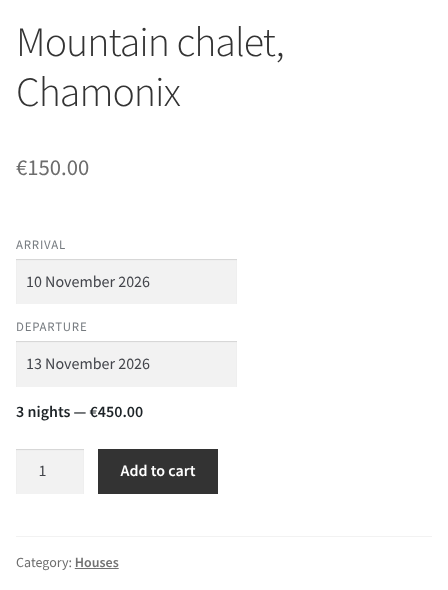
Sold by the night, with an arrival and a departure. The customer sees the number of nights and the total before adding the stay to the cart, and a shortest and a longest stay keep the bookings to the lengths you accept. See screenshot 9.
🚲 Bikes, kayaks and gear by the day
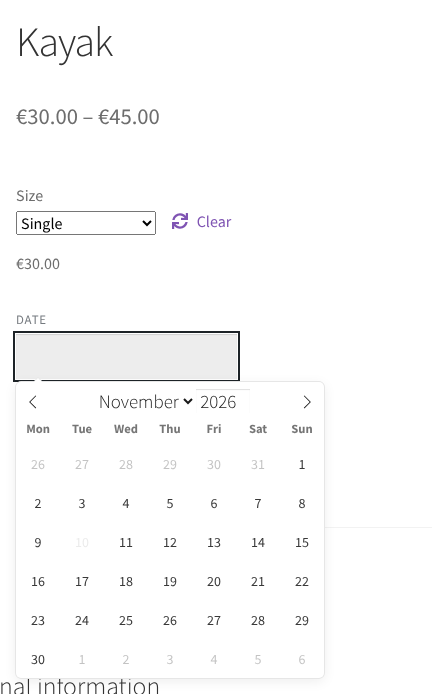
Sold by the day, on one date or over several days. Each size or model can be a variation with its own price and rules, and with the Pro version a date already rented out is greyed out in the calendar. See screenshot 10.
🛏️ Rooms and cabins in several sizes
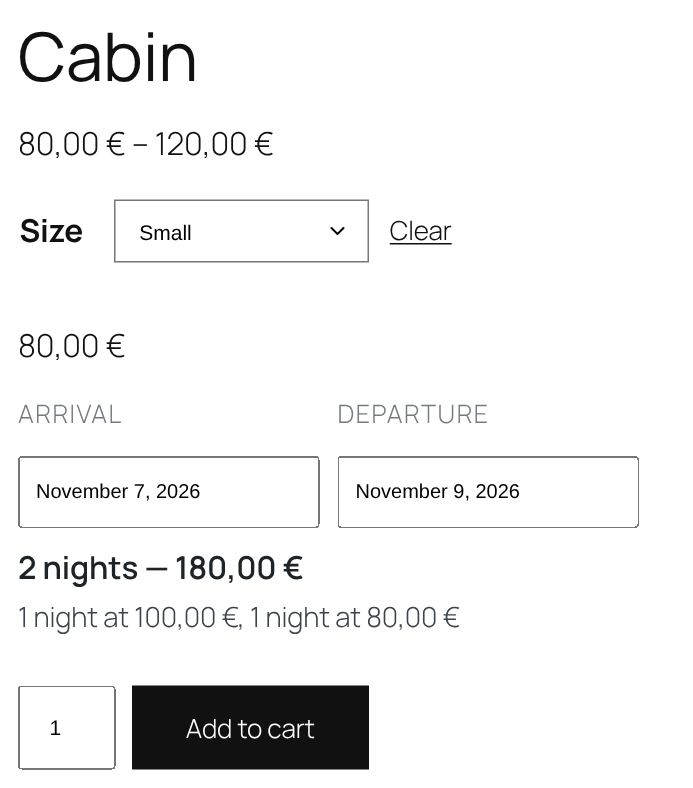
One product with a variation per room or cabin size, each at its own price per night. With the Pro version, a weekend or a season can cost more, and the customer sees how the total was reached. See screenshot 11.
🔎 Customers searching by date
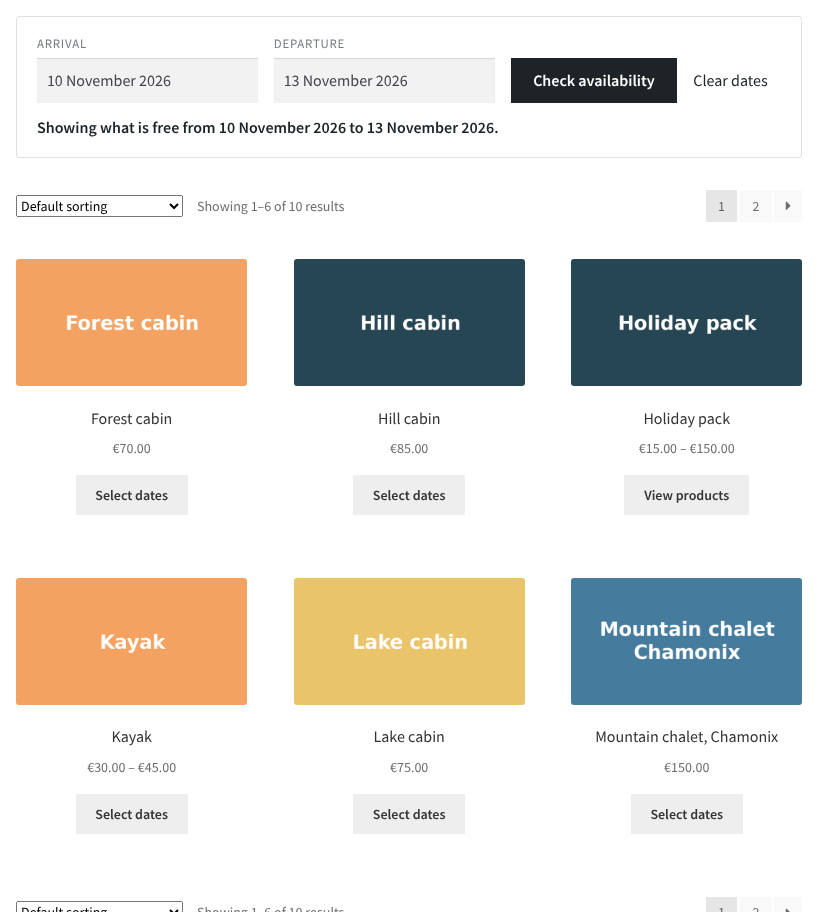
With the Pro version, a date filter above the shop lists only the homes, rooms or bikes free on the dates chosen, and each product opened from the list has the dates already filled in. See screenshot 12.
⚙️ Booking rules for the whole shop, exceptions for any product
Set the booking rules once for the shop. Any product, and any variation of a variable product, can then keep them or set its own.
- ✅ One date, or two dates for an arrival and a departure
- ✅ Charged per day or per night
- ✅ Bookings sold several days or nights at a time, such as a full week
- ✅ A shortest and a longest booking
- ✅ How soon bookings open, and how far ahead they close
- ✅ A switch making every product bookable, except those saved with their own box unticked
🛍️ A booking form your customers understand
- 📆 A date picker built into the plugin, with nothing loaded from another service
- 🚫 Dates outside the allowed period cannot be picked
- 🎯 Once an arrival is picked, only the departures giving an allowed length can be chosen
- 💶 The length of the booking and the total price update as the dates change
- 🎨 The dates sit under the price or behind a link, in the colours of your shop
- 📱 Works on phones as well as computers
📋 Everything under control after the sale
- 📨 The dates follow the booking into the cart, the checkout, the order and the order e-mails
- 🔒 Every rule is checked again before the order is taken, whatever the customer typed
- 🔎 A list of the bookings with their order, product, dates, length and quantity, filtered by status and by date
- 🗓️ A month calendar showing each booking across the days it takes up
- 🔄 Five steps in the life of a booking: booked, arriving, out now, just back and completed. Each step moves on its own with the calendar, or waits for you, as you choose
- ✏️ The dates of a booking can be corrected from its order while the order is unpaid or on hold
- ↩️ Cancelling the order frees the booking
- 🛠️ A repair tool rebuilds the bookings from the orders if they ever fall out of step
- 🧹 An option to delete all the plugin’s data when it is deleted, off by default so nothing is ever lost by accident
🚀 Ready for the WooCommerce of today
- ⚡ Compatible with the cart and checkout blocks
- 🗄️ Compatible with the high-performance order storage
- 🌍 Translated into French, German, Spanish, Japanese, Brazilian Portuguese, Italian, Dutch, Polish and Arabic
⭐ The Pro version
Everything above stays free, for good. The Pro version adds what a busy rental shop needs on top of it:
- 🔐 The same dates are never sold twice. Set how many customers can book the same date, for the shop, a product or a variation. Full dates are greyed out in the calendar, and the cart checks them again before the order is placed. The departure day of a stay can be kept for the leaving customer or sold to the next arrival
- 🚪 Closed dates. A day of the week, a date or a period, once or every year, closed to arrivals, departures or both, for the whole shop or for one product
- 🔎 A date filter on the shop. The customer picks dates and sees only the products free on them, on the shop and on its categories, tags and attributes, or anywhere with a shortcode or a block. Each product opened from the list has the dates already filled in
- 💶 Prices that follow the calendar. Prices by day of the week, by date and by date range, for a weekend rate or a season, per product or variation, set as a price or as a percentage up or down. The product page, the cart, the order and its e-mails show how the price was reached
- 📉 Discounts and surcharges by length of stay, fixed or as a percentage, per product or for the whole catalogue
- ☎️ Bookings without an order, for those taken by telephone or on another platform, entered one by one or loaded from a CSV file, changed or removed later, and counted in the availability. An import with a single wrong line imports nothing and lists what to fix
- 📤 Booking export. The bookings list, with or without an order, downloaded as a CSV file with each customer, for the whole shop or one product
⚖️ Free or Pro?
✅ In both versions
- Any simple, variable or grouped product sold by date
- By the day or by the night, on one date or two
- Shortest and longest stay, opening and closing of the bookings
- Rules for the whole shop, changed for any product or variation
- The usual cart, checkout, payment methods, coupons, taxes and e-mails
- Bookings list, month calendar and booking steps
⭐ Pro only
- The same dates never sold twice
- Closed dates
- Date filter on the shop, shortcode and block
- Prices by day of the week, date and season
- Discounts and surcharges by length of stay
- Bookings without an order, entered by hand or imported from a CSV file
- Booking export to a CSV file
❌ In neither
- Hours and time slots
لقطات الشاشة


التنصيب
- Install the plugin from the Plugins screen of WordPress, or upload it to the
/wp-content/plugins/folder. - Activate it. WooCommerce must be installed and active.
- Open the Settings page of the Bookings menu and set the rules of the shop.
- Open a product, click the Booking tab of the Product data box, tick Bookable, and update the product.
That’s it: the product page now asks for dates instead of going straight to the cart.
الأسئلة المتكررّة
-
Does it require WooCommerce?
-
Yes. WooCommerce must be installed and active.
-
Can customers book hours or time slots?
-
No. The plugin sells whole days or nights, for rentals and stays. There is no time of day in it.
-
How is the price calculated?
-
The price of the product is multiplied by the number of days or nights booked, then by the quantity. Coupons and taxes apply as usual.
-
Does it stop two customers from booking the same dates?
-
Not the free version: every booking is recorded and shown on the list and on the calendar, but it does not compare the dates of one booking with the others. The Pro version does: the shop sets how many customers can book the same date, and the dates that are full can no longer be picked.
-
What does the Pro version add?
-
Availability by date, closed dates, a date filter on the shop, prices by day, date and period, discounts and surcharges by length of stay, bookings without an order, entered by hand or loaded from a file, and booking export. Every feature of the free version stays free, and the Pro version can be tried for 14 days without a card.
-
Can customers search the shop by date?
-
With the Pro version, yes. A date filter sits above the products of the shop and of its categories, or anywhere else with the
[abogo_date_filter]shortcode or the Date filter block. Only the products free on the dates chosen are listed, and the dates are filled in on the product page. -
Which products can be booked?
-
Simple, variable and grouped products. Each variation of a variable product can hold rules of its own.
-
Does it change my checkout?
-
No. The customer goes through the usual WooCommerce cart and checkout, with every payment method the shop already offers.
-
Which languages does it come in?
-
English, French, German, Spanish, Japanese, Brazilian Portuguese, Italian, Dutch, Polish and Arabic.
المراجعات
لا توجد مراجعات لهذه الإضافة.
المساهمون والمطوّرون
“Abogo Booking for WooCommerce” هو برنامج مفتوح المصدر. وقد ساهم هؤلاء الأشخاص بالأسفل في هذه الإضافة.
المساهمون

ترجمة ”Abogo Booking for WooCommerce“ إلى لغتك.
مُهتم بالتطوير؟
تصفّح الشفرة، تحقق من مستودع SVN، أو الاشتراك في سجل التطوير بواسطة RSS.
سجل التغييرات
1.0.2
Added
- A Clear filter button on the bookings list empties the dates and the product in one click, and keeps the status being shown.
- The free version shows what Pro adds where it would be used, greyed out with a Pro badge and one line on what it does: the Availability, Prices and Shop filter tabs of the settings, the Add booking, Import and Export buttons of the bookings list, and the Pro rules of a product. One button starts the 14-day free trial.
- A notice on the admin pages offers the 14-day free trial to administrators of a free install. “Not now” hides it for two weeks, “Don’t show again” for good, and it goes away once a trial or a licence is active. It never shows at the same time as the review request, waits a few days after the review request is answered, and replaces the licensing service’s own trial offer, so the shop owner is never asked twice. Shop managers, and shops that have not answered the data-sharing question yet, are sent to the online checkout instead of a page they are refused.
- Once the shop has been paid for a booking, a notice on the admin pages asks everyone logged in for a review on WordPress.org. “Later” asks again after 14 days, and “Leave a review”, “Already done” or “No” never ask again.
- The plugin speaks five more languages: Brazilian Portuguese, Italian, Dutch, Polish and Arabic, on top of English, French, German, Spanish and Japanese.
Changed
- A stay can last two years at most, even on a product with no longest booking, so a mistyped departure can no longer ask for a stay of centuries.
1.0.1
Added
- A setting to delete every booking, setting and product rule when the plugin is deleted. It is off by default, so nothing is lost unless the shop asks for it.
- Once an arrival is picked, only the departures giving an allowed length can be chosen, and a departure that no longer fits a new arrival is cleared.
- The dates of a booking can be corrected from its order while the order is unpaid or on hold. The price of the line stays as it was, and dates no stay could have are refused with a message.
- The list of bookings can be narrowed to an arrival date and a departure date.
Changed
- The booking length, shortest and longest booking, and first and last dates carry plainer names and shorter help texts.
Fixed
- A variation with its own choice of one date or two now shows the right fields on the product page, and can be booked.
- The total shown under the dates on a variable product follows the variation picked, instead of the cheapest one.
- The length and the total now show on grouped products too.
- A booking moved to a step by hand stays there when its order changes status.
- The month calendar shows the bookings of the 1st, and its title always names the month on screen.
- The Every product box on the settings screen lines up with its title.
1.0.0
Added
- First release: any WooCommerce product can be sold by date, with an arrival and a departure or a single day, charged per day or per night, under rules set for the whole shop and changed for any product or variation.