

الوصف
Prime SEO — SEO for the AI Era
Prime SEO is an AI SEO plugin for WordPress. Decide which AI crawlers may read your site (GPTBot, ClaudeBot, PerplexityBot and 12 more), publish an llms.txt and llms-full.txt file for the ones you welcome, and see which AI bots actually visit. Classic SEO lives in the same plugin: meta tags, XML sitemap, schema markup, redirects and a 404 monitor.
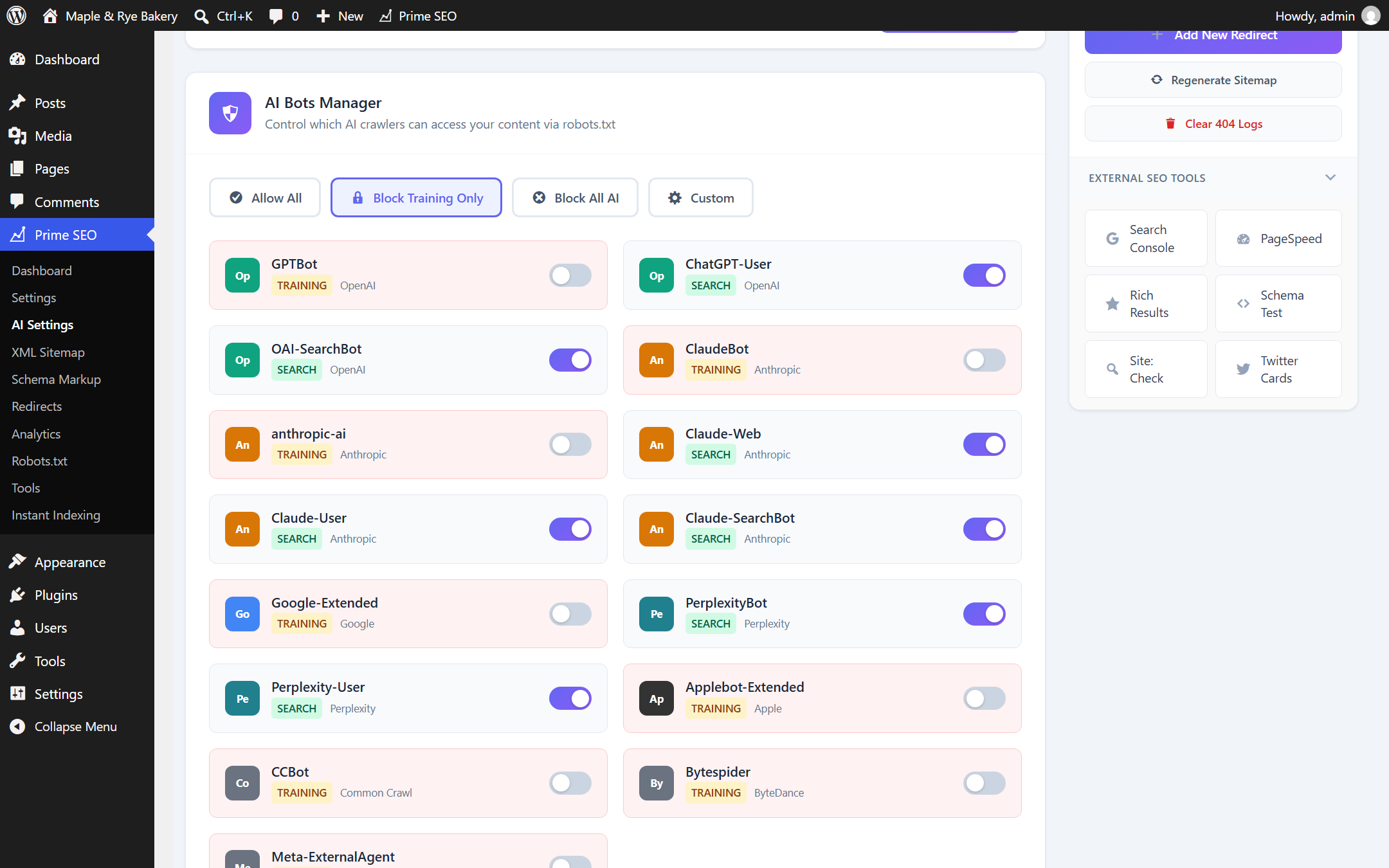
The AI crawler switches work in the free version. Pick a preset (allow all, block training bots only, block all) or set each of the 15 bots by hand in the AI Bots Manager. The robots.txt rules are written for you, and AI Crawler Stats show which AI bots came and which page they opened.
Pro: the meta written for you. “Generate All with AI” fills the SEO title, meta description, Open Graph and Twitter fields and the focus keywords of a post in one click; the AI Bulk Generator does the same for every post that still has none. 500 generations a month are included with the license, no OpenAI account needed, or use your own key without a limit. 14-day trial, no card.
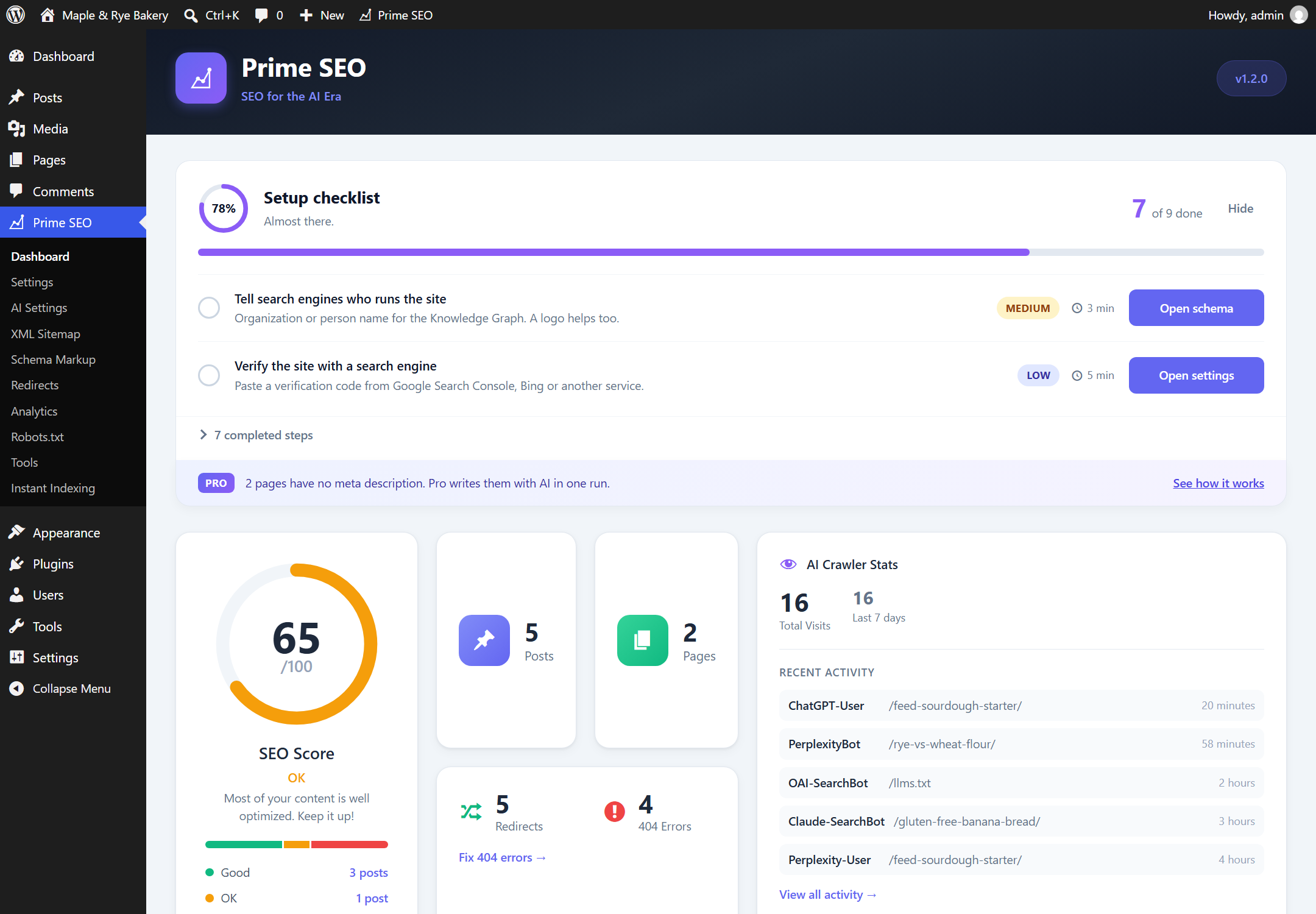
You always know the next step. A setup checklist on the Dashboard shows what is done and what is left, ticks steps off by itself as you configure the plugin, and links to the right screen. One SEO score, the same number in the editor, the posts list and the Dashboard, points to the posts that need work.
Moving from another SEO plugin? Titles, descriptions and redirects are imported from Yoast SEO, Rank Math, All in One SEO and SEOPress, with a backup made first.
Documentation | Support | Pro
AI Search Optimization — Be Found by ChatGPT & Perplexity
ChatGPT, Perplexity, Claude and Gemini read websites with their own crawlers. Prime SEO shows you which of them visit and lets you decide what each one may read.
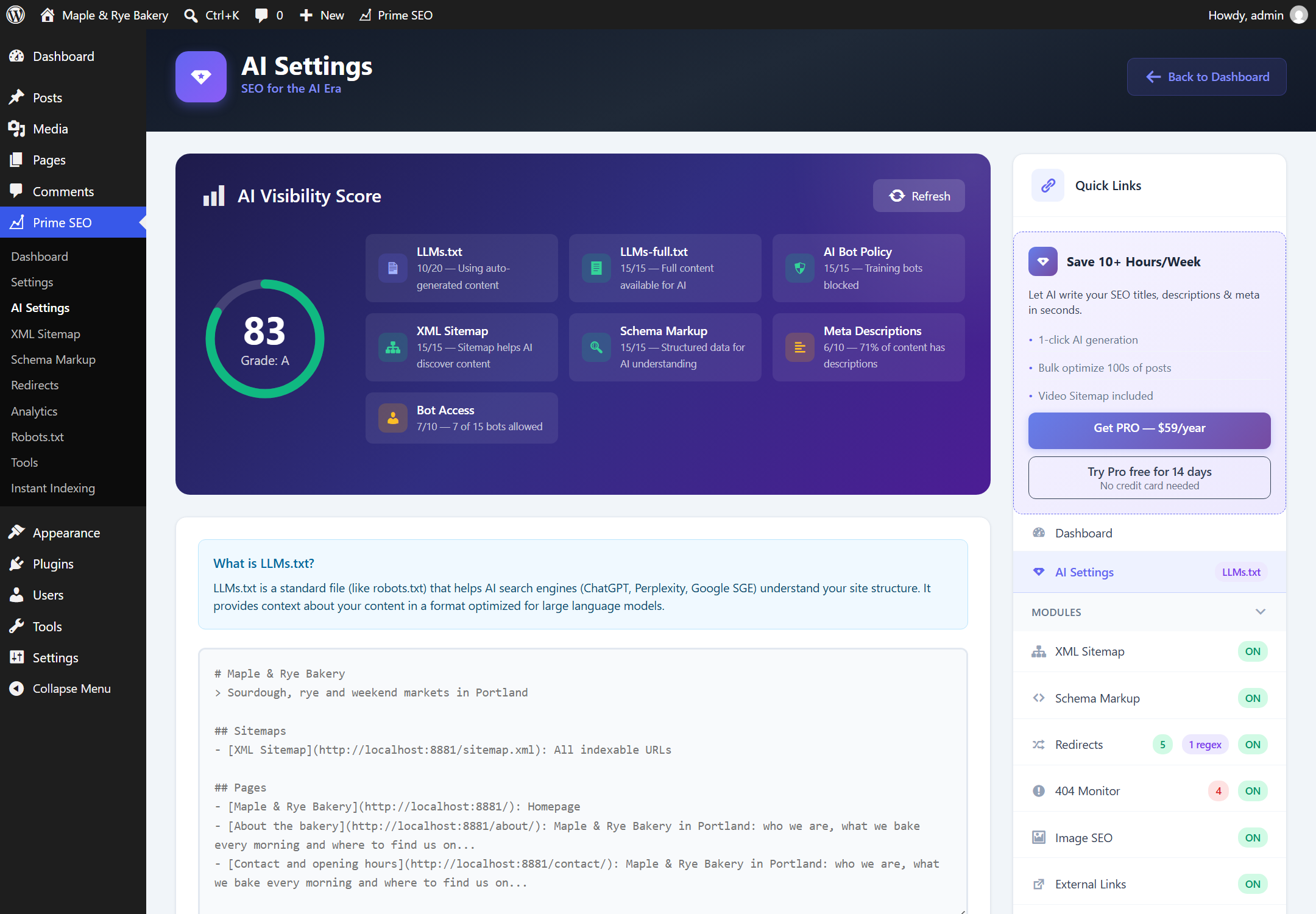
- LLMs.txt Generator — Create an llms.txt file automatically and tell AI crawlers what your site is about
- LLMs-full.txt — Provide full content for deeper AI indexing
- AI Bots Manager — Allow or block 15 AI crawlers (GPTBot, ChatGPT-User, ClaudeBot, Claude-User, PerplexityBot, Google-Extended, and more) with robots.txt rules added for you
- Quick Presets — Allow All, Block Training, Block All, or Custom rules
- AI Crawler Stats — See which AI bots visit your site, how often, and which pages they read
- AI Visibility Score — See your AI search readiness at a glance
- AI Content Score — Detailed analysis of how AI engines view your content (Pro)
SEO Metabox with Real-Time Analysis
Optimize every post with instant feedback and AI assistance:
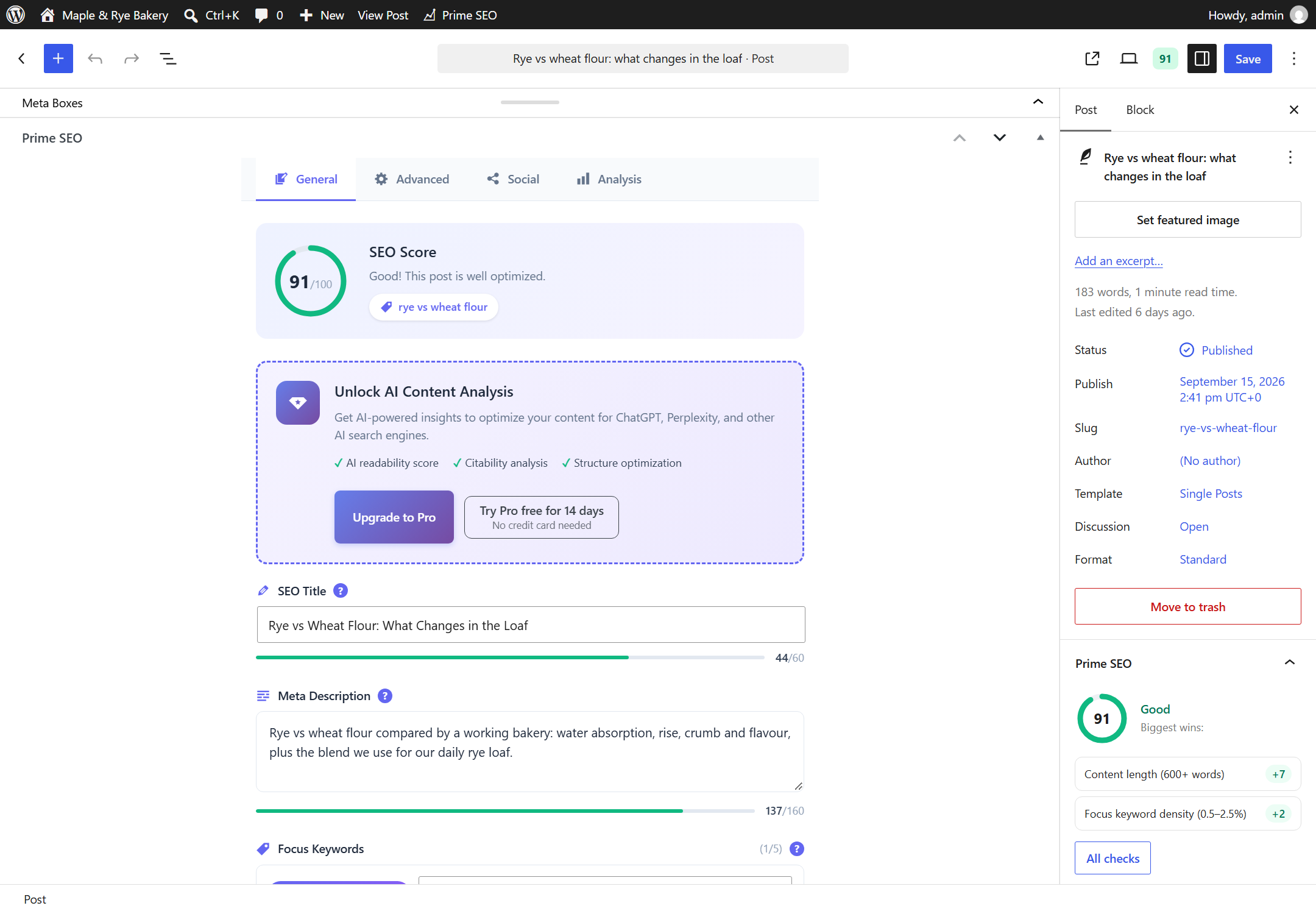
- Visual SEO Score (0-100) with circular progress indicator
- Live Google Preview for desktop and mobile
- Character counters with color-coded progress bars
- Multiple focus keywords per post
- Content recommendations as you type
- Generate All with AI — One click fills SEO title, description, social meta, and keywords (Pro)
The metabox appears in every post and page editor, giving you everything you need to optimize content without leaving the screen.
Prime SEO Pro — AI-Powered SEO
Prime SEO Pro adds AI automation to your SEO workflow.
⭐ Generate All with AI — Complete SEO in One Click (Pro)
Why fill fields manually when AI can do it all? One button generates everything:
- SEO Title — Optimized for Google (60 chars)
- Meta Description — Click-worthy snippet (155 chars)
- Facebook Title & Description — Social-optimized OG tags
- Twitter Title & Description — Twitter-specific formatting
- Focus Keywords — Auto-extracted from your content (top 5)
6 fields + keywords in one click. Search and social meta are generated together, so you do not have to fill each field separately.
- Works with any post type
- 500 generations a month are included with a Pro license (GPT-4o mini through the Prime SEO AI service, nothing to set up)
- Prefer no limit? Switch to your own OpenAI key and pick the model; you pay OpenAI directly
AI Bulk Generator — Optimize Your Entire Site (Pro)
Have 50, 100, or 500 posts without SEO? No problem. AI Bulk Generator finds all posts missing SEO data and generates titles and descriptions for all of them:
- Smart Detection — Finds posts missing title, description, or both
- Batch Processing — Generate SEO for hundreds of posts
- Progress Tracking — Real-time progress with pause/resume
- Undo Support — Restore previous values if needed
Additional Pro Features:
- AI Content Score — Detailed analysis for AI search optimization
- Video Sitemap — Auto-detect YouTube, Vimeo, Wistia, Bunny Stream
- Manual Video Fields — Complete control over video metadata
- Priority Support — Direct email support
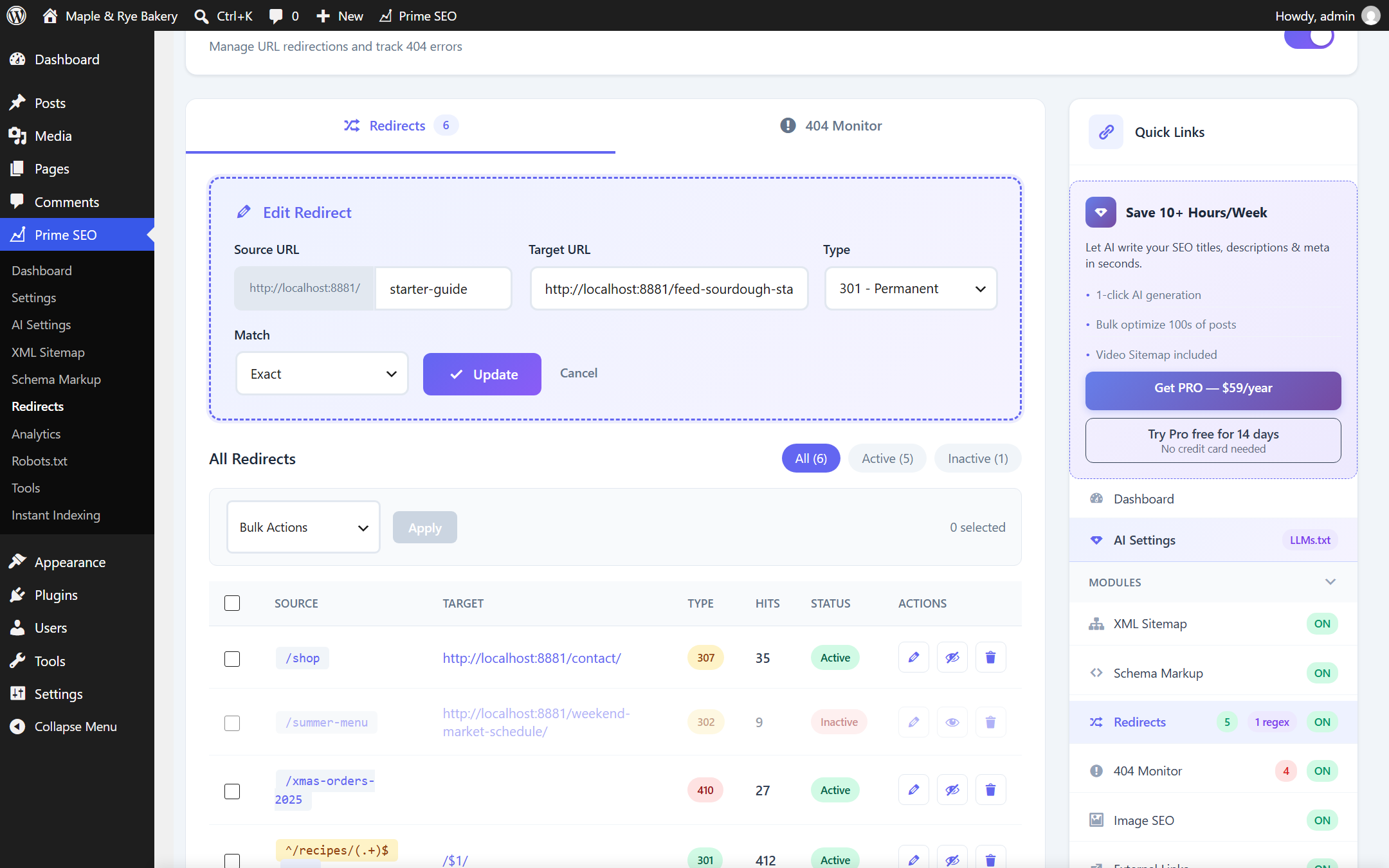
Redirect Manager
Professional redirect handling:
- 301 (Permanent), 302 (Temporary), 307 redirects
- 410 (Gone) and 451 (Unavailable for Legal Reasons) status codes
- Regex pattern matching with capture groups ($1, $2)
- Query string preservation for UTM parameters
- Hit counter for tracking redirect usage
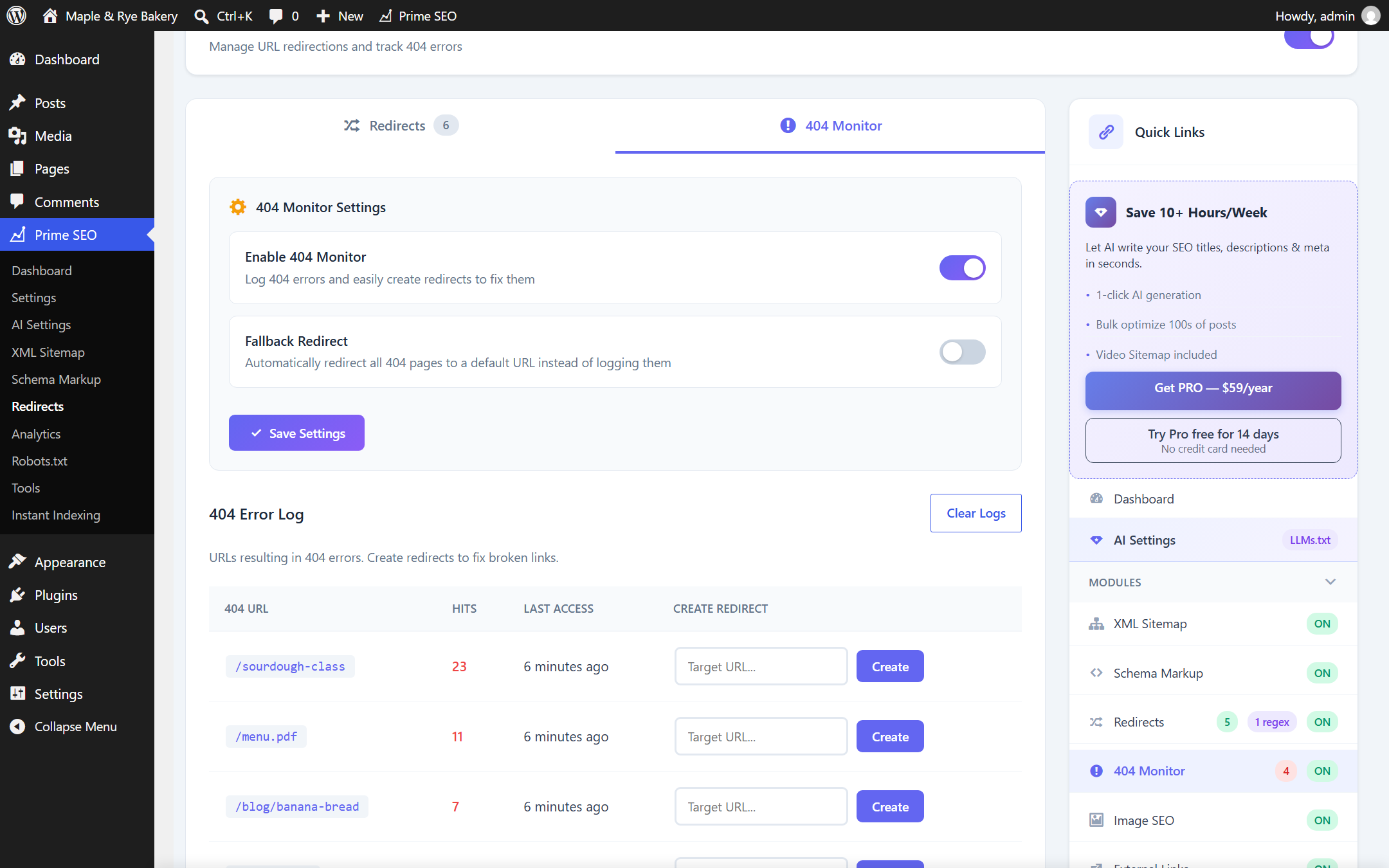
- Fallback redirect for all 404 errors
- Import and export functionality
404 Error Monitor
Track and fix broken links:
- Automatic logging of all 404 errors
- Referer and User Agent tracking
- One-click conversion to redirect
- Bulk delete options
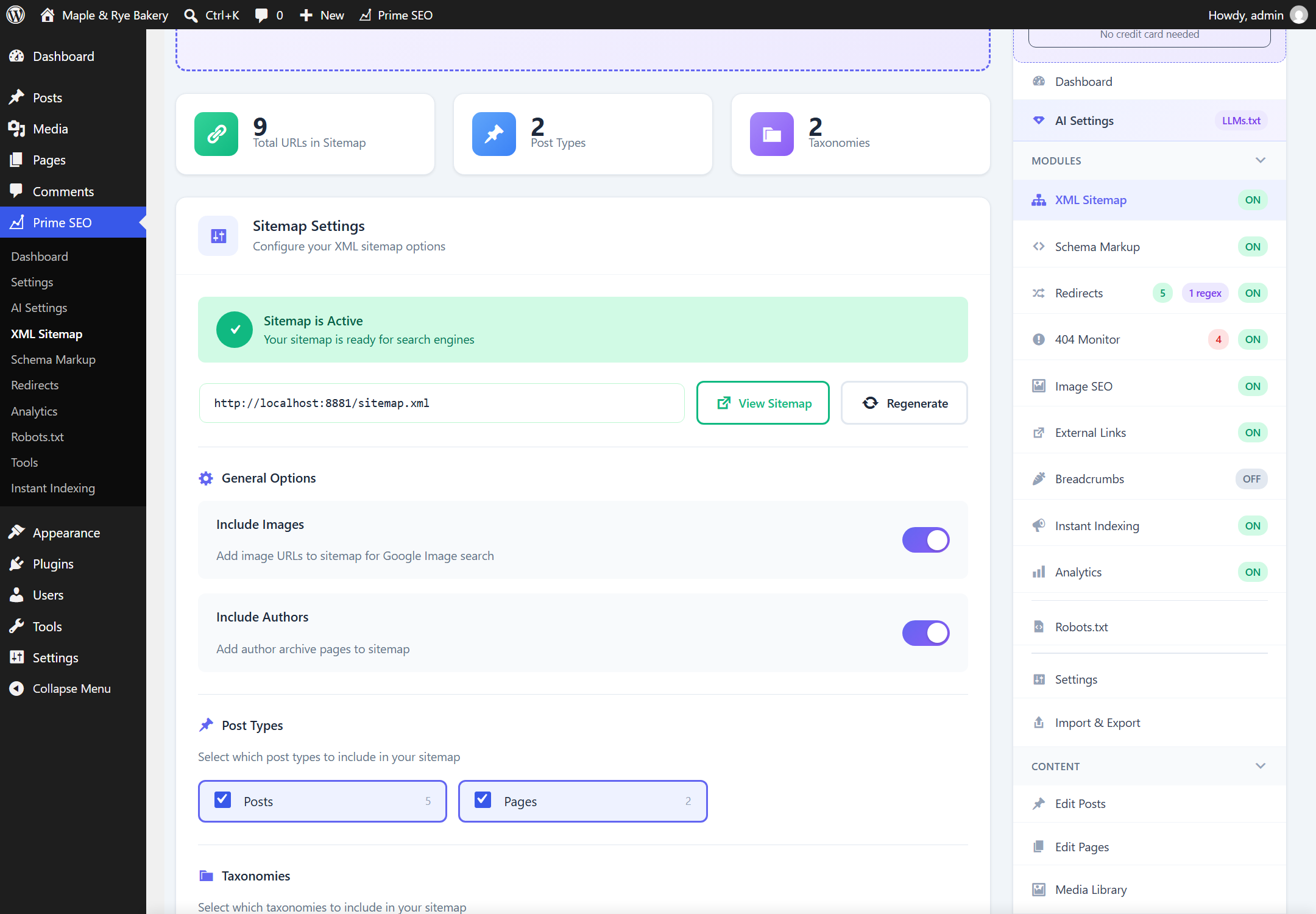
XML Sitemap
Automatic, standards-compliant sitemaps:
- Sitemap Index with separate post, page, category, and author sitemaps
- Image Sitemap for Google Image Search
- Video Sitemap — Auto-detect YouTube, Vimeo, Wistia, Bunny Stream (Pro)
- Custom Post Types and Taxonomies support
- Respects noindex settings automatically
- Beautiful XSL styling for human-readable sitemaps
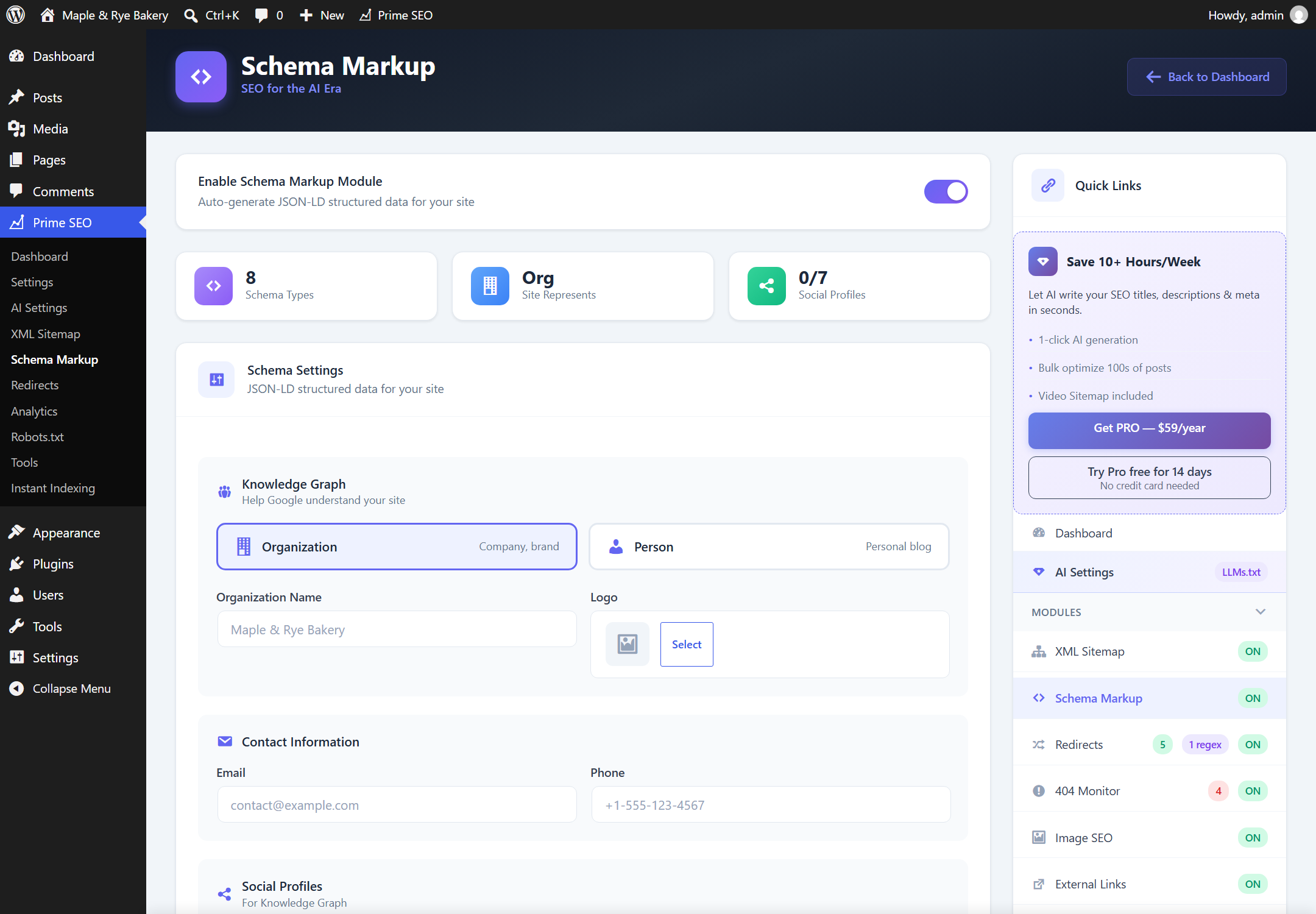
Schema Markup (JSON-LD)
Structured data for rich search results:
Site-wide:
- Knowledge Graph — Organization or Person
- WebSite schema with SearchAction
- Social profiles (Facebook, Twitter, LinkedIn, YouTube, etc.)
Content:
- Article, BlogPosting, NewsArticle
- FAQ and HowTo (auto-detected from content)
- Recipe and Event schemas
- Product schema for WooCommerce
- LocalBusiness with 40+ subtypes (Restaurant, Hotel, Dentist, and more)
Additional Features
- Robots.txt Editor — Visual editor with 5 ready-made templates
- Image SEO — Auto-generate ALT and TITLE attributes
- External Links Manager — Auto-add nofollow and open in new tab
- Breadcrumbs — Shortcode and PHP function with Schema.org markup
- Instant Indexing — Submit URLs via IndexNow API
- Import/Export — Full backup and restore with automatic backups
One-Click Migration
Import your existing SEO data:
- Yoast SEO (Free and Pro)
- Rank Math (including redirects)
- All in One SEO
- SEOPress
All titles, descriptions, focus keywords, canonical URLs, and robot settings transfer automatically.
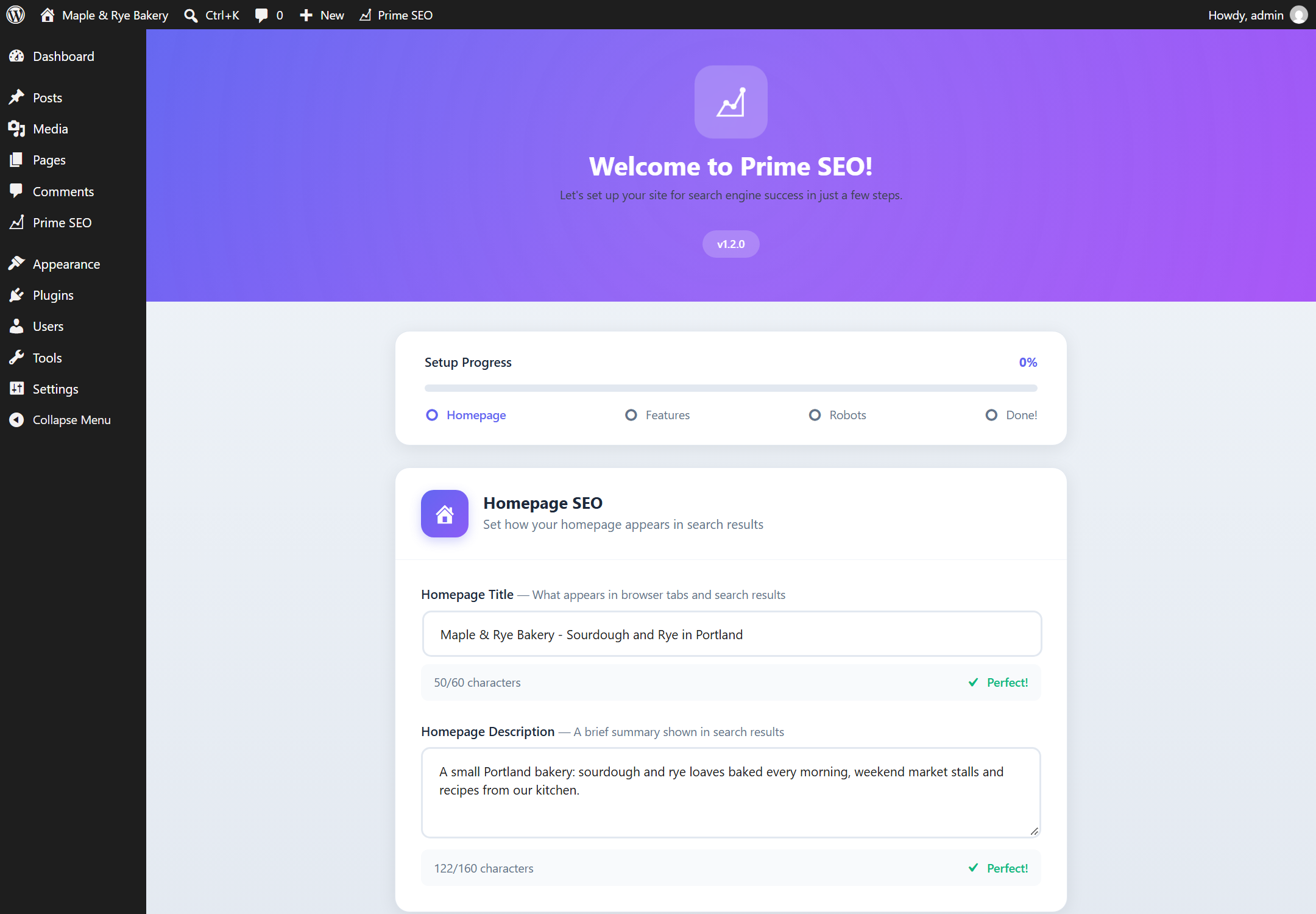
Setup Wizard
Get started in minutes with the 4-step configuration wizard:
- Homepage SEO settings
- Feature toggles (Sitemap, Image SEO, External Links, 404 Monitor)
- Robots.txt configuration
- Ready to optimize
Built for Performance
- Lightweight code following WordPress Coding Standards
- Assets load only on relevant pages
- No external API calls except optional IndexNow and the optional deactivation survey
- All data stored in your WordPress database
- Compatible with caching plugins
Developer Friendly
- Clean, well-documented codebase
- Hooks and filters for customization
- WordPress REST API compatible
- Translation ready
Privacy Policy
Prime SEO stores all data locally in your WordPress database:
- SEO settings and meta data
- Redirect rules
- 404 error logs (IP addresses stored for debugging purposes only)
- Backup files
External Services
This plugin connects to external services only when you explicitly use certain features:
IndexNow API (Free)
- Service: IndexNow (api.indexnow.org)
- When: When you click “Submit to IndexNow” or enable auto-submit
- Data sent: Your site’s URLs
- Purpose: Request faster indexing by search engines
- Privacy: IndexNow Privacy Policy
Prime SEO AI service (Pro only, default)
- Service: prime-seo-plugin.com/api/ai/ (our own website), which relays the request to OpenAI with our key
- When: When you use “Generate with AI”, “Generate All with AI”, the AI Bulk Generator or the AI Content Score with the “Included with Pro” option selected in AI Settings
- Data sent: the post title, excerpt and content (up to 500 words) and the focus keyword; your Freemius install id and license key so the service can check the license; the site address for that check only
- Stored on our side: per-license counters (how many generations this month) and a log line per request with the license id, install id, status, token counts and duration. Prompts, generated texts, site addresses and IP addresses are not stored
- Purpose: generate SEO titles, descriptions and social meta within the 500 generations a month included with Pro
- Terms: Terms of Service
- Privacy: Privacy Policy
OpenAI API (Pro only, with your own key)
- Service: OpenAI (api.openai.com)
- When: Same features as above, when “My own OpenAI key” is selected in AI Settings
- Data sent: Post title, excerpt, and content for SEO generation
- Purpose: Generate SEO titles and meta descriptions
- Privacy: OpenAI Privacy Policy
- Note: uses the API key you saved; no data goes through our servers
Prime SEO feedback (optional, free version)
- Service: prime-seo-plugin.com (our own website)
- When: Only if you pick a reason and press “Submit & Deactivate” in the dialog shown when you deactivate the plugin. “Skip & Deactivate” and “Cancel” send nothing
- Data sent: the reason you selected, your optional comment, the Prime SEO, WordPress and PHP versions, and the site language. No site address, no email address, no personal data. IP addresses are not stored
- Purpose: to learn why people stop using the plugin and fix those problems
- Terms: Terms of Service
- Privacy: Privacy Policy
No tracking or analytics are performed. No data is shared with third parties except as described above.
Support
For support, please use the WordPress.org support forum. We aim to respond within 24-48 hours.
Credits
Prime SEO is developed by the Prime SEO team.
Built following WordPress Coding Standards.
Icons: Dashicons
لقطات الشاشة
التنصيب
Automatic Installation
- Log in to your WordPress dashboard
- Go to Plugins Add New
- Search for “Prime SEO”
- Click “Install Now” and then “Activate”
- Follow the Setup Wizard to configure your site
Manual Installation
- Download the plugin zip file
- Go to Plugins Add New Upload Plugin
- Choose the zip file and click “Install Now”
- Click “Activate Plugin”
- Follow the Setup Wizard
After Activation
The Setup Wizard will guide you through:
- Setting up your homepage SEO
- Enabling features (Sitemap, Image SEO, etc.)
- Configuring robots.txt
- You’re ready to optimize!
الأسئلة المتكررّة
-
How do I create an llms.txt file in WordPress?
-
Install and activate Prime SEO — the llms.txt file is generated automatically and is available at
yoursite.com/llms.txtright away, no file upload needed. Go to Prime SEO AI Settings to edit the file, choose which sections it includes, and enablellms-full.txtwith the full content of the post types you select. -
How do I block GPTBot or other AI crawlers?
-
Go to Prime SEO AI Settings AI Bots Manager. Switch off GPTBot, ClaudeBot, PerplexityBot, Google-Extended or any of the 15 supported AI crawlers, or use a preset: Allow All, Block Training (blocks bots that collect training data but keeps AI search bots), or Block All. The matching rules are added to your robots.txt automatically.
-
How can I see if ChatGPT or other AI bots crawl my site?
-
The Dashboard shows AI Crawler Stats: visits from GPTBot, ClaudeBot, PerplexityBot and other AI crawlers for the last 7 days, the most visited URLs, and a feed of the latest visits — including requests for your llms.txt, sitemap and robots.txt.
-
What is AI SEO and why do I need it?
-
AI search engines like ChatGPT, Perplexity and Google Gemini answer questions directly and read websites with their own crawlers to do it. No plugin can make them cite a site. What Prime SEO gives you is control and visibility: an llms.txt file that tells AI tools what your site is about, the AI Bots Manager to decide which crawlers may read it, and AI Crawler Stats that show which ones actually visit.
-
Do I need SEO knowledge to use this plugin?
-
No! Prime SEO is designed for beginners. The Setup Wizard configures everything, and the metabox provides clear guidance with real-time feedback.
-
What is “Generate All with AI”?
-
Generate All with AI is a Pro feature that fills ALL your SEO fields with one click:
- SEO Title (Google)
- Meta Description (Google)
- Facebook Title & Description (Open Graph)
- Twitter Title & Description
- Focus Keywords (auto-extracted)
That’s 6 fields plus keywords in one click. Each post costs one of the 500 monthly generations included with Pro; the page shows how many are left before you start. For bigger runs, switch to your own OpenAI key and there is no limit on our side.
-
What’s the difference between Free and Pro?
-
The free version includes everything you need for professional SEO: metabox, sitemaps, schema markup, redirects, 404 monitor, AI bots manager, and LLMs.txt.
Pro adds AI-powered automation:
- Generate All with AI — One click generates SEO title, meta description, Facebook meta, Twitter meta, and focus keywords (6 fields + keywords!)
- AI Bulk Generator — Generate SEO for hundreds of posts at once
- AI Content Score — Detailed analysis for AI search optimization
- Video Sitemap — Auto-detect videos from YouTube, Vimeo, Wistia, Bunny Stream
- Priority Support — Direct email support
-
Will this slow down my website?
-
No. Prime SEO is optimized for performance. Assets load only where needed, and the code follows WordPress best practices.
-
Can I import from Yoast or Rank Math?
-
Yes! Prime SEO includes a migration tool. Go to Prime SEO Migration and select the plugin you want to import from. We support:
- Yoast SEO (Free & Pro)
- Rank Math (including redirects)
- All in One SEO Pack
- SEOPress
All your titles, descriptions, focus keywords, canonical URLs, and robot settings will be transferred automatically.
-
Where is my sitemap?
-
Your sitemap is automatically available at:
yoursite.com/sitemap.xml -
Use the shortcode
[prime_seo_breadcrumbs]in any post/page, or add<?php prime_seo_breadcrumbs(); ?>to your theme template. -
Can I use this with other SEO plugins?
-
We don’t recommend it. Running multiple SEO plugins can cause conflicts and duplicate meta tags. Prime SEO includes everything you need.
-
How do redirects work?
-
Go to Prime SEO Redirects, enter the old URL and new URL, select redirect type (301/302/307/410/451), and save. The redirect is instant.
-
What’s the difference between redirect types?
-
- 301 — Permanent redirect (passes SEO value)
- 302 — Temporary redirect (for temporary moves)
- 307 — Temporary redirect (preserves request method)
- 410 — Gone (page permanently deleted)
- 451 — Unavailable for legal reasons
-
How do I fix 404 errors?
-
Go to Prime SEO Redirects 404 Log tab. You’ll see all 404 errors with options to create redirects or delete entries.
-
Is the robots.txt virtual or physical?
-
Virtual. Prime SEO doesn’t create a physical file, so there are no conflicts with existing files.
-
What is LLMs.txt and why do I need it?
-
LLMs.txt is a standard (like robots.txt) that helps AI search engines understand your site. It provides a structured overview of your content that AI crawlers like ChatGPT, Claude, and Perplexity can use to better index and reference your site in AI-powered search results.
-
How do I control which AI bots can access my site?
-
Go to Prime SEO AI Settings. You’ll find the AI Bots Manager where you can allow or block specific AI crawlers. Use Quick Presets for common configurations, or customize access for each bot individually.
-
Where are llms.txt and llms-full.txt?
-
They’re automatically available at:
yoursite.com/llms.txt— Basic site overviewyoursite.com/llms-full.txt— Extended version with full content (when enabled)
المراجعات

المساهمون والمطوّرون
“Prime SEO – AI SEO, LLMs.txt & AI Bots Manager” هو برنامج مفتوح المصدر. وقد ساهم هؤلاء الأشخاص بالأسفل في هذه الإضافة.
المساهمون
ترجمة ”Prime SEO – AI SEO, LLMs.txt & AI Bots Manager“ إلى لغتك.
مُهتم بالتطوير؟
تصفّح الشفرة، تحقق من مستودع SVN، أو الاشتراك في سجل التطوير بواسطة RSS.
سجل التغييرات
1.2.1
Release Date: September 2026
AI without an API key (Pro):
- New: 500 AI generations a month are included with every Pro license. Pick “Included with Pro” in AI Settings and the plugin generates through the Prime SEO AI service; no OpenAI account needed. Your own key still works as the second option, without a limit on our side
- New: AI Settings and the Bulk Generator show how many generations are left this month and when the counter resets; the Bulk Generator warns before a run that would exceed it
- Changed: “Generate both” in the post editor and each post in the Bulk Generator now make one combined request instead of two
- Changed: “External Services” in this readme describes the Prime SEO AI service (what is sent, what is stored)
- Fixed: Pro could not be activated while the free version was still active (the Freemius SDK was looked for in the free plugin folder)
- Changed: the build is byte-for-byte reproducible regardless of line endings in the checkout; release files use LF
1.2.0
Release Date: September 2026
A clear first ten minutes:
- New: Setup checklist on the Dashboard. It shows how many setup steps are done, lists the open ones by priority with the time each takes, and ticks them off by itself as you configure the plugin
- New: The setup wizard now ends with your checklist progress: what the wizard has just completed and the three steps to take next
- New: Edit a redirect. The pencil in each row opens the redirect in the form at the top; hits and status are kept
- New: Pagination for the redirects table. Sites with more than 20 redirects can now reach all of them, and the Active / Inactive filter is kept between pages
- New: AI Bots Manager covers 15 AI crawlers. Added Claude-User, Claude-SearchBot and Perplexity-User
- Improved: If you chose “Block All AI” or “Block Training Only”, newly added bots follow that choice automatically
- Improved: AI Crawler Stats no longer list Google-Extended and Applebot-Extended. They are robots.txt names that never appear in a visit, so their counters could only show zero. Both stay in the AI Bots Manager, where they work
- Improved: Empty screens now explain what will appear there and link to the next step: redirects, 404 Monitor, AI crawler visits, IndexNow
- Fixed: A regex redirect target such as /archive/$1 could not be saved because the field accepted full URLs only
- Fixed: Updating a regex redirect no longer trims the slashes of its pattern
- Fixed: Saving robots.txt without changes no longer rewrites its line endings
1.1.9
Release Date: September 2026
One SEO score you can trust:
- New: One SEO score for every post. The editor, the posts list and the Dashboard now show the same number, calculated the same way
- New: The score no longer stays at 0 until you add a focus keyword. Titles, descriptions, content length, images and links earn points on their own; the focus keyword checks add the rest
- New: The score is always in view in the block editor: a score badge in the editor toolbar, a Prime SEO sidebar with your three biggest wins and the points each one adds, and the same summary in the pre-publish panel
- New: Score breakdown in the Analysis tab is grouped into “What to improve” and “Done”, shows the points every check adds, and takes you to the right field with one click
- New: A small celebration the first time a post reaches the green zone
- New: A short notice after saving tells you how the score changed, for example “SEO score: 38 48”
- New: Filter posts and pages by score: Good, OK, Needs improvement
- New: The Dashboard score is now the average of your post scores, with a breakdown that links straight to the posts in each group and a bar showing how your content is split between them
- Improved: Focus keyword matching ignores punctuation, so “llms txt” matches “llms.txt”
- Improved: The per-keyword analysis now follows the same matching rules as the score, including keywords in subheadings
- Improved: Consistent button sizes and text sizes across all plugin pages
- Improved: Scores saved by earlier versions are recalculated automatically in the background
Other:
- New: Optional one-question survey when you deactivate the plugin. Nothing is sent unless you press “Submit & Deactivate” (see External Services)
- Improved: The review request now appears after a success, such as a post reaching a good score, instead of only after a week
- Fixed: The plugin description mentioned 16+ AI crawlers. The AI Bots Manager controls 12, listed in the documentation
1.1.8
Release Date: September 2026
- New: “Generate all descriptions with AI” shortcut under Needs Attention on the Dashboard
- Fixed: “Get Pro” link on the Plugins page pointed to a missing page
- Changed: Removed the third-party licensing SDK that was added to the free version in 1.1.7. Version 1.1.7 was never delivered as an update. The free plugin does not collect or send any usage data
1.1.6
Release Date: September 2026
Compatibility:
- Tested with WordPress 7.1 and PHP 8.3
- New: Prime SEO panel in the block editor sidebar — one click opens the SEO meta box, which WordPress now keeps in a collapsed area
- Fixed: PHP 8.1+ deprecation notice on the setup wizard page
Security:
- Hardened JSON-LD output so content containing a closing script tag cannot break out of the schema block
- Settings export files no longer contain the OpenAI API key (Pro). If you shared an export file made with an earlier version, consider rotating the key
Bug Fixes:
- Fixed: Saving the Settings page switched off the XML Sitemap and Schema modules and cleared sitemap post types — if your sitemap became empty, re-enable them on the XML Sitemap page once
- Fixed: Import and backup restore now keep AI Bots, LLMs.txt and sitemap options, and no longer turn disabled checkboxes on
- Fixed: Settings import failed on Windows servers
- Fixed: Quick Index on the Dashboard always answered “Security check failed”
- Fixed: AI Crawler Stats now counts AI bot visits to sitemap.xml, llms.txt and llms-full.txt
- Fixed: Sitemap index is now displayed with the styled view, same as the other sitemaps
- Fixed: Sitemap is refreshed immediately after sitemap settings are saved
- Fixed: The setup wizard no longer reappears after re-activation or after upgrading to Pro
- Fixed: Empty meta description tag is no longer printed
- Fixed: Horizontal scrollbar on plugin pages; Dashboard and Redirects layout on wide screens
Improvements:
- Safer default robots.txt in the setup wizard: CSS, JS and URLs with parameters are no longer blocked. An unmodified old default is replaced automatically on update; customised robots.txt files are left untouched
- Posts with a canonical URL pointing to another page are left out of the sitemap
- IndexNow no longer submits URLs from local, development or non-public sites
- Pro: a notice is shown when the license is not activated
1.1.5
Release Date: March 2026
New Features:
- New: Webmaster Verification Tags — support for 6 services (Google, Bing, Yandex, Pinterest, Baidu, Ahrefs)
- New: Review Nudge — non-intrusive card-style notice asking for a review after 7 days of use
Improvements:
- Smart verification code extraction — paste full meta tag or just the code
- Verification tags output only on the homepage for optimal performance
- Review Nudge shows only on Prime SEO pages for admin users
- Three response options: Rate, Remind Later (30 days snooze), Already Rated
1.1.4
Release Date: February 2026
Bug Fixes:
- Fixed: Analytics module now properly saves GA4 Measurement ID
- Fixed: False “unsaved changes” notification on Analytics page load
1.1.3
Release Date: February 2026
Hotfix:
- Fixed: Export now correctly includes all selected options when “Post SEO Data” is checked
1.1.2
Release Date: February 2026
Enhanced Backup System:
- New: Full Post Meta export — all 48 SEO meta keys per post
- New: Batched export for large sites (up to 1000 posts)
- New: Three import modes — Overwrite, Skip Existing, Merge
- New: Cross-site post matching — matches by ID first, falls back to slug
- New: Maximum 5 automatic backups limit with oldest auto-deletion
- Improved: Import now properly handles post meta restoration
- Improved: Backup file includes post meta section for complete site transfer
1.1.1
Release Date: January 2026
Security & Bug Fixes:
- Fixed: PRO license validation now properly checks before rendering Bulk Generator page
- Fixed: AI Content Score AJAX handlers now validate license before processing
- Fixed: Metabox PRO UI shows “Activate License” prompt when license is not active
- Improved: Consistent license checking pattern across all PRO features
1.1.0
Release Date: January 2026
New PRO Features:
- New: Video Sitemap — automatic video detection for YouTube, Vimeo, Wistia, Bunny Stream (PRO)
- New: Manual Video Fields — add videos not in content, override auto-detected metadata (PRO)
- New: Video Sitemap XSL Stylesheet — human-readable display (PRO)
- New: Generate All with AI — One click generates SEO title, meta description, OG meta, Twitter meta, and focus keywords (PRO)
- New: AI Bulk Generator — batch generate SEO for hundreds of posts at once (PRO)
- New: AI Content Score — 15 optimization checks for AI search engines (PRO)
Improvements:
- Improved: Dashboard with PRO features integration
- Improved: Metabox with AI generation buttons
- Fixed: Manual videos now correctly appear in video sitemap
1.0.6
Release Date: January 2026
UX Improvements:
- Added: Toast notification system — modern slide-in notifications replace inline alerts
- Added: Sticky Save Bar — unsaved changes warning with one-click save across all settings pages
- Added: beforeunload warning prevents accidental data loss when navigating away
Dashboard Improvements:
- Added: AI Activity Feed — shows last 5 AI bot visits with URLs and timestamps
- Added: Quick Index — submit URLs to IndexNow directly from Dashboard
- Added: IndexNow Stats widget with submission history
- Improved: New 6-column grid layout with dedicated sidebar for AI and IndexNow widgets
- Improved: Responsive design for 1400px, 1200px, and mobile breakpoints
1.0.5
Release Date: January 2026
Migration Improvements:
- Improved: Rank Math migration now imports Knowledge Graph settings (Site type, Organization/Person name)
- Improved: Rank Math migration now imports Breadcrumbs settings (Separator, Home label)
- Improved: Proper conversion of Rank Math “company” type to “organization”
- Fixed: SQL error when migrating from Rank Math without Redirections module enabled
1.0.4
Release Date: January 2026
Migration Improvements:
- Improved: Yoast SEO migration now imports Knowledge Graph settings (Site represents, Company name, Email, Phone, Person name)
- Improved: Yoast SEO migration now imports Social Profiles (Facebook, Twitter, Instagram, LinkedIn, YouTube, Pinterest)
- Improved: Yoast SEO migration now imports Breadcrumbs settings (Separator, Home label, Prefix)
- Improved: Breadcrumbs module auto-enables if Yoast had breadcrumbs enabled
Bugfixes:
- Fixed: Setup Wizard now correctly saves all module settings (Image SEO, External Links, 404 Monitor)
- Fixed: All modules now enabled by default on fresh installation
- Fixed: dbDelta duplicate key warning on plugin reactivation
- Fixed: Plugin Check warnings resolved
New:
- Added: uninstall.php for proper cleanup when plugin is deleted (removes all options, meta, tables, transients)
1.0.3
Release Date: January 2026
New Features:
- Added: AI Crawler Analytics — Dashboard widget showing visits from AI bots (GPTBot, ClaudeBot, PerplexityBot, etc.)
- Added: Batched logging for performance (minimizes database writes)
- Added: Track top visited URLs by AI crawlers
- Added: 7-day visit statistics
Reliability:
- Improved: Sitemap and LLMs.txt now use dynamic rewrite rules — work instantly after activation without requiring permalink flush
- Improved: No more “sitemap.xml not found” issues on fresh installations
1.0.2
Release Date: January 2026
Performance:
- Improved: Admin assets (CSS/JS) now load only on Prime SEO pages
- Improved: Post columns CSS loads only on post list screens (edit.php)
- Improved: All scripts now use modern defer loading strategy (WP 6.3+)
- Reduced: Admin page load time on non-SEO pages
Bugfix:
- Fixed: Sitemap and LLMs.txt rewrite rules now properly flush on plugin activation/update
1.0.1
Release Date: January 2026
New Features:
- Added: Cornerstone Content support — mark important pages for higher sitemap priority (1.0)
- Added: Cornerstone column in posts/pages list with star icon
- Added: Filter posts by cornerstone status in admin list
Schema Improvements:
- Fixed: Product Schema now correctly shows BackOrder status instead of InStock for backorder items
- Added: OnlineBusiness schema type for digital businesses without physical location
- Added: OnlineStore schema type for e-commerce sites without physical stores
- Added: Recipe schema fields in metabox (prep time, cook time, servings, cuisine, category)
- Added: Event schema fields in metabox (start/end date, venue, address, attendance mode, URL)
- Added: Book schema type with full metabox support (author, ISBN, publication date, format, pages, edition, publisher, language)
1.0.0
Release Date: January 2026
- Initial release
AI Search Optimization:
- AI Bots Manager — Control access for ChatGPT, Claude, Perplexity, Google Gemini, and 12 more AI crawlers
- LLMs.txt Generator — Auto-generate AI-friendly site description
- LLMs-full.txt — Extended content for AI indexing
- Quick Presets — Allow All, Block Training, Block All, Custom
- AI Visibility Score — Real-time AI readiness indicator
- Configurable content sections for llms.txt generation
SEO Metabox:
- Tabbed interface (General, Advanced, Analysis)
- Circular SEO score (0-100)
- Multiple focus keywords support
- Live Google Preview with character counters
- Real-time content analysis
Dashboard:
- Modern Bento Grid design
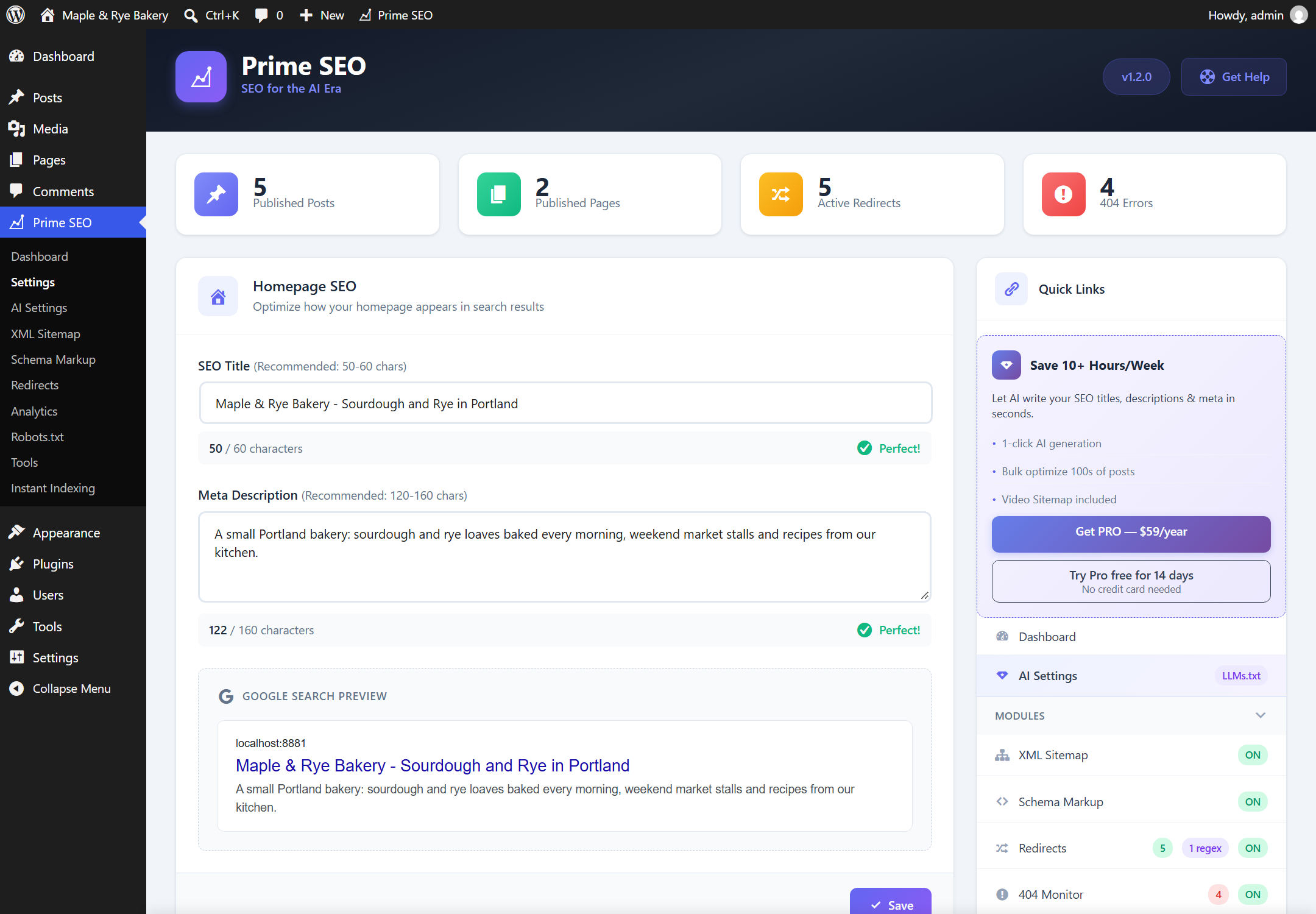
- Homepage SEO with live preview
- Module toggles with instant save
- Quick Links sidebar
Redirect Manager:
- 301/302/307/410/451 redirect types
- Regex support with capture groups
- Query string preservation
- Hit tracking and statistics
- Bulk actions (activate, deactivate, delete)
- Fallback redirect for all 404s
- Import/Export redirects
404 Monitor:
- Automatic logging
- Referer and User Agent tracking
- One-click convert to redirect
- Bulk delete
XML Sitemap:
- Sitemap index architecture
- Image sitemap support
- Author sitemap
- Custom Post Types and Taxonomies
- Beautiful XSL styling
Schema Markup (JSON-LD):
- Knowledge Graph (Organization/Person)
- WebSite schema with SearchAction
- Social profiles (sameAs)
- Article, FAQ, HowTo, Recipe, Event schemas
- LocalBusiness with 40+ subtypes
- Product schema (WooCommerce ready)
Other Features:
- Robots.txt Editor with 5 templates
- Image SEO (auto ALT/TITLE)
- External Links Manager (nofollow, new tab)
- Breadcrumbs with BreadcrumbList schema
- Instant Indexing via IndexNow API
- Migration from Yoast, Rank Math, AIOSEO, SEOPress
- Import/Export with backup management
- Setup Wizard
- SEO Score column in posts list