
الوصف
Oppso Maps is a simple and easy to use wordpress plugin for displaying Google Maps on your site / blog.
You just have to install and go to the shortcode builder, create your shortcode and display it.
It’s easy! You just enter the address or coordinates, set the size for the map and you have the shortcode.
You can preview the map right there, while you create it!
Things you can configure:
- address or coordinates
- map width and height
- map type(e.g satellite, road map etc.)
- zoom level
- text for the info window on the map
This plugin uses the latest Google Map Api so tou don’t need an API key to work.
Also, you can use as many maps on a single page / post.
See more on Oppso Maps.
لقطات الشاشة
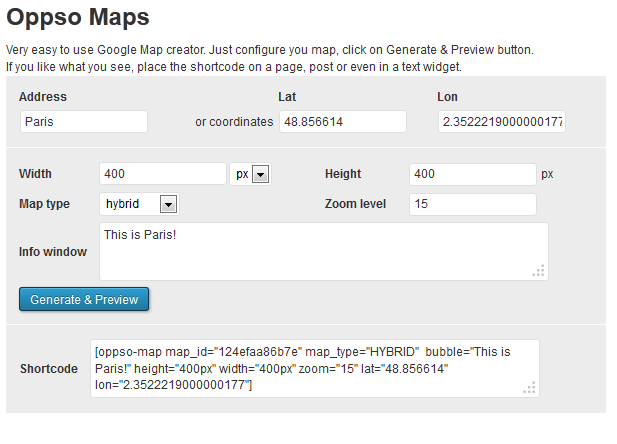
Shortcode builder in wp-admin 
Shortcode builder with map preview 
Oppso maps in action
التنصيب
- Upload ‘oppso-maps’ folder to the ‘/wp-content/plugins/’ directory
- Activate the plugin through the ‘Plugins’ menu in WordPress
- A page is created under settings where you can create a shortcode to use inside posts / pages or in a sidebar as a text widget.
المراجعات
لا توجد مراجعات لهذه الإضافة.
المساهمون والمطوّرون

مُهتم بالتطوير؟
تصفّح الشفرة، تحقق من مستودع SVN، أو الاشتراك في سجل التطوير بواسطة RSS.