

الوصف
Type a post title, click Generate Post, and get a complete, well-structured blog post inserted straight into your editor — with AI-generated images saved to your Media Library. Version 2.0 turns this plugin from an OpenAI-only tool into a full multi-provider AI writing assistant:
- OpenAI — the GPT-5.6 family (Sol, Terra, Luna) plus still-supported classics like GPT-4.1, GPT-4o, and GPT-3.5 Turbo, with GPT Image 2 and DALL-E 3 for images.
- Anthropic Claude — Claude Opus 5, Sonnet 5, and Haiku 4.5, plus legacy Claude 4.x models.
- Perplexity — the Sonar family, with an optional “Sources” section built from real web citations.
- Google Gemini — Gemini 3.6/3.5 Flash for text, and the Nano Banana image family (Nano Banana 2, Nano Banana Pro) for stunning illustrations.
Works with the Block Editor (Gutenberg) and the Classic editor, on posts and pages.
✍️ Writing, your way
- Set the number of section headings, and choose whether to include an introduction and a conclusion — the post follows your structure exactly.
- Pick a default provider and model once in Settings AI Blog Post, then override either per post right from the editor sidebar.
- If a post ever hits your token limit, you get a clear notice instead of a silently cut-off article.
🖼️ Images that behave
- Generate up to 4 images per post with Google Nano Banana or OpenAI.
- Images are saved to your Media Library with proper alt text — no expiring external URLs, no broken posts a day later.
- Choose where images go: spread between sections, at the beginning, after the first paragraph, after each heading, at the end — or pick the exact paragraph for each image with the custom placement mode.
- One click sets the first image as the featured image, correctly synced with the editor.
🚀 Future-proof models
Model dropdowns are curated (latest + still-supported legacy models), and every provider also has a Custom Model ID field — when a provider ships a brand-new model tomorrow, paste its ID and use it immediately. No plugin update required.
🛠️ Built for developers
Clean provider abstraction with filters for everything: martincv_openai_post_providers (register your own provider), martincv_openai_post_models, martincv_openai_post_system_prompt, martincv_openai_post_user_prompt, martincv_openai_post_image_prompt, martincv_openai_post_request_timeout, and martincv_openai_post_post_types.
لقطات الشاشة
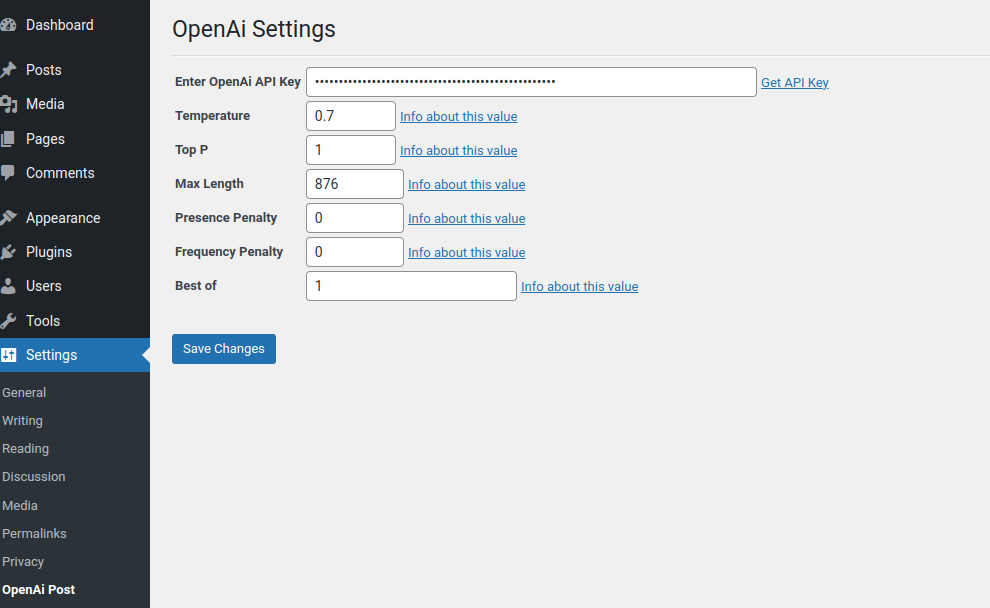
The Settings screen for the plugin.

The AI options in the Add / Edit post screen.

Generated Post
التنصيب
Installing:
- Download the package.
- Extract it to the “plugins” folder of your WordPress directory.
- In the Admin Panel, go to “Plugins” and activate it.
- Go to Settings AI Blog Post, add the API key(s) for the provider(s) you want, and pick your defaults.
Upgrading from 1.x:
Your existing OpenAI API key and settings are migrated automatically the first time you visit the admin after updating.
Uninstalling:
- In the Admin Panel, go to “Plugins”, deactivate the plugin and click “Delete”. All plugin settings are removed on delete.
Usage:
Create a Post or Page and enter a title — the title is the topic. In the sidebar “AI Blog Post” box pick a provider and model (or keep your defaults), set the structure and image options, and click Generate Post. The content is inserted into the editor as regular blocks (or classic-editor content), and generated images land in your Media Library.
If you need any additional help feel free to contact me at martin@martincv.com.
الأسئلة المتكررّة
-
Which API keys do I need?
-
Only the key(s) for the provider(s) you want to use. Each key field in Settings AI Blog Post links directly to that provider’s key page.
-
I want to use a model that is not in the dropdown.
-
Enter its exact model ID in the “Custom Model ID” field — it overrides the dropdown. This keeps the plugin working with models released after this version.
-
Can I control where the generated images are placed?
-
Yes. Choose a placement in the editor sidebar: spread between sections, at the beginning, after the first paragraph, after each heading, at the end — or “Custom”, which lets you type the exact paragraph number for each image.
-
The generation request times out. Why?
-
A full post is a single AI request that can take a minute or two depending on the provider, model, and length. If your host enforces a short PHP/proxy timeout, lower Max Tokens or use the
martincv_openai_post_request_timeoutfilter. -
The text gets cut off before finishing.
-
The plugin will tell you when that happens — increase Max Tokens in Settings AI Blog Post (default 2048).
المراجعات


المساهمون والمطوّرون
“MartinCV AI Blog Post” هو برنامج مفتوح المصدر. وقد ساهم هؤلاء الأشخاص بالأسفل في هذه الإضافة.
المساهمون
ترجمة ”MartinCV AI Blog Post“ إلى لغتك.
مُهتم بالتطوير؟
تصفّح الشفرة، تحقق من مستودع SVN، أو الاشتراك في سجل التطوير بواسطة RSS.
سجل التغييرات
2.0.0
Release Date – 30 July 2026
Major update: one plugin, four AI providers
- New providers: Anthropic Claude, Perplexity, and Google Gemini join OpenAI.
- Pick a default provider and model in Settings; override both per post in the editor sidebar.
- Curated model lists with the latest models (GPT-5.6, Claude Opus 5, Gemini 3.6, Sonar) plus still-supported legacy favorites (GPT-4o, GPT-4.1, GPT-3.5 Turbo, Claude 4.x), and a Custom Model ID field for anything newer.
- Image generation via Google Nano Banana (Gemini image models) or OpenAI GPT Image 2 — images are saved to the Media Library with alt text instead of hotlinking expiring URLs.
- Image placement control: spread between sections, at the beginning, after the first paragraph, after each heading, at the end, or a custom per-image paragraph position.
- Option to set the first generated image as the featured image, properly synced with both editors.
- Perplexity citations: optionally append a “Sources” section with real links.
- Truncation detection: a clear notice when a post hits the Max Tokens limit; migrated 1.x limits are raised to a safe minimum.
- Faster and more reliable: one AI request per post (previously three), cleaner content via native block conversion.
- Fixed from 1.1: generated text was always empty (response parsed with the legacy completions shape); the Max Length setting was never applied; zero values (e.g. temperature 0) reset to defaults.
- Security hardening: capability checks on generation, strict input sanitization,
manage_optionsfor the settings page, real HTTP status codes on errors. - Developer filters for providers, models, prompts, timeouts, and post types; settings are cleaned up on uninstall.
1.1
- Switched to gpt-3.5-turbo via Chat Completions.
1.0
Release Date – 14 December 2022
- Public release of ‘MartinCV OpenAi Post’