
الوصف
View WPListCal plugin information using the JSON API plugin with this simple WordPress plugin.
After installing and activating you can use the upcomming events in your external applications.
لقطات الشاشة
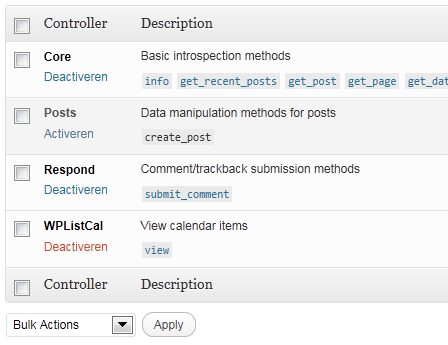
JSON API Settings: Activate WPListCal
التنصيب
The automatic plugin installer should work for most people. Manual installation is easy and takes fewer than five minutes.
- Create a wplistcal-json directory in your plugins directory. Typically that’s wp-content/plugins/wplistcal-json/.
- Into this new directory upload the plugin files (wplistcal-json.php, etc.)
- Activate the plugin through the ‘Plugins’ menu in WordPress.
- Activate the ‘WPListCal’ controller through the ‘JSON API’ options page.
الأسئلة المتكررّة
- Does it work with older versions of WordPress?
-
I don’t know, try it and let me know.
المراجعات
لا توجد مراجعات لهذه الإضافة.
المساهمون والمطوّرون
“WPListCal JSON” هو برنامج مفتوح المصدر. وقد ساهم هؤلاء الأشخاص بالأسفل في هذه الإضافة.
المساهمون
ترجمة ”WPListCal JSON“ إلى لغتك.
مُهتم بالتطوير؟
تصفّح الشفرة، تحقق من مستودع SVN، أو الاشتراك في سجل التطوير بواسطة RSS.
سجل التغييرات
1.1
- Bugfix: Sorting results
1.0
- Initial release