

الوصف
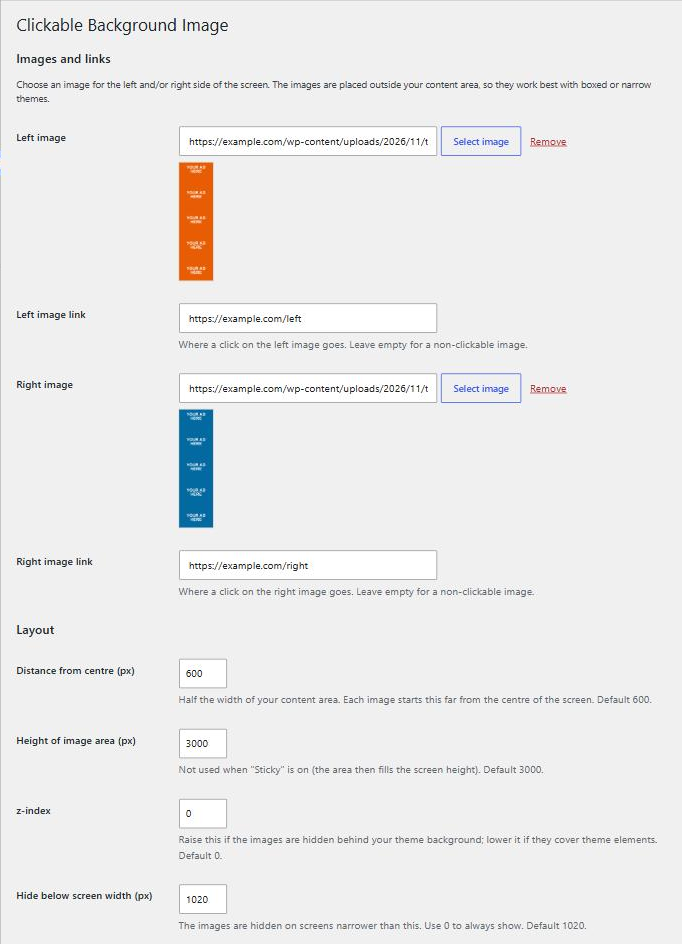
Clickable Background Image turns the empty space on either side of a boxed or narrow theme into advertising space. Pick one image for the left side and one for the right, give each its own link, and visitors who click the side of the page go to the advertiser.
- Separate image and link for the left and right side, or use only one side.
- Choose images from the Media Library or paste any image URL.
- Set how far from the centre of the screen the images start, so they sit right next to your content.
- Optional sticky mode keeps the images in place while the page scrolls.
- Optional vertical repeat for tall pages.
- Show on every page or on the front page only.
- Hidden automatically on small screens (you choose the width).
- Links get
rel="sponsored", as search engines ask for paid links. - No external requests, no tracking, no extra CSS or JavaScript files on the front end.
Settings are under Appearance Clickable Background.
Developers can hide the images on specific pages with the iwsm_cbi_display filter:
add_filter( 'iwsm_cbi_display', function ( $display ) { return is_page( 'contact' ) ? false : $display; } );
لقطات الشاشة

التنصيب
- Install the plugin from Plugins Add New, or upload the
iwsm-customize-background-imagesfolder to/wp-content/plugins/. - Activate it from the Plugins screen.
- Go to Appearance Clickable Background, choose your images and links, and save.
الأسئلة المتكررّة
-
The images cover part of my content, or there is a gap between them and the content
-
Change Distance from centre. It should be half the width of your content area. For a theme with a 1200px wide content area use 600.
-
I can’t see the images
-
Your theme probably paints a background over them. Raise the z-index setting (for example to 1). Also check that your screen is wider than the Hide below screen width setting.
-
What image size should I use?
-
A common site-skin size is 300 to 400 pixels wide and 1000 to 1500 pixels tall for each side. The left image is aligned to its right edge and the right image to its left edge, so the part nearest the content is always visible.
-
Does it work with full-width themes?
-
The images only appear in the space outside your content area. Full-width themes have no such space, so the plugin suits boxed or narrow layouts.
المراجعات

المساهمون والمطوّرون
“Clickable Background Image” هو برنامج مفتوح المصدر. وقد ساهم هؤلاء الأشخاص بالأسفل في هذه الإضافة.
المساهمون
ترجمة ”Clickable Background Image“ إلى لغتك.
مُهتم بالتطوير؟
تصفّح الشفرة، تحقق من مستودع SVN، أو الاشتراك في سجل التطوير بواسطة RSS.
سجل التغييرات
2.0.0
- Rewritten for current WordPress and PHP versions (tested up to WordPress 7.1).
- Security: all settings are now sanitized when saved and escaped when shown.
- New: choose images from the Media Library, with a preview.
- New: “Hide below screen width”, “Open links in a new tab” and “Front page only” settings.
- New: links use
rel="sponsored noopener". - New: “Settings” link on the Plugins screen and the
iwsm_cbi_displayfilter. - Changed: when only one image is set it now appears on its own side, instead of as a full-screen background that blocked clicks on the page.
- Removed: the plugin no longer forces a default background image or adds theme background support.
- Removed: sample images that were bundled with the plugin.
- Existing settings from 1.0 are kept.
1.0
- Initial release.